Ready-made, one-time
$3,699
OnlyFans Clone
Live in 6 working days from kickoff
- Full source code
- White-label under your brand
- 60 days of technical support
- 1 year of free updates
- App publishing support
Creator subscription platform
A white-label creator platform where fans pay in every way
Launch a branded creator subscription platform with fan subscriptions, pay-per-view media, paid messages, tips, live sessions, calls, a creator shop and AI personas in one unified app. You receive the full source code, Android and iOS apps, a web app and an admin panel, ready to run under your own name on your own hosting.
The facts a buyer checks first, in one place. Everything on this page is the product as it ships.
| Product type | Creator subscription and fan commerce platform, delivered white-label |
|---|---|
| Ready-made price | $3,699 one-time, Professional tier |
| Launch time | 6 working days from kickoff |
| Client surfaces | Android app, iOS app, web app and PWA |
| App model | One unified app for fans and creators, with creator tools unlocked per account |
| Back office | Web admin panel with role-based access |
| Source code | Complete Laravel 12 source, owned outright, no revenue share |
| Hosting | Self-hosted on AWS, GCP or DigitalOcean, set up with you |
| Payment gateways | Stripe, PayPal, Paystack, CCBill, Flutterwave, MercadoPago, crypto gateways, wallet flows |
| Support and updates | 60 days of technical support, 1 year of free updates |
An OnlyFans clone is a ready-made creator monetization platform. Creators publish posts, stories and reels, price their content, and fans pay for access through subscriptions, one-off unlocks, tips, gifts and paid conversations. The term describes a product category, not an affiliation: nothing here is connected to or endorsed by the brand it is named after.
The platform is a complete stack rather than a single app. It includes unified Android and iOS apps, a browser-based web app that works as a PWA, a Laravel-based API layer and a web admin panel. Fans and creators sign in to the same app, and creator tools unlock once the account is verified and enabled.
It ships white-label. Your app name, logo, colors, domain and content categories replace ours, and you receive complete source code so your own team can extend it. Modules can be enabled, disabled or extended to match your creator category, target market, content policy and payment provider strategy, which makes it a configurable foundation rather than a fixed template.
OnlyFans is a creator subscription service: a creator sets a monthly price, fans pay it to see that creator's feed, and the same fans can be charged again for locked posts, paid messages and tips. The company sits in the middle, handles payment collection and takes a share of what flows through. People who say they want an "OnlyFans clone" almost never want a copy of that company. They want that revenue structure, owned by them, under their own name.
That is what a clone means commercially: a finished platform with the same mechanics, delivered as code you host yourself. You choose the niche, the creators, the commission and the content rules. Nothing about it is connected to the original service, and it carries none of its audience, so the work of recruiting creators and drawing fans stays with you. What you skip is the build: months of subscription billing, media handling, chat and admin tooling.
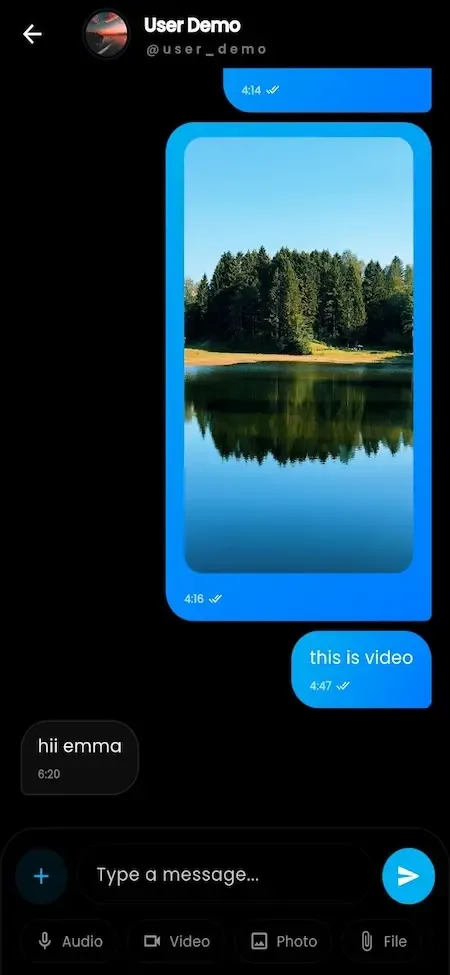
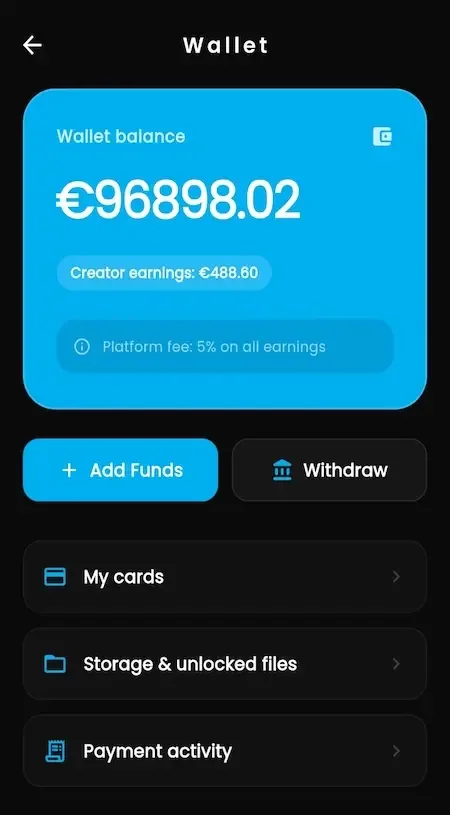
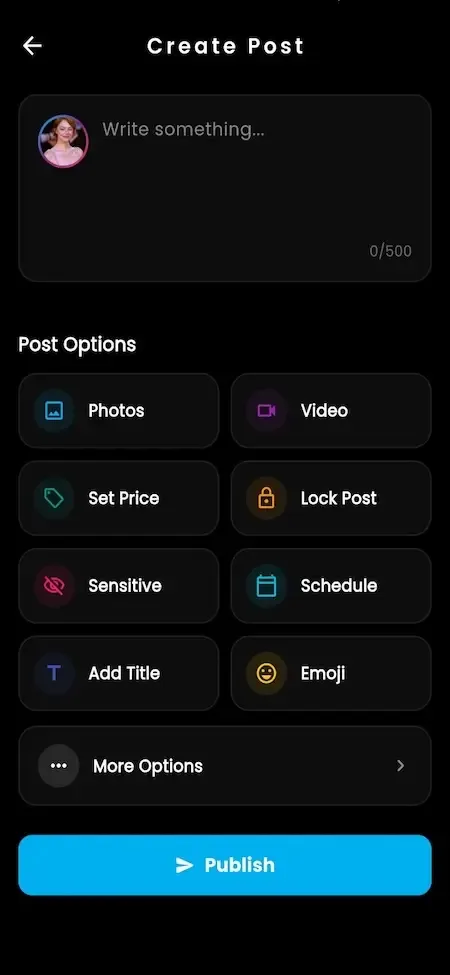
Each role works in its own side of the same product. The screens come from the working demo.
A fan signs up once and keeps one account for everything: browsing, paying, chatting and watching. The wallet sits under every purchase so a second or third payment takes a tap instead of a fresh checkout.
A creator runs a small business from the same app. Verification unlocks the tools, then pricing, publishing, outreach, selling and withdrawing all happen in one place with a dashboard that shows where income comes from.
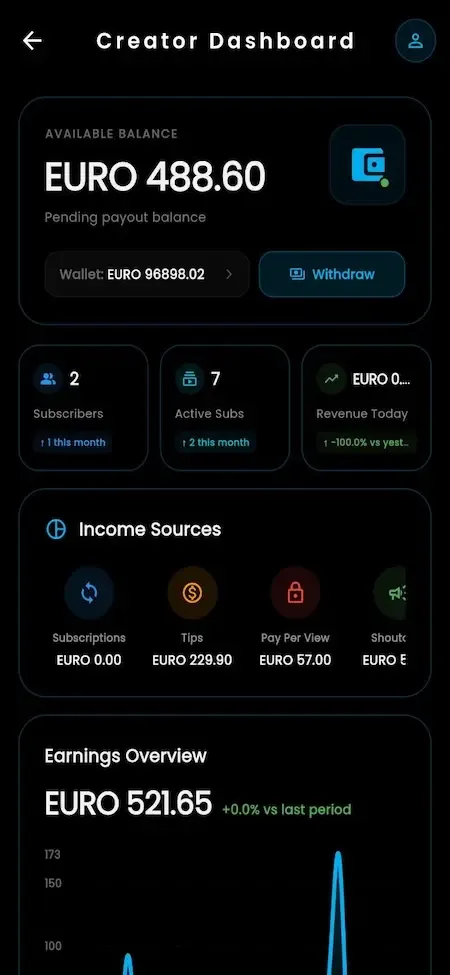
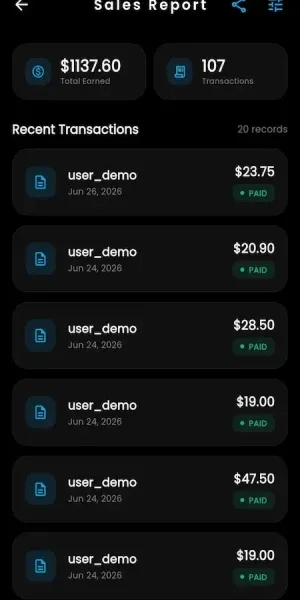
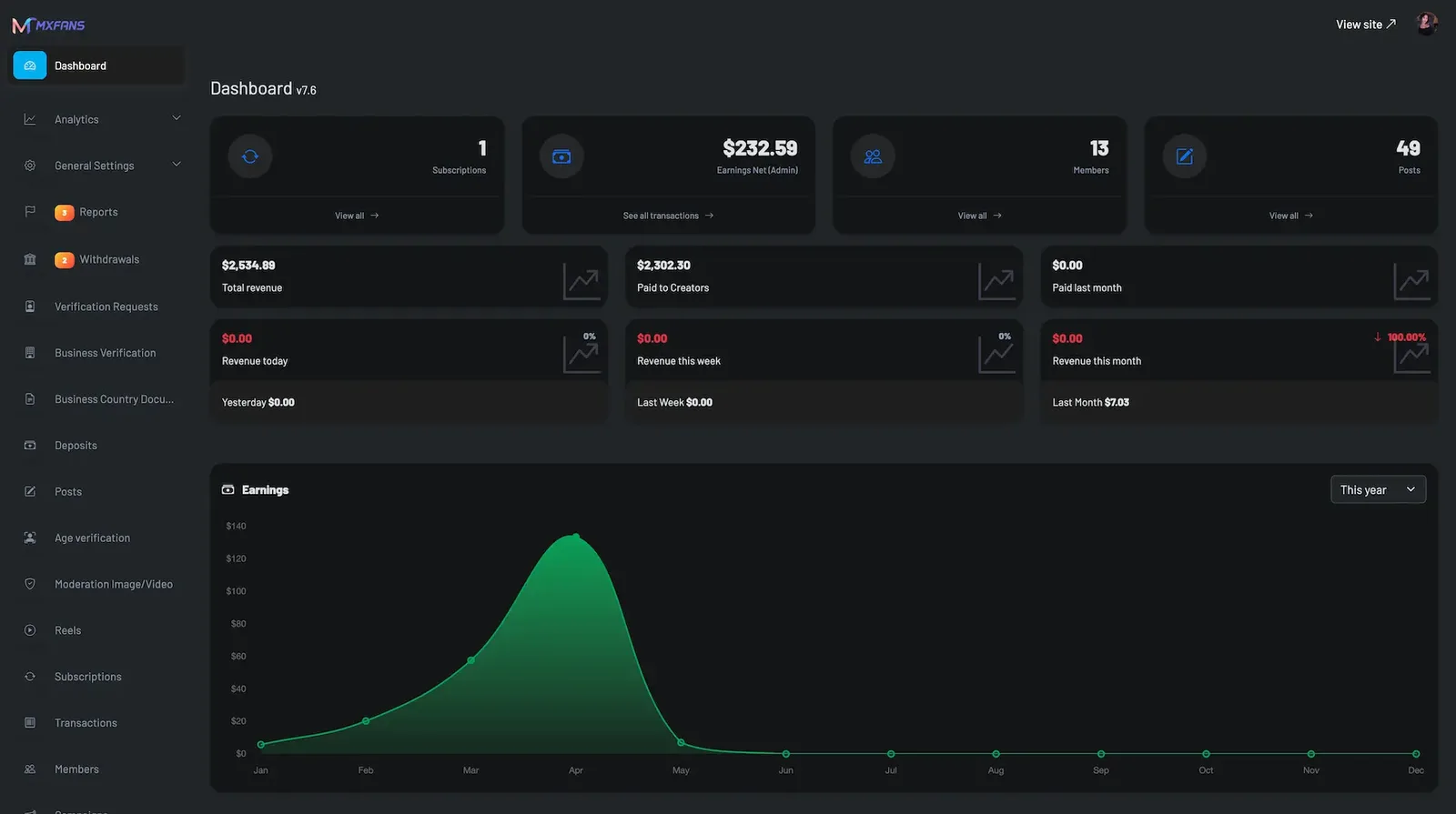
The operator works from a web admin panel. It covers accounts, verification, money, moderation and presentation, so a small team can run the platform day to day without touching code.
Safety work runs through queues and recorded decisions rather than one-off deletes. The tooling ships in the platform, and the policy that drives it is yours to write and staff.
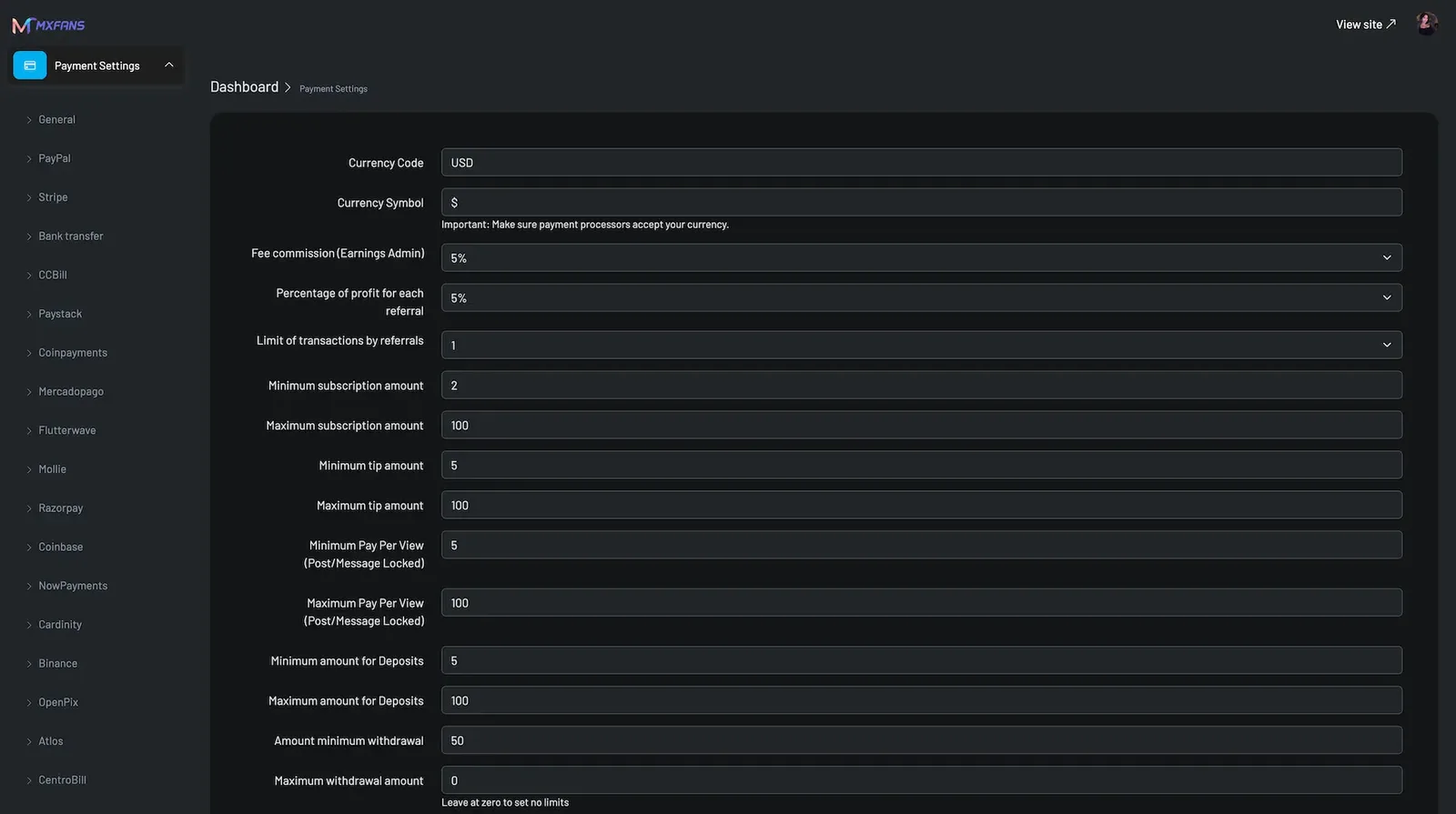
13 screens from the working demo, grouped by where they live. Your platform ships rebranded with your name, logo and colors.
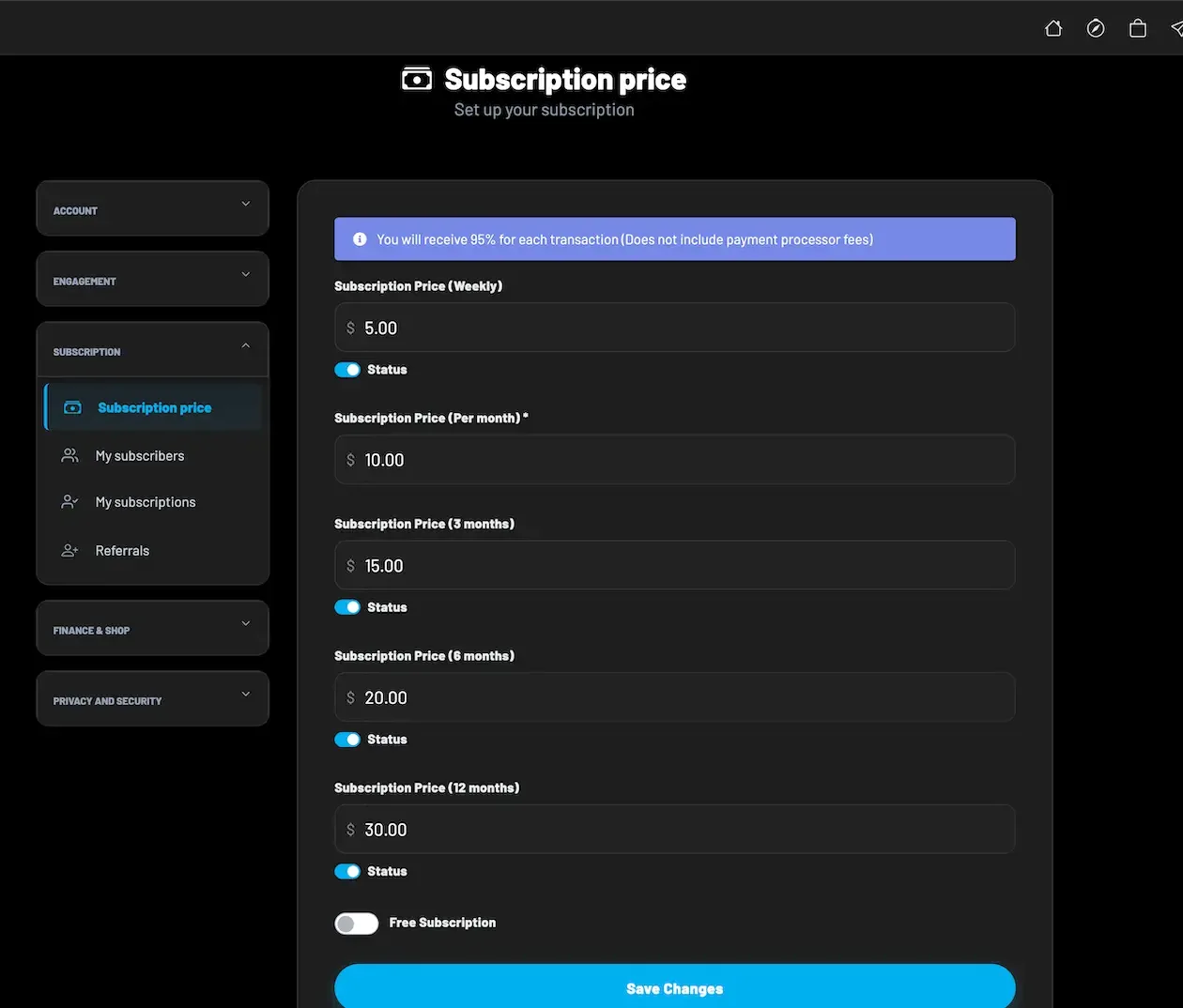
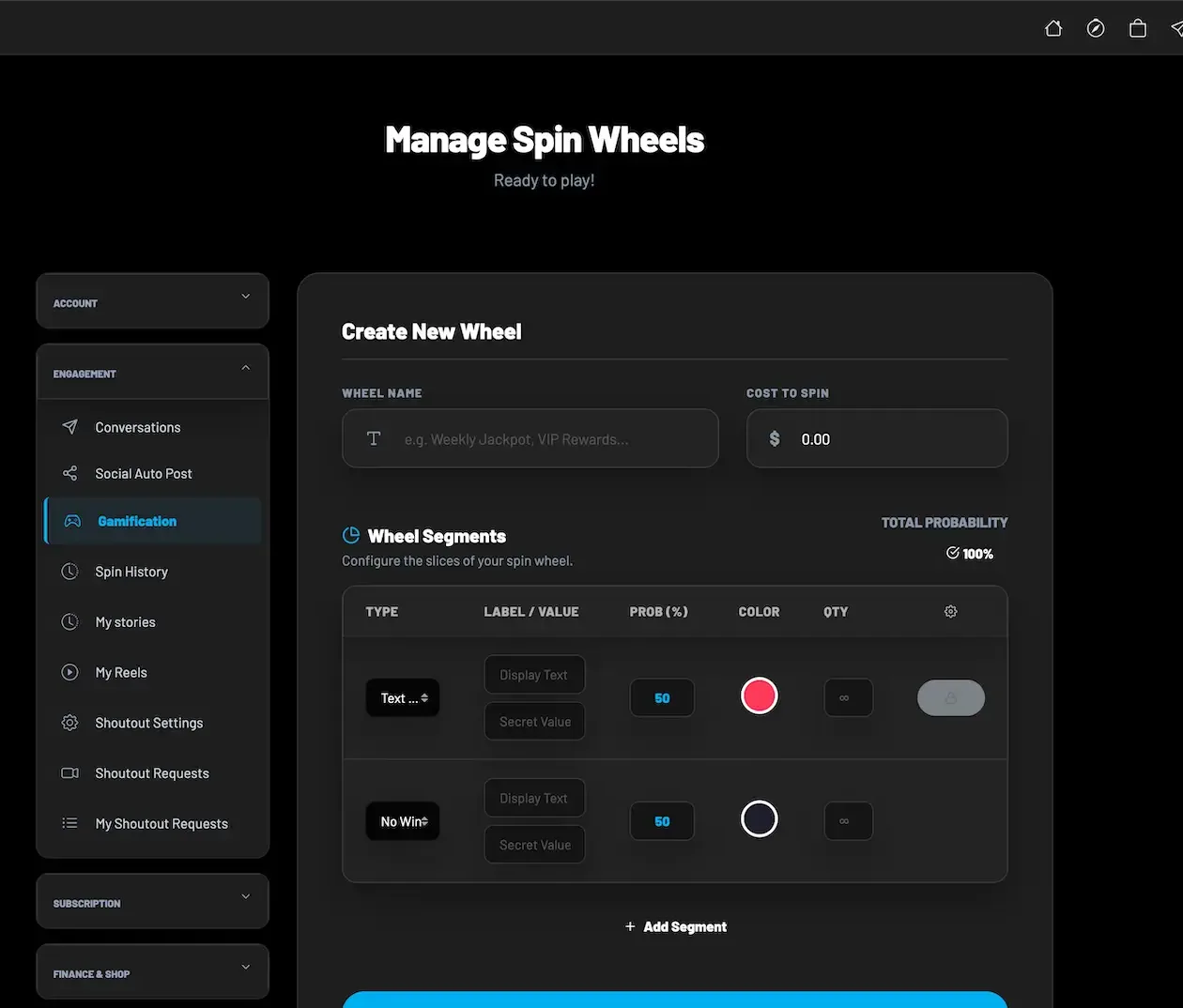
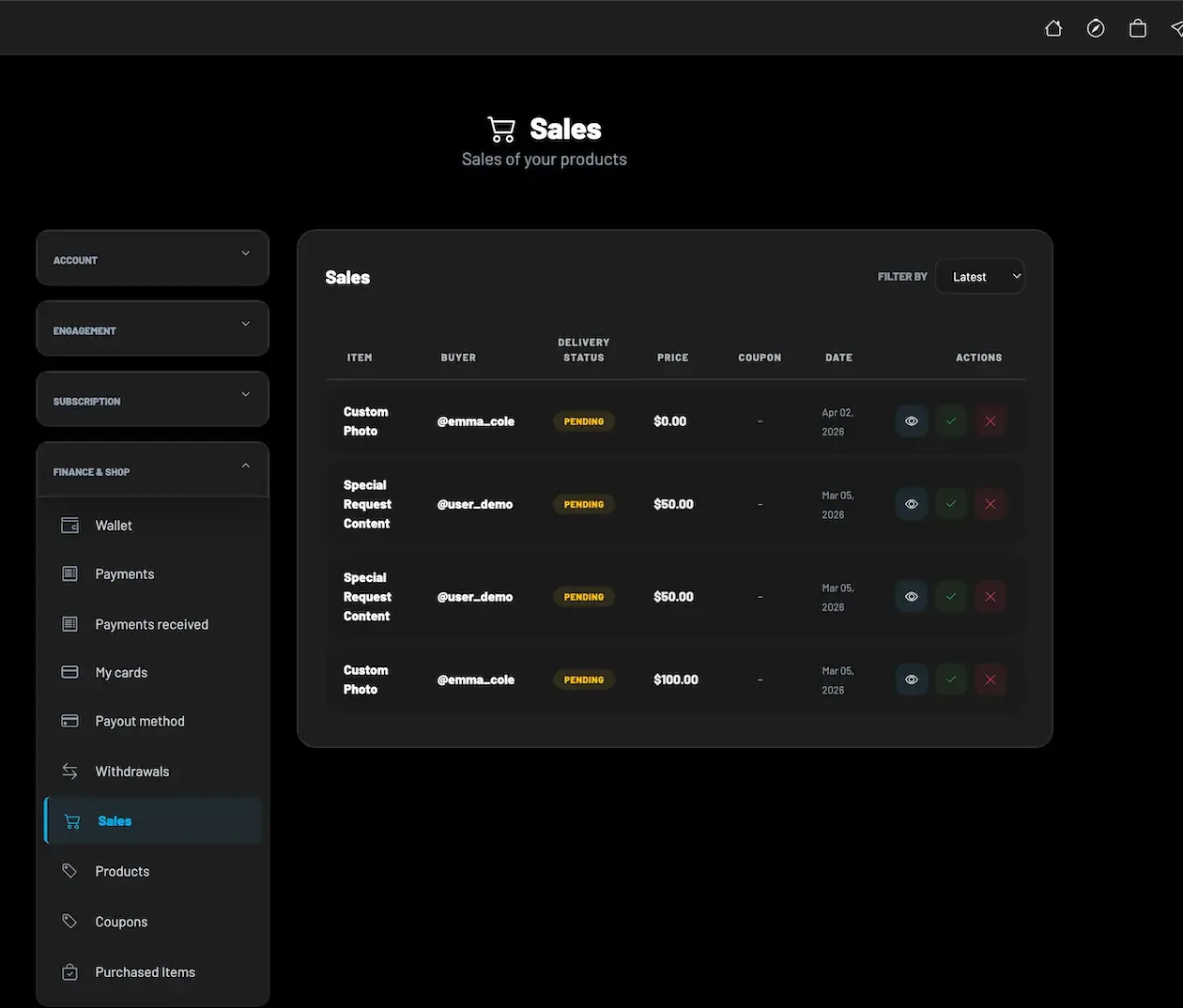
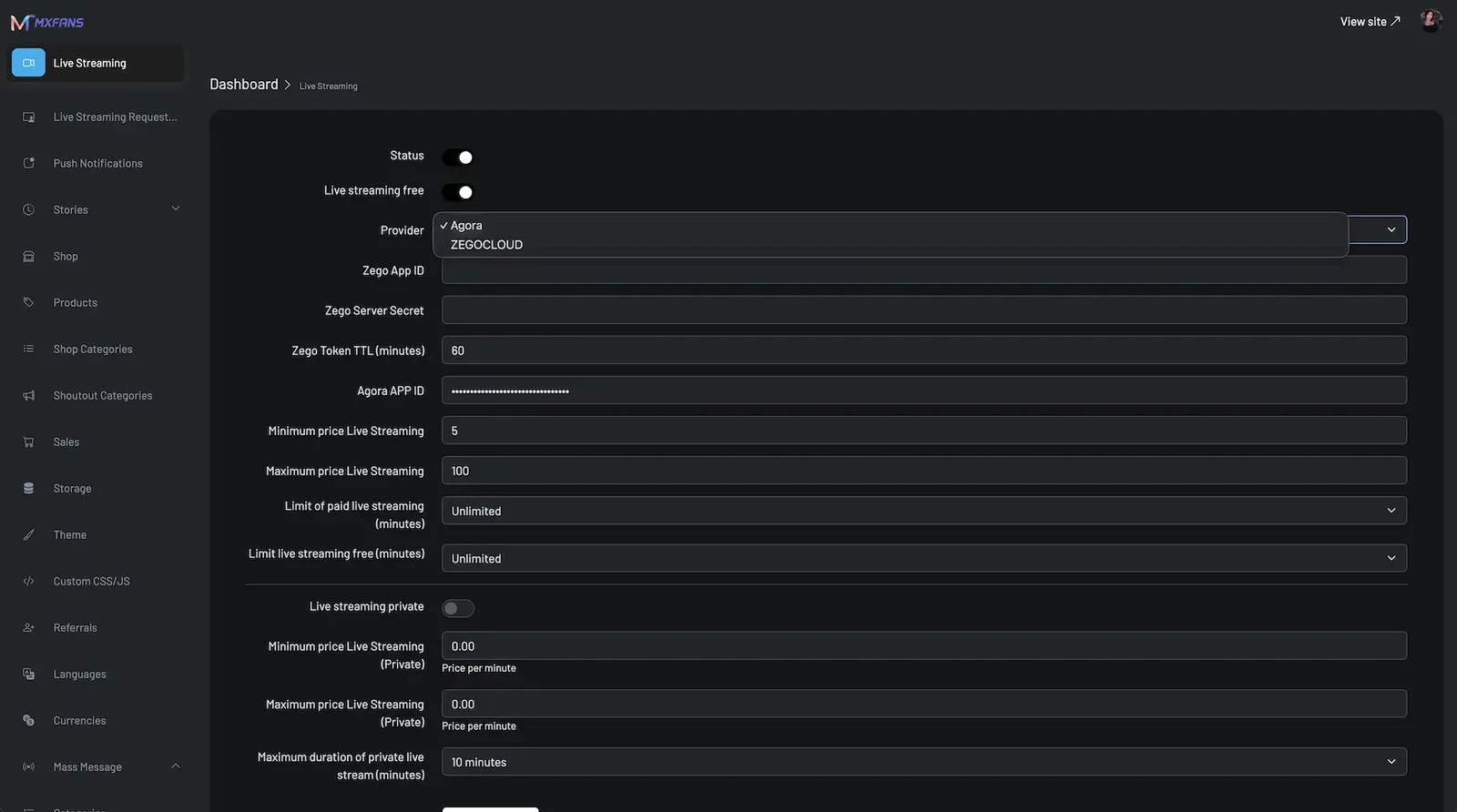
The demo shows the platform as delivered, with the vendor demo branding still in place, before your name, logo and colors are applied. You can open the Android build, the browser app and the admin panel, and sign in with the public sample accounts below to follow one creator business from both sides.
user@demo.comUser_321creator@demo.comCreator_321admin@demo.comAdmin_$32149 features across 4 roles. The first six of each role are here and the full list is one click away. Nothing is held back for a sales call.
Explore featured creators, categories and search results with free and premium previews shown before any payment.
Subscribe on a free or paid plan, with renewal, expiry and lapse handled by the platform.
Pay once for a locked post, reel, story, file or message and keep the entitlement on the account.
Fund a balance once and spend it across tips, gifts, products and sessions without repeating checkout.
The wallet screen keeps saved payment cards and a store of files the fan has already unlocked.
Message creators one to one or in groups, with media attachments and paid media messages.
6 more Fans features are in the full list.
Write posts with text, photo and video, set a price, lock content and choose publishing options.
Publish short-lived stories and reels next to the main feed, with comments, likes and bookmarks.
Set subscription prices for weekly, monthly, three-month, six-month and annual periods, each switched on or off.
Upload, name, rename, price and organize media, then post it or send it inside messages.
Save reusable replies so repeat conversations take seconds rather than minutes.
Group fans into lists and target a message or offer at one list only.
7 more Creators features are in the full list.
Search fans and creators, change status, apply restrictions and control visibility.
Set currency, platform commission, referral share, transaction limits and pricing rules for subscriptions, tips and unlocks.
Enable providers, store credentials and manage wallet funding and subscription settings.
Follow wallet movements, purchases and entitlement state across the platform.
Review requests, check verification status and mark payout state with reconciliation records.
Configure live provider credentials, token lifetime, price limits, duration limits and public or private broadcasts.
6 more Operators features are in the full list.
Review identity submissions, approve or reject creators and see provider callback status.
Collect applicant, business type, address, country and documents for creators who work through a company.
Define which documents are required for each supported jurisdiction.
Restrict content behind age checks and connect a third-party age or identity provider.
SightEngine is named for automated screening of uploads, with manual review queues behind it.
Fans and creators file reports that move through policy workflows to a recorded decision.
6 more Trust and safety features are in the full list.
The path through the product, in the order it happens for the people using it.
Registration by email, phone OTP or social login. Every account starts as a fan.
Verification and settings unlock creator tools, and the creator sets pricing.
Fans browse profiles and previews, then subscribe, unlock, tip or fund the wallet.
Messaging, live sessions, calls, shop orders and campaigns keep fans spending.
The admin panel handles moderation, reports, payouts and platform configuration.
Every earning route built into the product you receive: how it works, who pays and where the operator earns.
| Revenue model | How it works | Who pays | How you earn |
|---|---|---|---|
| Platform commission | A percentage you set on creator earnings, applied to subscriptions, unlocks, tips, messages, live, calls and shop orders. | Creator, through the split | Your main income line, set per creator and per revenue type |
| Subscriptions | Fans pay recurring access to a creator, billed on the price and period that the creator chose. | Fan | Commission on every renewal, which makes this the most predictable stream |
| Pay-per-view unlocks | A one-time payment opens a single post, message, reel, file or bundle without a subscription. | Fan | Commission on each unlock, driven by creator output |
| Paid messaging | Locked media messages and paid replies, including sends to saved lists from the creator vault. | Fan | Commission on message revenue, with volume that follows creator effort |
| Tips and gifts | Fans send one-off support from the wallet, including during live sessions. | Fan | Commission on tips, often set lower than the headline rate |
| Live and calls | Paid entry to streams, private session requests and audio or video calls priced by the creator. | Fan | Commission on entry and bookings, minus live provider usage costs |
| Shop and auctions | Creators sell products, services and auction items, with coupons and sales records. | Fan | Commission on orders, which can earn even when the creator does not post |
| Ads and boosts | Featured placement, boosts and platform advertising priced as flat placements. | Creator or advertiser | Flat placement fees that do not depend on creator sales |
| AI persona credits | Fans buy access to AI personas and chat sessions in credit bundles. | Fan | Credit sales priced above the AI cost you carry |
The flow of money, the gateways you can connect and how payouts are handled.
Money enters the platform in two ways: direct gateway payments for a subscription or unlock, and wallet top-ups that fans spend later. Every purchase records a transaction and an entitlement. The platform commission is split off at the point of spend, the creator balance grows, and the creator requests a withdrawal that you approve. Which processors you can actually use depends on your market, your content category and the provider approving your business.
| Gateway | What it covers |
|---|---|
| Card | |
| Stripe | Card payments for subscriptions, unlocks and wallet funding where the provider accepts your category. |
| Wallet | |
| PayPal | Wallet checkout for fans who prefer not to enter card details. |
| Adult-friendly | |
| CCBill | Named integration path for operators in content categories that standard processors often decline. |
| Regional | |
| Paystack | Regional processor for markets it serves. |
| Flutterwave | Regional processor for supported African and international payment methods. |
| MercadoPago | Regional processor for Latin American payment methods. |
| Crypto | |
| Crypto gateways | Crypto payment integration paths, subject to the provider you contract. |
| Other | |
| Platform wallet | Stored balance funded once and spent across the platform, with transaction records. |
You operate the platform, so legal compliance in each market you serve is yours. This is the tooling that ships in the product. It is not legal advice.
Age-gated flows and document-backed creator verification are part of the platform. The build follows Yoti and Didit verification patterns and connects to the provider you contract. You decide the standard, such as which documents count, which countries are served and when a creator may start earning. We set up advanced KYC and AML integration with you and confirm the scope at kickoff.
Reports, complaints, review queues and takedowns run as workflows with recorded decisions. SightEngine is named for automated screening of uploaded media, with manual review behind it. Automated classification tuned to your own policy, escalation rules and transparency reporting are something we set up with you. Plan for moderator hours from the first week, because queue volume follows creator count.
Gateway availability depends on the provider approving your business, and approval can be reviewed later. The platform gives you the verification and moderation records underwriting tends to ask about, but it cannot secure the account for you. Start the processor conversation before development begins, and treat a second processor as a continuity question rather than an afterthought.
The takedown workflow records who removed what and why, which helps when a rights holder, a creator or a processor asks what happened. Your terms, creator agreements and release forms are yours to write. If you need extra consent steps, such as release forms for tagged creators, we can set them up as tailored work, with scope confirmed with us.
Account deletion and deactivation, profile privacy, notification settings and retention configuration support a privacy-aware deployment. Because you self-host, personal data sits on infrastructure you choose. Retention periods, export handling and the legal basis for processing depend on your market and are yours to define with your own advisers.
Sanctum token authentication, HTTPS and TLS, role checks, rate limiting, OTP attempt controls and protected webhooks cover the common attack surface. Two-factor authentication is available for accounts. No security certification is claimed, and a penetration test against your own deployment is a sensible step before public launch.
If your platform carries adult content, the operator is responsible for legal compliance in each market. We supply age-verification and moderation tooling, not legal advice.
The layers of the product as delivered. You receive the full source code for every one of them.
| Layer | Built with | Hosting note |
|---|---|---|
| Mobile and web | Unified Android and iOS apps, Blade and Livewire web app, PWA | |
| Backend | Laravel 12, PHP 8.2+, Sanctum APIs | Laravel 12 on PHP 8.2 or newer, with Sanctum-protected REST APIs for the apps, web app and admin. |
| Database | MySQL or MariaDB | MySQL or MariaDB for users, subscriptions, media records, messages, wallets and transactions. |
| Live and calls | Provider integrations such as Agora or Zego | Streaming and call providers such as Agora or Zego, billed to your own account. |
| Infrastructure | AWS, GCP or DigitalOcean, with Redis and queues | AWS, GCP or DigitalOcean, with backups, staging to production workflows and monitoring set up at deployment. |
| Media storage | S3-compatible object storage with CDN-ready delivery | S3-compatible object storage for images, video, audio, files and vault content.CDN-ready delivery for premium media and static assets. |
| Security | HTTPS/TLS, Sanctum tokens, rate limiting, 2FA and OTP | |
| Queues and cache | Redis with queue workers for notifications, media jobs, payment events and background tasks. | |
| Real time | WebSockets carry messaging, live chat and in-stream tips. | |
You run the platform on your own cloud account, so you hold the servers, the database and the media. We set up the environment with you during launch week and hand over credentials and documentation. Cost scales with media volume and live usage more than with account count.
Vendors often show a demo with three tabs. This table translates that idea into tasks, so you can see which part of the product each person touches and what you should test during a walkthrough before committing.
| Role | Daily tasks | What to test in a demo |
|---|---|---|
| Fan | Browse profiles, subscribe, unlock posts, top up the wallet, message creators. | Pay for one unlock and confirm access appears at once and the wallet balance drops. |
| Creator | Publish posts and stories, price content, send mass messages, run live sessions. | Create a locked post, set a price, then check how it looks to a non-subscriber. |
| Manager | Act for a creator within a limited permission scope. | Confirm a manager can post but cannot reach payout settings. |
| Moderator | Work the report queue, review flagged media, record takedown decisions. | Follow one report from submission to a logged removal. |
| Finance lead | Approve withdrawals, reconcile wallet movements against gateway records. | Approve a test withdrawal and trace it back to its source transactions. |
| Platform owner | Set commission, branding, gateways, feature switches and territory rules. | Change a commission rate and see it apply to a new purchase only. |
The software is the quick part of a launch. Getting a provider to agree to process payments for a creator business takes longer, depends on things outside our control, and is where many first-time operators lose weeks. This is the honest sequence and what you can do to shorten it.
Search results for this topic are full of scripts offered at a tiny fraction of what a working platform costs, and community threads repeat the claim that a clone can be had for almost nothing. Often that is accurate in a narrow sense: you receive a code package that shows profiles and a feed. What it rarely includes is mobile apps, a tested payment flow, moderation workflows, verification, support and updates. Each missing piece becomes a project of its own, and the total can exceed the cost of a finished product.
Open-source alternatives follow the same pattern from the other direction. The code is free and you can inspect every line, which suits an experienced team. But free code does not come with a wallet ledger that survives disputes, a moderation queue a payment reviewer will accept, or store submission help. Ask any supplier, free or paid, to show a fan unlocking a paid post, a creator withdrawing money and a report becoming a takedown. What you cannot see working, you will end up building.
One fixed price for the ready-made platform, published here so you can plan before you talk to us.
Ready-made, one-time
$3,699
Live in 6 working days from kickoff
The engineers who deploy your platform stay with it once it is live.
Need more? We tailor the platform to your plan, typically in 2-8 weeks, and confirm the scope with you before work starts. App store review times are set by Apple and Google.
Everything here is available around the ready-made OnlyFans clone. We confirm the scope with you before any price is agreed.
Connect a specialist verification and anti-money-laundering provider beyond the age and identity flows that ship with the platform.
Confirm with usExtend manager access with creator portfolios, permission scopes, team dashboards and agency-level analytics.
Confirm with usAdd escalation rules, transparency reports, moderation analytics and policy-specific queues.
Confirm with usRoute by region, apply payout rules and tax logic, add invoice workflows, wallet limits and fraud review rules.
Confirm with usSell during streams with paid live shopping, timed offers, product drops and campaign-linked purchases.
Confirm with usRedesign onboarding, discovery, navigation, notifications and monetization surfaces around your brand.
Confirm with usAdd creator cohort analytics, fan lifetime value views, churn tracking and subscription retention reports.
Confirm with usConnect CRM, single sign-on, marketing automation, internal tools or a proprietary verification system.
Confirm with usVendors usually sell three package tiers and leave you to guess where a feature sits. This is a single matrix instead. One ready-made package exists. Most of the platform ships ready, and the rest is set up around your plan.
Free or paid plans with renewal and lapse handling built into the subscription engine.
Single posts, messages and media sets sold once, tracked as entitlements for each fan.
Stored balance for tips, gifts and purchases, with admin visibility of every movement.
Direct and group chat, paid media messages, templates, custom lists and scheduled sends.
Image, video, audio and file uploads with comments, likes and bookmarks.
Stored media a creator can price, post or attach to paid messages.
Public streams plus private requests, using a streaming provider billed to your account.
One-to-one calls with session records, priced by the creator.
Products or services sold from the profile, with promotions and order records.
Request-based shoutouts, donation drives, boosts and ads inside the app.
Persona chat sessions with a choice of AI providers; usage fees go to your provider account.
Review queue for identity documents, built around the verification provider you contract.
Automated media screening, report handling, review queues and a recorded takedown workflow.
Territory rules by country, state, city and region rather than country only.
Platform cut set per creator and per revenue type from the admin panel.
Name, logo, colors, splash screens and domain replaced across apps, web and admin.
Complete code handed over, with no per-creator license and no revenue share.
Deeper identity and anti-money-laundering checks for markets where standard verification is not enough; we set this up for your market.
Wider manager access, creator portfolios, permission scopes and agency-level analytics; we set this up for your build.
Escalation rules, policy-specific queues, transparency reports and moderation analytics; we set this up for your build.
Gateway routing, payout rules, tax logic, invoicing and fraud review rules; we set this up for your build.
Account and content migration depends on source formats and consent, so we scope it with you per project.
Four pages go deeper on the questions buyers ask most about the OnlyFans Clone. This page stays the overview.
A creator subscription business is mostly plumbing: entitlements that expire correctly, wallets that balance, queues that someone can actually work.
See the full breakdownThe software price is the easy number to find and the least important one to a creator platform.
See exact pricingA creator subscription platform has one core income line, a share of what creators earn, and everything else is about making that line larger and keeping it.
See the playbookPlenty of developers can build a feed with a subscribe button.
Compare optionsFrom kickoff to a live OnlyFans clone under your brand: what we do each day, and what we need from you.
1Day 1
2Day 2
3Day 3
4Day 4
5Day 5
6Day 6
The software is the smaller part of what a creator platform costs. A build from scratch needs a senior team for several product areas at once: subscriptions, entitlements, wallets, live, messaging, verification and moderation. Renting a hosted platform moves that effort to a vendor, and you pay with a recurring fee and with control over policy. Buying a ready-made platform with source code sits between them: a one-time purchase, your hosting and your rules. What follows are the factors that move the total in each route.
| Factor | Build from scratch | Rent a SaaS | Own it with GetFame |
|---|---|---|---|
| Time to launch | Long, and compliance tooling tends to arrive last | Fast, on the vendor timetable | 6 working days for the ready-made platform |
| Upfront spend | A multi-month engineering programme | Low entry cost | One-time purchase, then your own hosting |
| Recurring platform fee | None, but you carry maintenance | Monthly fee, often with a cut | None from us, no revenue share |
| Who sets content policy | You | The vendor, and it can change | You, with moderation tooling to apply it |
| Factor | Build from scratch | Rent a SaaS | Own it with GetFame |
|---|---|---|---|
| Source code | Yours | Not available | Complete source delivered at handover |
| Customization | Unlimited, at your cost | Limited to vendor settings | Tailored work we scope with you, usually 2 to 8 weeks |
| Creator and fan data | Yours | Held by the vendor | On your servers |
Running costs. The purchase price does not include hosting, media storage and bandwidth, live and call provider usage, gateway and chargeback fees, SMS and OTP delivery, AI provider usage, verification provider fees, moderator staffing, Apple and Google developer accounts, or legal work. Budget these separately and model them against your expected creator count before you set your commission.
A creator subscription platform looks like one product but behaves like a dozen systems that must agree with each other about who paid for what. Here is each module compared by the effort a from-scratch team faces and what you start with instead. Effort is described in words because it varies with team and scope.
Build it yourselfRecurring charges, renewals, lapses, refunds and proration, tested against every gateway you intend to use.
Ready-madeA working subscription engine with plans, renewal handling and a state view in the admin panel.
Build it yourselfA rules layer deciding, per fan and per item, who may open what, kept correct as plans change.
Ready-madeEntitlement tracking for subscriptions and single unlocks already wired to the feed and messages.
Build it yourselfA ledger that survives disputes and reversals, plus withdrawal approval and reconciliation. A specialist task.
Ready-madeWallet, balances, withdrawal requests and payout status tracked alongside commission.
Build it yourselfUpload handling, transcoding, protected delivery and storage for large video. A team for several months.
Ready-madeS3-compatible storage and CDN-ready delivery configured for images, video, audio and vault files.
Build it yourselfReal-time messaging, attachments, locks inside conversations and scheduled broadcasts to fan lists.
Ready-madeDirect and group chat with paid media messages, templates, lists and scheduled sends.
Build it yourselfA streaming and calling provider integration, session billing and moderation of live rooms.
Ready-madeProvider-based live sessions and calls with comments, viewers, history and session records.
Build it yourselfDocument checks, review queues, report handling and audit records, designed with a lawyer in the room.
Ready-madeVerification queue, media screening, report workflow and takedown log, using your chosen providers.
Build it yourselfTwo native codebases or a cross-platform build, store submission and constant OS updates.
Ready-madeOne unified fan and creator app for Android and iOS, plus a web app, with store submission help.
Build it yourselfUser, creator, payment, content and settings screens that are tedious, essential and never finished.
Ready-madeA web admin panel covering accounts, gateways, payouts, moderation, branding and reports.
Build it yourselfShops, campaigns, shoutouts and boosts, each its own small product with its own ledger.
Ready-madeShop, coupons, campaigns, shoutouts and boosts present, ready to switch on or off.
OnlyFans is widely known as a subscription-first creator marketplace with paid posts, paid messages and tips. This platform follows the same overall model, and differs in who runs it. The brand named here has no connection to this product, and the comparison covers model characteristics only.
| Aspect | The OnlyFans model | This platform |
|---|---|---|
| Who operates it | The brand runs one global marketplace | You operate your own platform under your own name |
| Who sets the rules | The brand sets one policy for every creator | You set policy, categories and territories |
| Commission | Set by the brand | You set it per creator and per revenue type |
| Creator relationship | Held by the marketplace | Held by you, on your infrastructure |
| Source code | Not available to buyers | Complete source delivered |
| Revenue paths | Subscriptions, paid posts, paid messages, tips | Those, plus live, calls, shop, auctions, campaigns and AI personas |
| App model | Fans and creators share a single app | One unified app with creator tools unlocked per account |
The founders and teams this product fits most directly, one line each. The launch ideas that follow turn these audiences into a first-week plan.
Launch a branded marketplace with subscriptions, PPV and wallet, then add live, shop and AI later.
Use delegated manager access and scoped permissions to run creators, payouts and reporting centrally.
Sell premium access, tiered posts and live sessions under your own name.
Put exclusive content, paid calls and campaigns behind a single branded app.
Configure local gateways, languages and geo-blocking for one market.
Deploy branded creator platforms for clients from a ready product foundation.
The mechanics are general: subscriptions, locked media, messages, tips. What makes a launch succeed is a specific audience that already pays for something similar. These are directions that suit the model, with what to set up first for each.
Trainers sell weekly programs behind a subscription, then charge extra for personal feedback videos and live classes. Fans pay for access and accountability. Configure paid messages and calls first, add a shop for plans and equipment, and keep commission low enough that coaches stay with you instead of returning to free social posting.
Artists release demos, stems and rehearsal clips to paying followers, and sell one-off unlocks for exclusive tracks. Fans pay to be closer to the work. Start with pay-per-view, tips and live sessions, then use campaigns for album launches.
A platform serving one language or country, with local payment methods and content rules that global services handle poorly. Creators who feel overlooked elsewhere move first. Configure local gateways and languages, set territory rules carefully, and recruit a small group of known names before opening the doors to everyone.
An agency runs a roster of creators from one back office: managers post, message and track earnings for several accounts. The agency earns on commission and on services. Set up delegated manager access and scoped permissions first, and agree payout rules in writing so every creator sees the same terms.
Makers show process, sell recipes or patterns, and run live demonstrations. Fans pay for tutorials and for items sold in the shop. Turn on the creator shop and coupons first, then live sessions. The subscription is the relationship; the shop often becomes the larger revenue line over time.
Athletes, authors or entertainers sell closer access to fans: early content, private chats, paid shoutouts and meet-style calls. The audience is large but each fan pays modestly. Configure shoutouts, paid calls and tiered posts first, and decide in advance how many requests a creator may accept.
If you are comparing routes, the real question is rarely which famous brand is best. It is which kind of arrangement fits your market, your budget and your appetite for risk. These are the common routes, described by how they work and what each asks of you. None is the right answer for everyone.
Existing marketplace
A creator who wants an audience and billing handled with no technical work.
Rules, fees, discovery and payout terms are set by the company, not by you.
Membership platform
Creators running supporter communities, tiers and behind-the-scenes content.
Built for supporter relationships, with a different content and positioning focus than fan-pay media.
Rented platform
Founders who want to launch fast and prefer a vendor to run infrastructure.
Ongoing fees and a shared codebase; you rent rather than own, and limits follow the vendor.
Community code
Teams with strong engineers who want free code and full control of every line.
Maturity, billing, moderation and mobile apps are usually yours to finish and maintain.
Bespoke development
Well-funded operators with an unusual model that no existing product fits.
Longest path to launch and the largest bill, with ongoing engineering you must staff.
A ready-made platform you own sits between renting and building. You receive the working code, host it on your cloud account and pay a one-time price rather than a monthly platform fee or a share of creator earnings. You give up the instant start of a rented service, because hosting, providers and policy become your responsibility, and gain control over commission, data and roadmap.
Longer answers to the questions buyers of this model ask before they commit.
Start with the processor, not the app. Payment approval is the slowest step in this category and it runs on its own clock, so open that conversation first and keep it moving while the platform is configured. Decide your content policy and the territories you will serve at the same time, because both shape which processors will talk to you.
Then choose a narrow opening. Switch on subscriptions, pay-per-view and messaging first, prove that creators earn from them, and add live, calls, shop and AI later. A wide launch gives creators more ways to hit something unfinished in front of their audience. A small one lets you fix problems while the stakes are low.
Finally, plan the first month of operations before day six. Name who verifies creators, who works the moderation queue, who approves withdrawals and who answers support. The platform removes the build work, but these jobs still need people with hours set aside, and they are easiest to staff before the first creator arrives.
A creator platform has one core revenue line: a share of what creators earn. That share applies across subscriptions, unlocks, messages, tips, live, calls and shop orders, and you can set it per creator and per revenue type. The rate is therefore the most consequential number you choose, and creators compare it across platforms.
Different revenue paths tolerate different rates. A fan who tips on impulse during a stream is not comparing fees, while a creator choosing where to host a subscription base is. Many operators keep one headline rate and discount a few surfaces rather than varying it everywhere, which stays easy to explain and still leaves room to reward top earners.
Model what you keep, not what you charge. Subtract processing fees, any reserve held by the processor, chargebacks, live provider usage, storage and moderation staffing from your commission. Costs such as moderation follow creator count, not revenue, so a long tail of inactive creators costs you money even when it earns nothing.
Treat the first rate as close to permanent. Raising it later puts your highest earners, who matter most, in the position of reconsidering the platform.
Creators bring their own audience, so you are selling a destination, not supplying demand. Lead with what makes your platform specific: a category you serve well, a payout schedule that is reliable, a verification process that is quick and fair, or tools such as the vault and mass messaging that save them hours each week.
Recruit in small numbers and onboard by hand. Verify each creator yourself, help them set prices, and watch where they get stuck. The wallet, the vault and message templates are the features that change a creator daily routine, so show those early rather than describing the full feature list.
Use reliability as the recruiting argument. Creators in this space have been burned by delayed or withheld payouts. Publish your payout cadence and minimum threshold, stick to them, and approve withdrawals on schedule. A reputation for paying on time travels faster than any promotional offer.
Ask to see verification and moderation in the demo, not only the feed. A platform that lacks review queues, takedown records, age-gated flows and territory blocking is a content app, and processors and app stores tend to treat it that way. Open the admin demo and trace a report from submission to a recorded decision.
Check the licence and the code. You should receive complete source code with no revenue share and no remote licence check, because a platform that phones home cannot be resold or safely run for clients. Confirm the stack is something your own team can hire for, and ask what is excluded from the price.
Finally, read the exclusions as carefully as the inclusions. Gateway approval, moderator staffing, hosting, third-party provider fees, legal documents and app store acceptance sit outside any software price. A vendor who tells you plainly what is not included is easier to trust than one who promises the whole business ready-made.
Projects and comments as published by our parent company, Miracuves, with the release notes as printed there.
We wanted a creator monetization platform without spending a year building subscriptions, PPV, wallet payments, and messaging from scratch.
Pixxie needed more than a standard clone. We wanted creator vaults, PPV messaging, consent workflows, rewards, staff access, geo-blocking, and a custom user experience. Miracuves helped shape the platform around the way our creator business actually needed to operate.
A custom creator platform delivered in May 2025 for a client named Swazey. The scope added a creator vault, paid mass messaging, regional blocking by city and state, a rewards program, staff access for creators, release forms with age verification, and deployment on AWS.
A premium creator platform delivered in December 2025 for a client named Jason. The project adapted the white-label foundation with a custom design direction and several feature refinements, and was prepared for further modules and custom development later.
v2026.2Jun 2026
v2026.1Jan 2026
v2025.2Jul 2025
v2025.1Jan 2025
v2024.2Jul 2024
The ready-made Professional package is $3,699, one time, and goes live in 6 days with your branding and self-hosted deployment. Tailored work such as extra gateways, agency workflows or regional compliance settings is confirmed with us and typically takes 2 to 8 weeks depending on scope.
No. It is one unified app. Every user starts as a fan, and creator tools appear once the account is verified and enabled. The web app works the same way, so the same login covers browsing, subscribing and publishing.
Yes. You receive complete source code and can host, extend and rebrand it without us. Your own team can add modules, gateways and creator workflows because the stack is Laravel, PHP and MySQL, which is easy to hire for. That ownership covers customization, integrations, branding, hosting and business logic, so the roadmap stays in your hands.
Integration paths include Stripe, PayPal, Paystack, CCBill, Flutterwave, MercadoPago and crypto gateways, plus wallet flows and regional providers. What you can actually use depends on your market, content category and the provider approving your business.
Yes. Commission is configurable per creator and per revenue type, so a top earner can sit on different terms from a new signup without a manual payout process. We take no revenue share from what your platform earns. Wallet movements and withdrawals are tracked alongside it, so finance and support read the same numbers.
You do, as the operator. The platform ships age gating, creator verification, moderation queues, takedowns and geo-blocking, but laws differ by market and we do not give legal advice. Plan for provider checks and staffing of moderation yourself. Plan for provider checks, record-keeping and staffing of moderation as part of launch rather than after it.
No. The platform is fully white-label. Your app name, logo, colors, splash screens and domain replace ours across the apps, web app and admin panel, and you can localize presentation for your market. That covers app name, logo, colors, splash screens, domain, content categories and policies.
You get 60 days of technical support and 1 year of free updates, along with documentation, credentials handover and help with Play Store and App Store submission. Extended maintenance and custom changes are available afterward. Our first response is under 2 hours, Monday to Saturday, 10:00 to 19:00 IST.
Yes. A live demo covers the mobile app, the web app and the admin panel with sample logins, and you can book a walkthrough call. The demo shows the product as delivered, before your branding is applied.
Yes. Categories, policies and verification standards are settings, so the same platform can serve fitness, music, education, coaching or any other creator category. A mainstream niche usually simplifies payment approval, though you still need your own terms and moderation practice.
Yes, the platform is self-hosted on your own cloud account, typically AWS, GCP or DigitalOcean. We set up the environment with you during launch week. You pay the provider directly, and you keep control of the database, the media and the credentials.
Crypto gateways are listed among the payment integration paths. Which one you use depends on the provider you contract and your market. Treat crypto as one option next to cards and wallets rather than a complete payment strategy.
We help prepare the builds and listings and support submission. Whether a store accepts a platform in your category, and under what content restrictions, is the store decision and can change. Operators in sensitive categories often launch the web app and PWA first.
Yes. The backend is Laravel and PHP with MySQL or MariaDB, which most web teams already know. You can add modules, gateways and creator workflows without us, and free updates for the first year can be merged into your customized code with our guidance.
You scale the infrastructure rather than rebuild the product. Add queue workers, move media to larger object storage behind a CDN, and expand regions or brands from the same codebase. Moderation and payout operations tend to need staff before servers need upgrading.
We scope migration of accounts and content with you, since formats and consent differ by source. Creators can usually bring their audience through links and offers, while fans create accounts and subscribe on your platform under your terms.
The platform supports several gateway integration paths and wallet flows. Multi-processor failover and region-specific routing are advanced payment work that we set up for your build. It is worth planning early if one declined account would stop your business.
Gateway approval, hosting and media bandwidth, third-party provider fees, moderator staffing, legal documents and app store acceptance are outside the price. We also set up advanced KYC and AML, agency tooling, payment routing and custom moderation rules, with scope confirmed with us.
It includes all three surfaces. You receive an Android app, an iOS app and a browser-based web app that can be installed as a progressive web app, all reading the same backend, plus the admin panel. The mobile builds carry your branding and arrive with help preparing store submissions. Store acceptance itself is decided by Apple and Google, and we cannot promise an outcome.
Yes. Public live sessions, private live requests and paid audio and video calls are part of the product. Live and call traffic runs through a streaming provider such as Agora or Zego, and you pay that provider directly on your own account, so usage costs grow with your audience rather than being bundled into the one-time price.
Yes. Every module can be switched on, off or extended, and you receive the full source code, so your own developers can change anything. If you would rather we do it, we scope it with you first. Typical requests include extra gateways, agency workflows, regional compliance settings and a bespoke app design.
No one can give an honest number, because the provider decides and timelines vary with category, country and the paperwork you supply. Treat approval as its own workstream that runs beside the technical launch. Starting applications early, and preparing your policy and verification evidence first, is the most reliable way to shorten the wait.
Expect to need strong identity verification of creators and a way to screen uploaded media, since payment providers and regulators look for both. The platform includes creator verification workflows and automated media screening through providers you contract. We set up deeper KYC and anti-money-laundering checks for your market. What the law requires in your market is a question for your lawyer.
Rental gets you live fastest and moves infrastructure work to the vendor, which suits a quick test. Self-hosting costs more attention but gives you the data, the code and freedom to change commission and features. Operators who expect to grow, switch providers or operate in sensitive categories tend to prefer owning the platform, though the choice depends on your team.
Some community projects exist, and they can be a sound base for a strong engineering team. Check how complete they are before relying on them: whether they include a wallet ledger, mobile apps, moderation workflows and active maintenance. Free code still carries the cost of finishing, securing and supporting it, which is why many operators choose a finished product instead.
You can obtain a basic script cheaply, but a basic script is not a launch-ready business. Mobile apps, tested payments, verification, moderation, hosting and support are the parts that cost money, and a low price usually means they are missing. Ask what is excluded and what you will have to build or buy next before comparing any two quotes.
Every user starts as a fan. A creator's publishing tools appear only after the account passes the verification and enablement steps you configure, so an unverified person cannot sell content. You decide who approves creators and how strict the document checks are, and the review queue in the admin panel records each decision.
Yes. Feature switches in the admin panel let you open subscriptions and pay-per-view first and keep live, calls, the shop and AI hidden until you are ready. Starting narrow keeps moderation and support manageable while you learn how creators and fans actually behave, and each module can be enabled later without reinstalling.
→Start here
Share the platform and your market. You get a walkthrough of the live demo, the exact scope of what ships, and a fixed price in writing. First response in under 2 hours, Monday to Saturday, 10:00 to 19:00 IST.
This page uses the name OnlyFans to describe a type of platform. The product sold here is separate software, built independently, and OnlyFans has no part in it.
"OnlyFans clone" is industry shorthand that founders use when searching for software with a comparable business model. It names a category of product, not a copy of OnlyFans.
The platform is an original product designed and written by Miracuves. It contains no code, design, graphics or content originating from the OnlyFans website or applications, and it ships under your own brand.
OnlyFans and its logos are trademarks of their respective owner and are named here for reference only. GetFame is not affiliated with, sponsored by or endorsed by OnlyFans. Rights holders can write to legal@miracuves.com.
Operator responsibility. The operator of a launched platform is responsible for legal compliance in the markets it serves. Nothing on this page is legal advice.Read the full disclaimer
First response under 2 hours, Mon-Sat 10:00-19:00 IST
India+91 98300 09649 United States+1 516 202 3950