Ready-made, one-time
$3,699
Netflix Clone
Live in 6 working days from kickoff
- Full source code
- White-label under your brand
- 60 days of technical support
- 1 year of free updates
- App publishing support
Video streaming platform
A subscription streaming service that pays its producers by minutes watched
A white-label OTT platform for founders who want a branded streaming service: movies, series, episodes and live TV behind subscription plans, with rentals and pay-per-view where a title needs its own price. Producers get their own panel and are paid from watch-minute data. Android, iOS, web, admin and producer panel ship with full source code.
The facts a buyer checks first, in one place. Everything on this page is the product as it ships.
| Product type | White-label OTT and video-on-demand platform with a producer network |
|---|---|
| Apps and panels | Android, iOS, web or PWA, admin panel and a separate producer panel |
| Price | $3,699 once, with no cut of subscriptions and no per-stream charge |
| Launch time | Deployed in 6 working days; content preparation runs separately |
| Source code | Complete Laravel backend and Flutter apps, transferred at handover |
| Stack | Flutter mobile apps, a Laravel web platform and API, MySQL or MariaDB database |
| Streaming formats | HLS, MP4 and external URLs, with 360 VR-ready playback where content supports it |
| Hosting | AWS, GCP or DigitalOcean with S3, Bunny CDN or Cloudflare for delivery |
| Ways to unlock a title | Subscription plan, timed rental or single pay-per-view purchase |
| Support and updates | 60 days of support after handover and 1 year of free updates |
A Netflix clone is a ready-made OTT and video-on-demand platform. It lets you launch a branded streaming service with movies, series, seasons, episodes, standalone videos, trailers and live channels, sold through subscriptions, rentals and pay-per-view, with profiles, a watchlist and resume-where-you-stopped playback.
It is more than a front end. The package includes the backend, database, APIs, viewer apps, web platform, admin dashboard and producer panel, plus the billing, rental and payout logic that a streaming business needs. Instead of building login, catalog, playback, billing and approvals from zero, you start from a working foundation.
You own the source code, rebrand the whole platform under your name and enable, disable or extend modules around your content strategy. We also set up Smart TV apps, DRM integration and advanced recommendations around your plan.
Netflix is a subscription streaming service. Members pay a recurring fee for access to a catalog of films and series, much of it licensed from studios and some of it commissioned, and watch on their own profiles across phones, televisions and browsers. The service recommends titles from viewing history, lets people download for offline viewing and has added an ad-supported plan alongside its paid ones.
A Netflix clone is not that catalog or that audience. It is the software that lets you run a streaming service of your own: the apps, the player, the plans, the profiles and the controls behind them. What you bring is the content, the rights to show it and the audience. The software supplies the shop window, the till and, here, a producer panel through which outside studios and creators feed titles in and are paid by minutes watched.
Each role works in its own side of the same product. The screens come from the working demo.
A viewer signs in, chooses a profile and lands on a home screen merchandised by the operator. From there the path is short: open a title, see how it is unlocked, pay if needed, and watch. Everything resumes per profile, on any supported device.
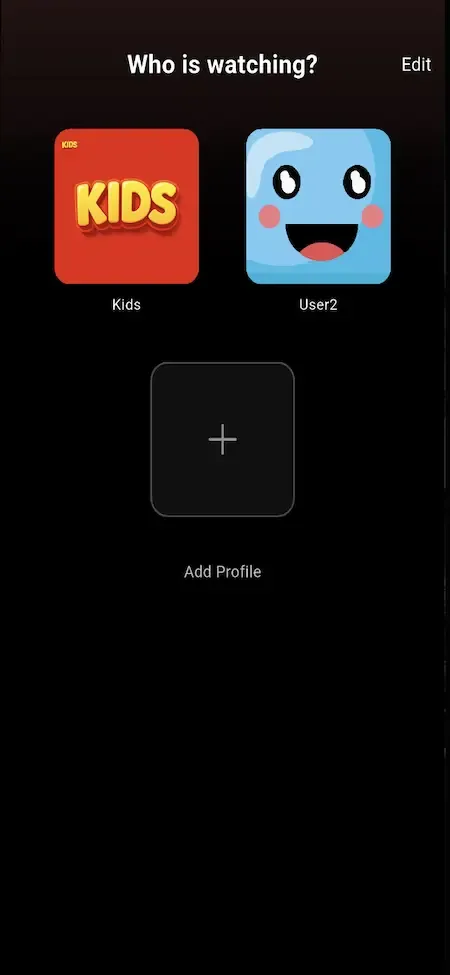
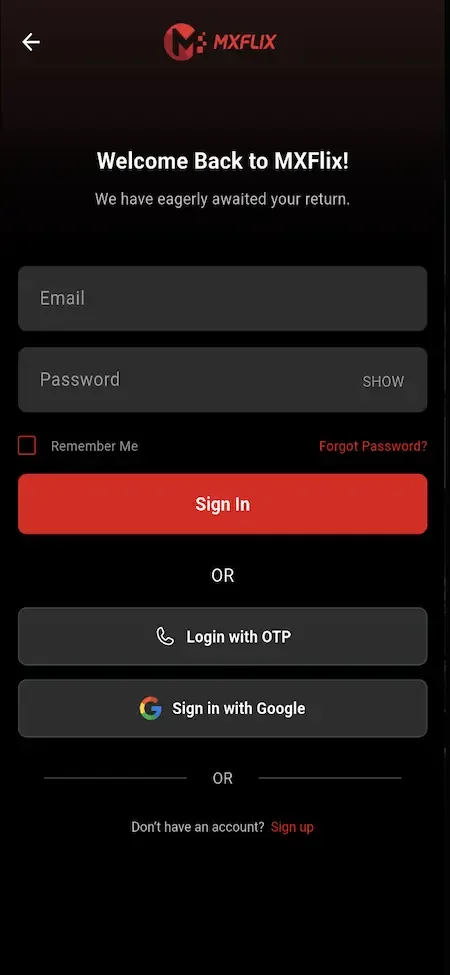
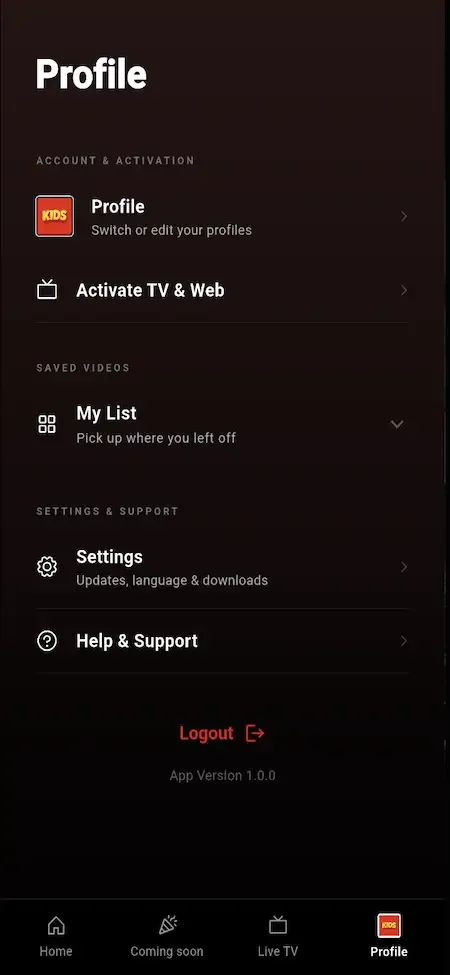
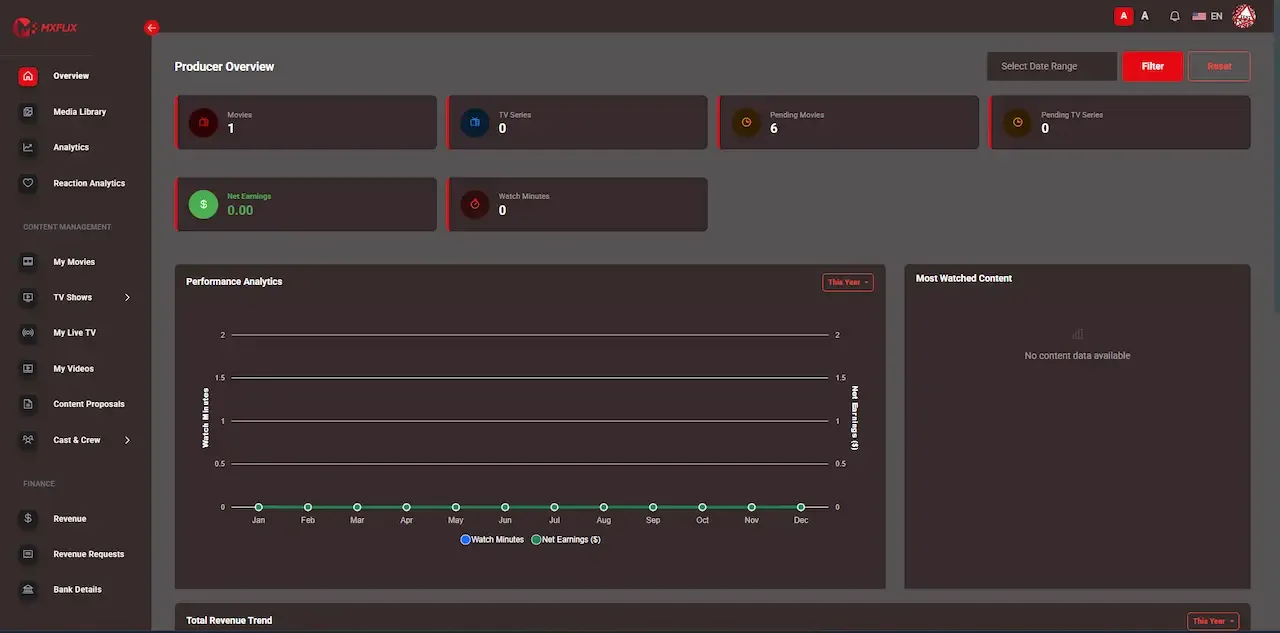
Producers are the partners who fill your catalog without a licensing budget. They work in their own panel, never in the operator console. Nothing they upload goes live until you approve it, and what they earn is calculated from measured viewing.
Pricing here is a property of each title and plan, not of the platform. The operator can sell the same film through a subscription, as a rental and as a premium unlock, then add coupons on top. All prices, windows and tax rules are settings in the console.
The operator console is where the catalog, the money and the partners meet. It carries the approval queues, pricing controls and payout reviews, and it limits each staff member to the modules they should touch.
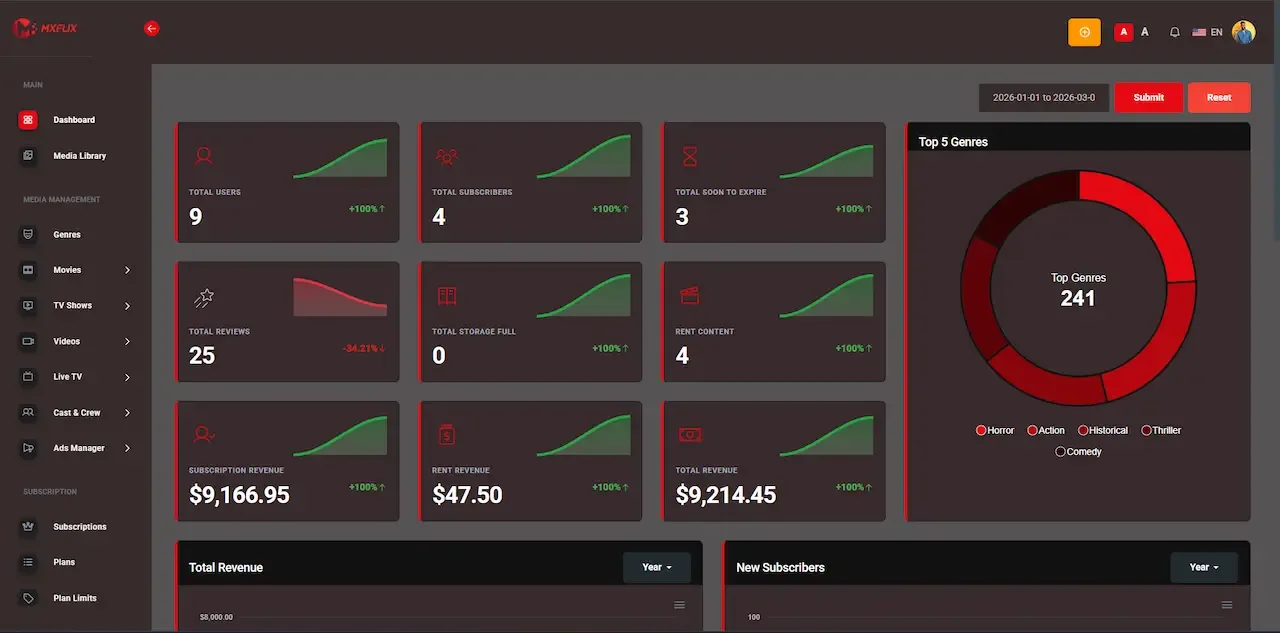
16 screens from the working demo, grouped by where they live. Your platform ships rebranded with your name, logo and colors.
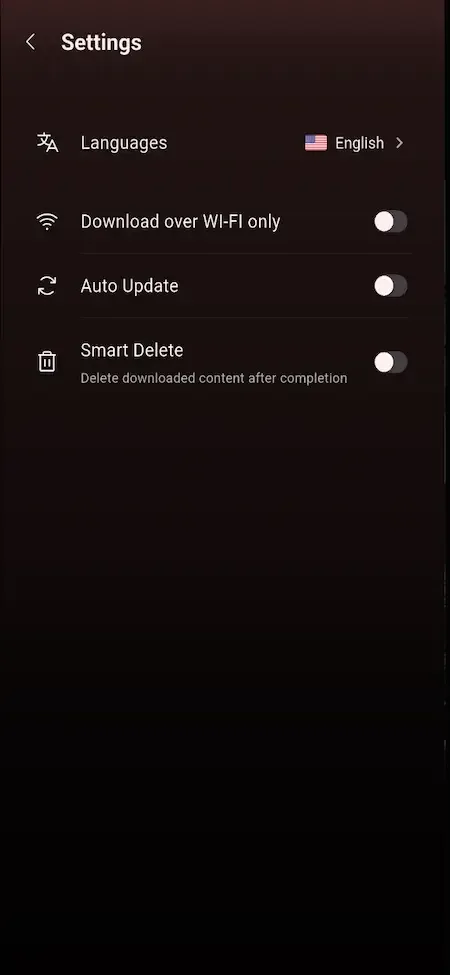
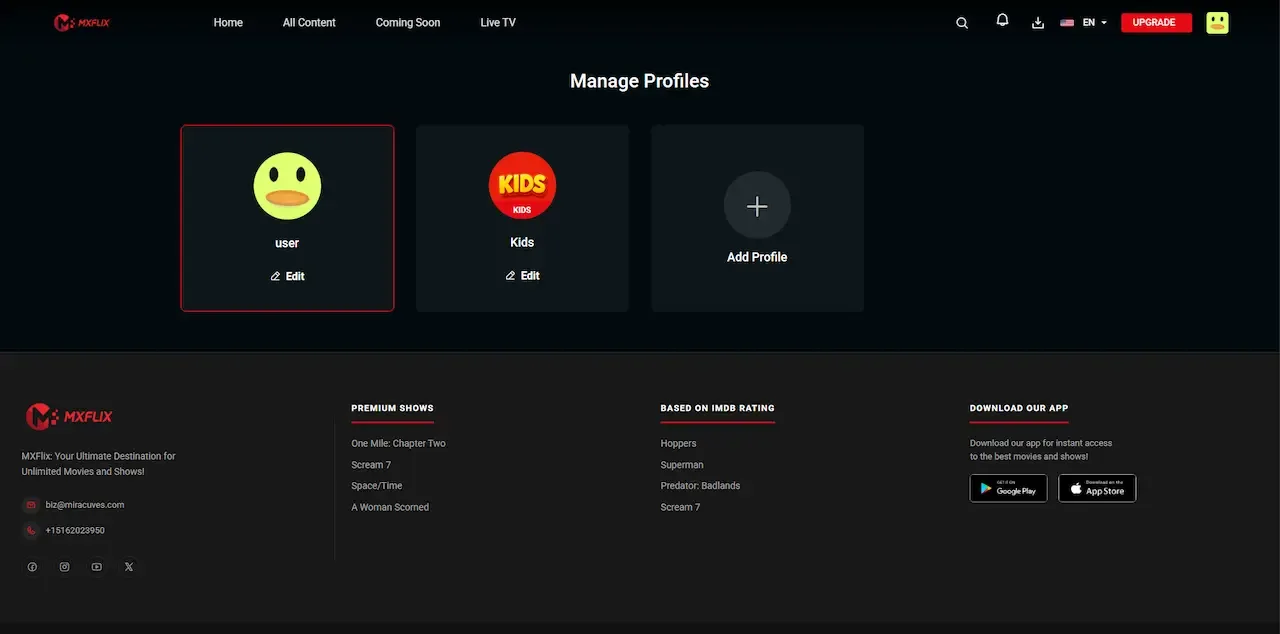
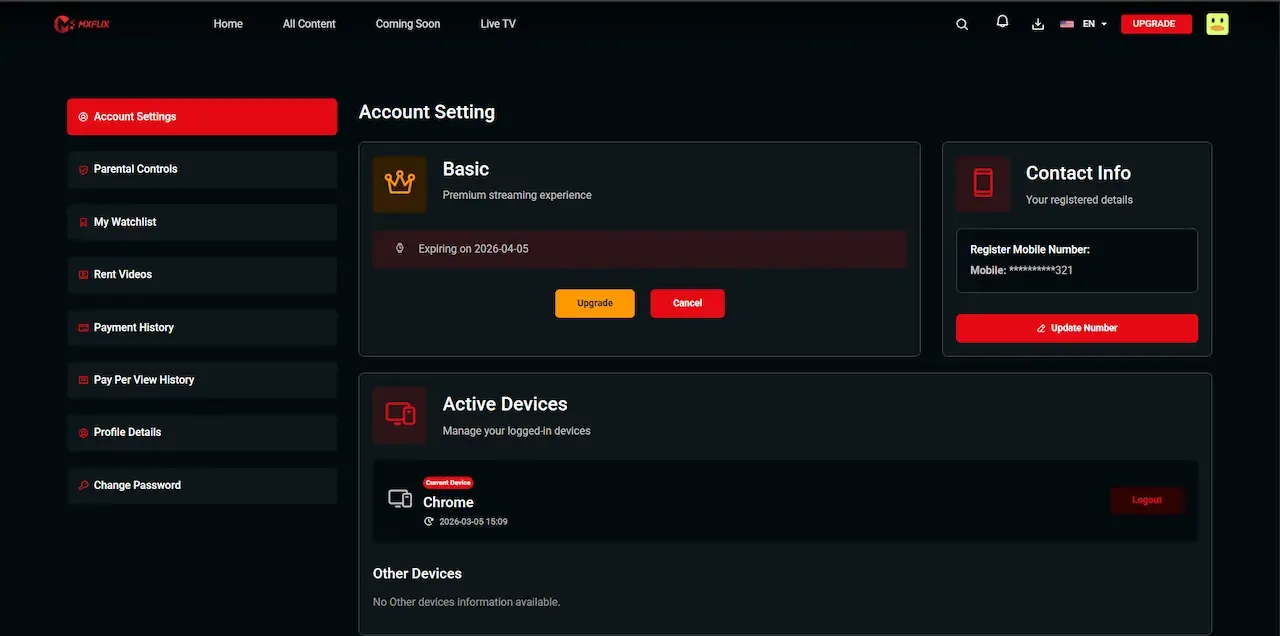
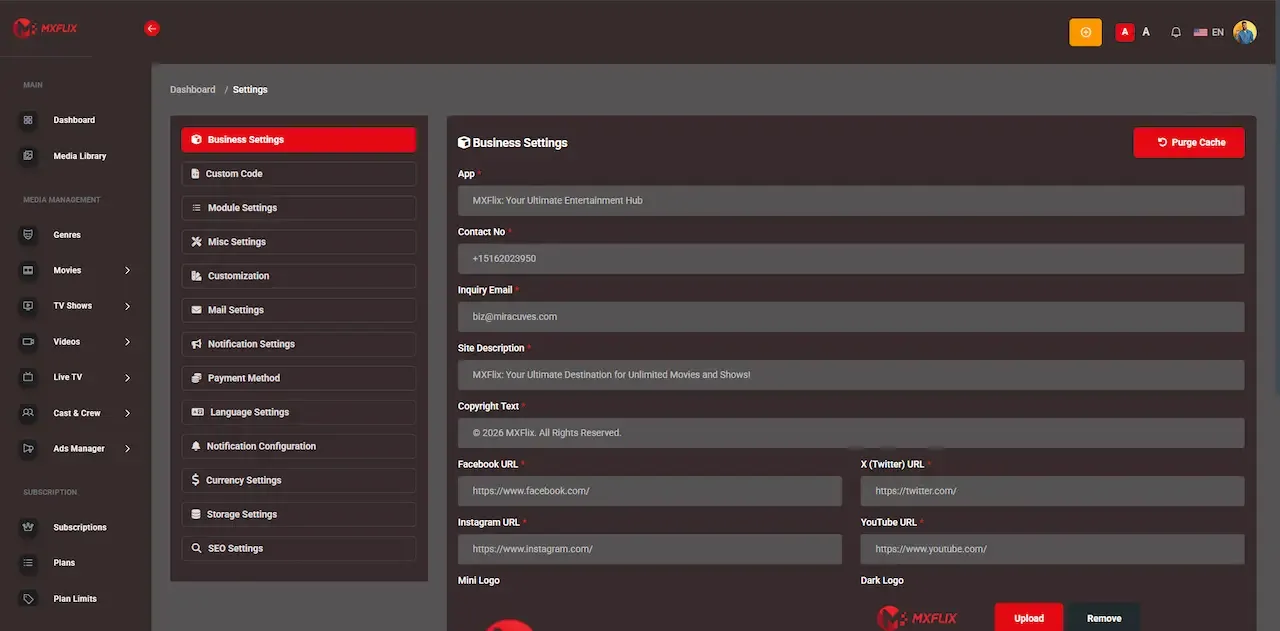
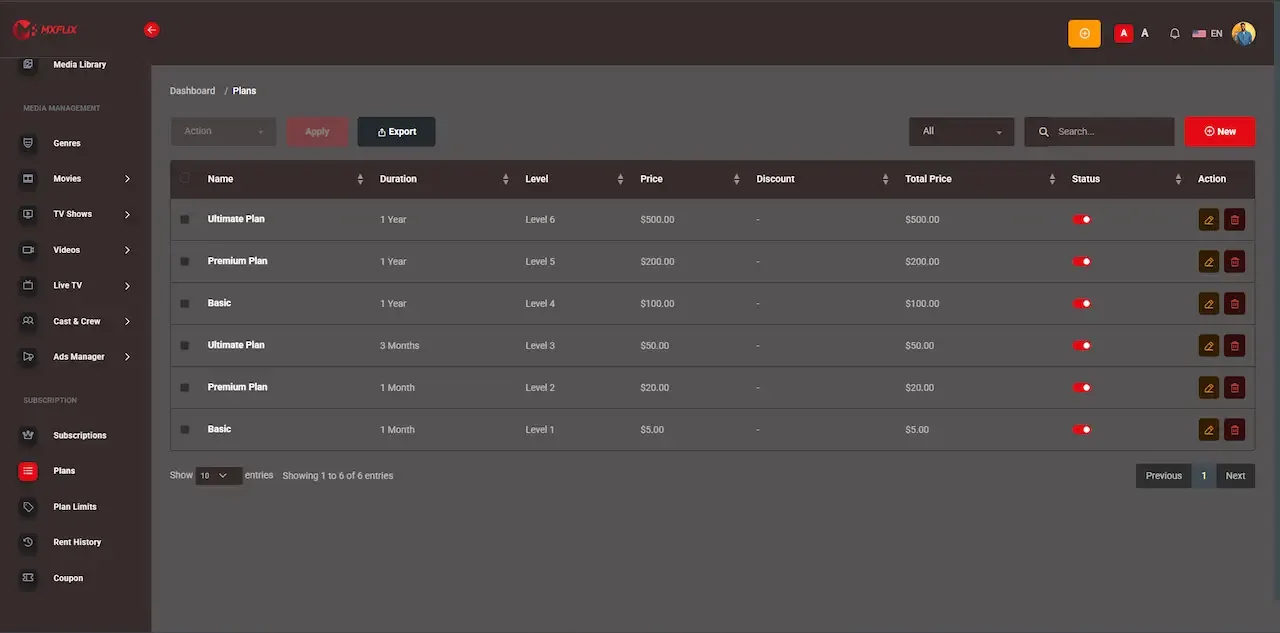
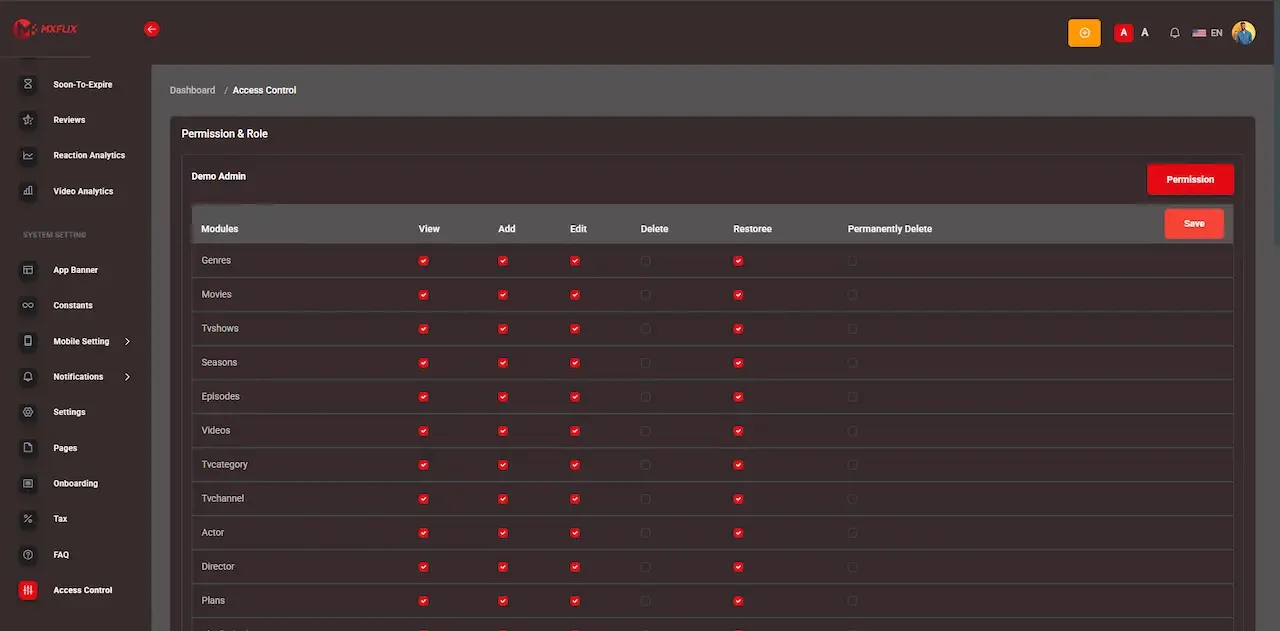
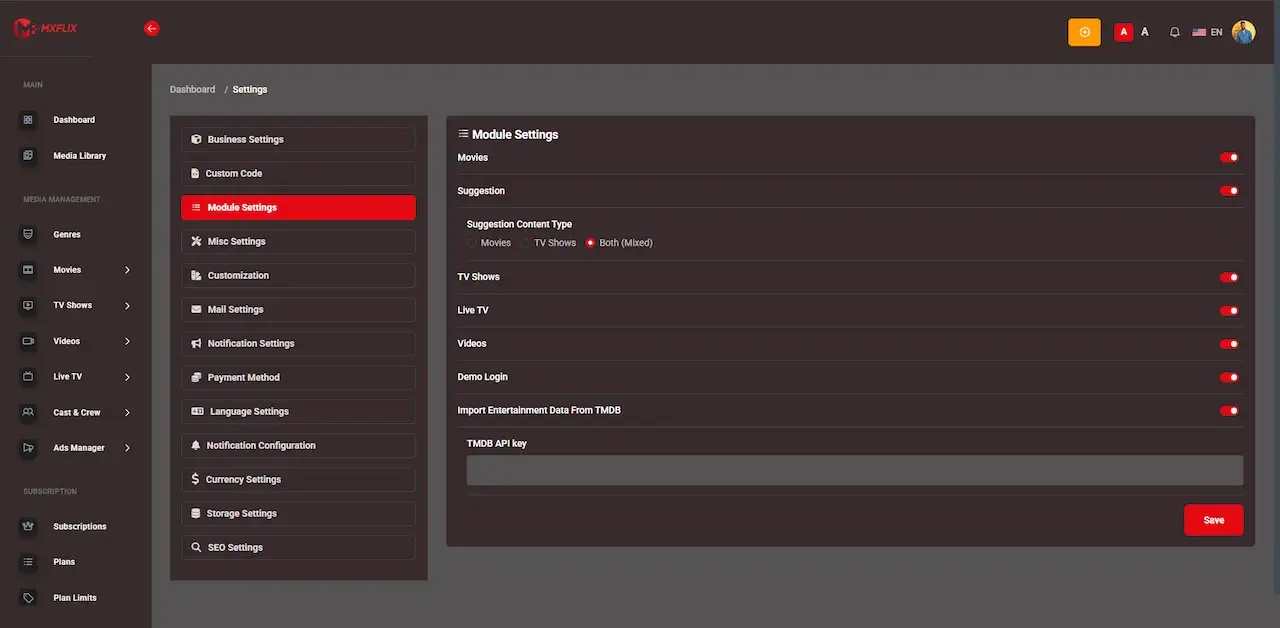
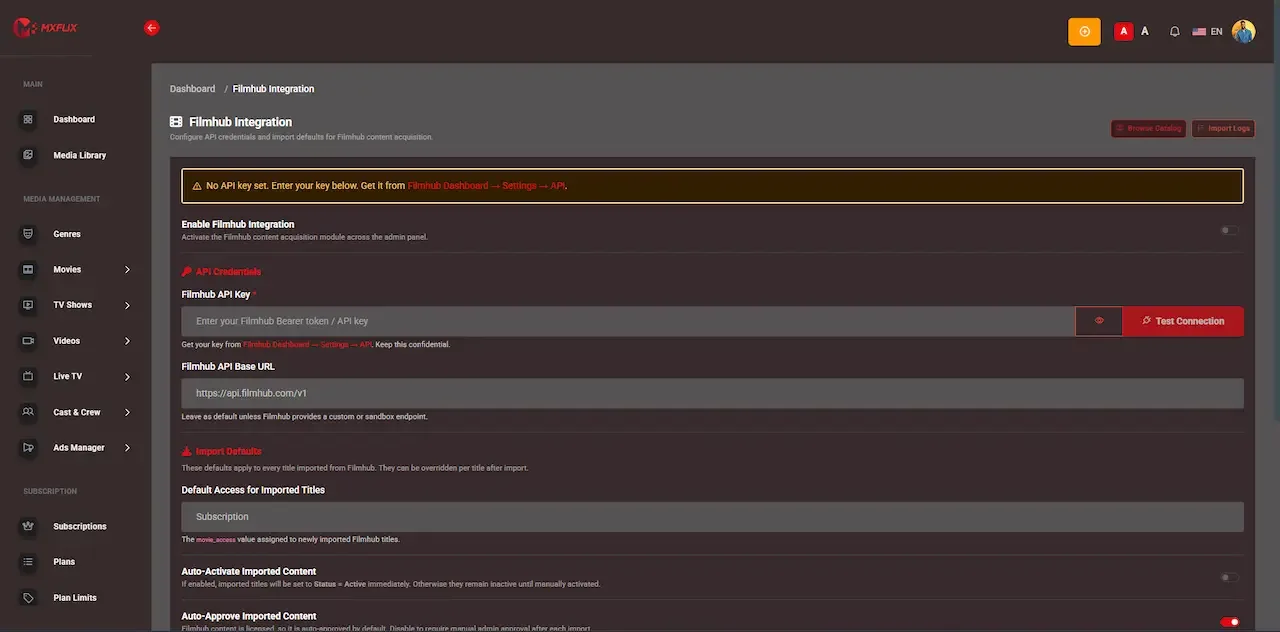
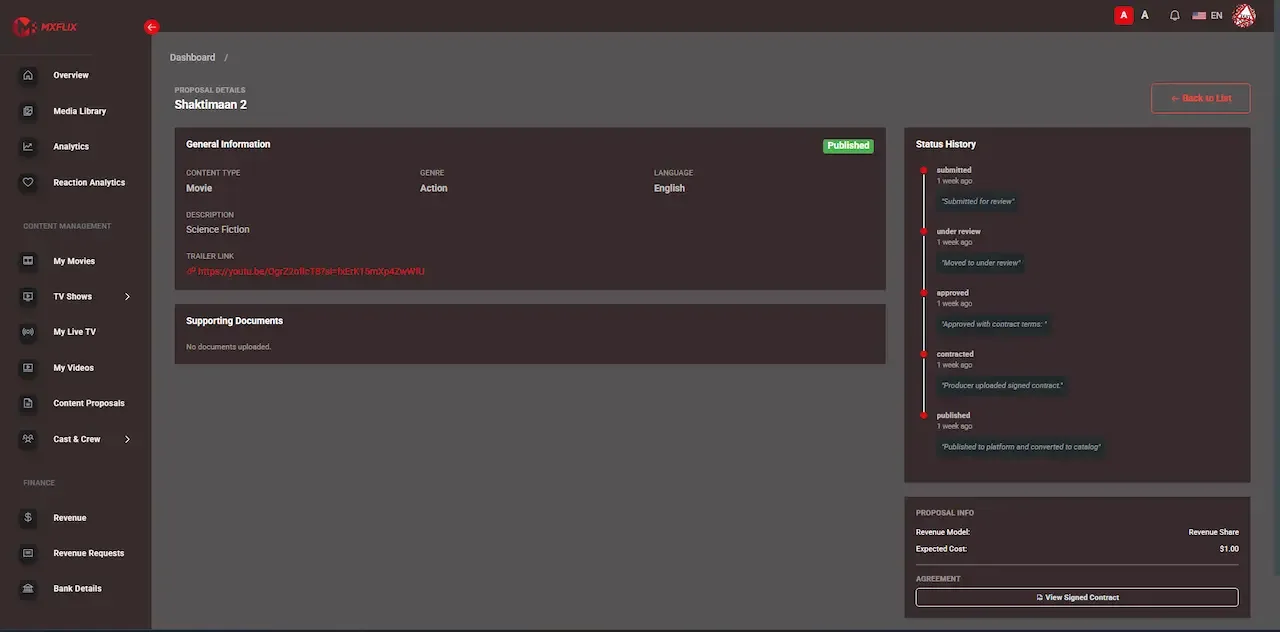
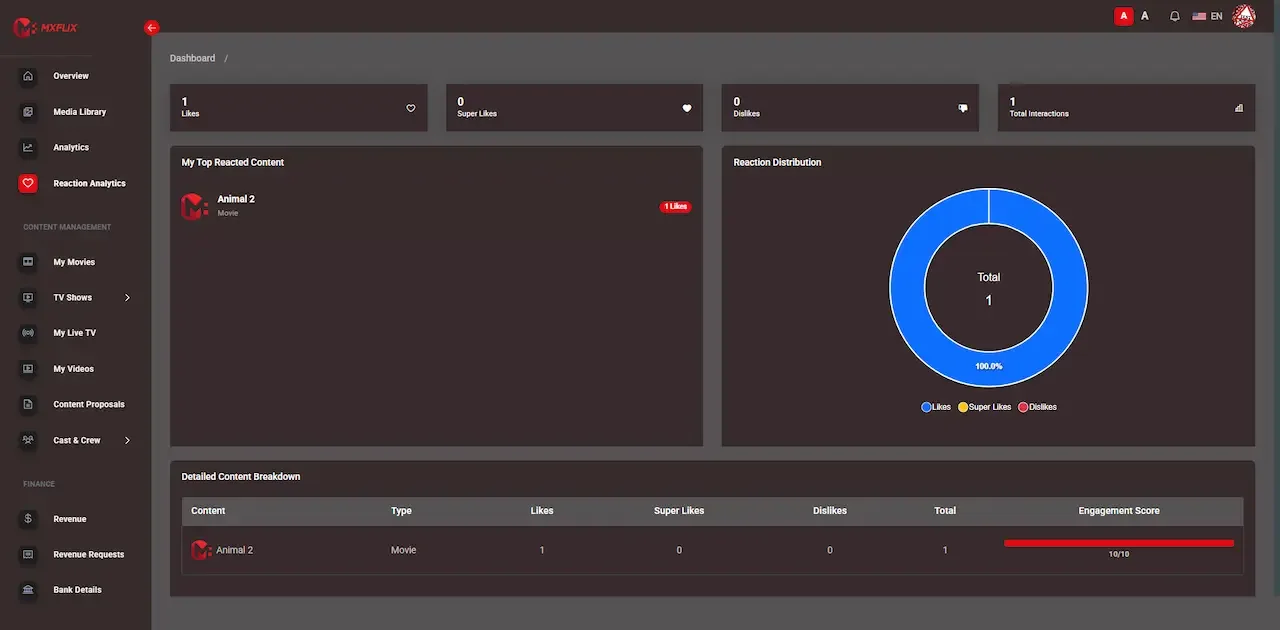
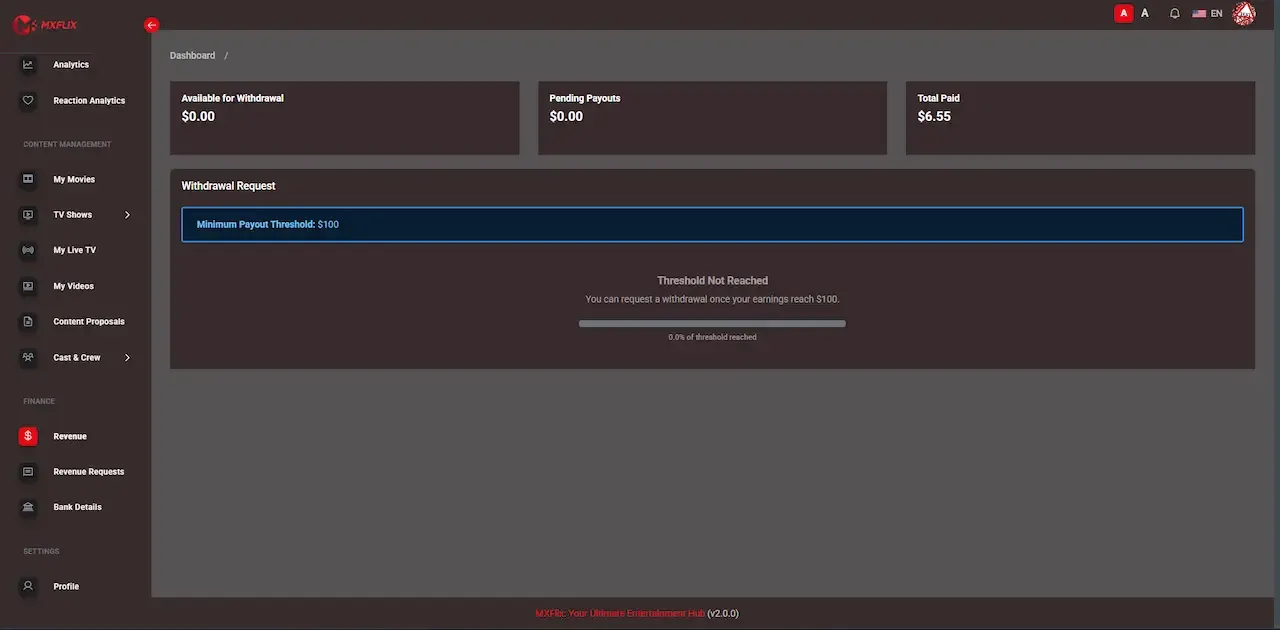
The demo is a working copy of the streaming platform carrying demo branding and sample titles, so nothing in it is your final look. Open the viewer web app, then sign in to the producer panel and the admin console to follow one title from submission to playback. The sample logins below are public demo accounts.
user@demo.comUser_321user@demo.comUser_321producer@demo.comProducer_321admin@demo.comAdmin_$32149 features across 4 roles. The first six of each role are here and the full list is one click away. Nothing is held back for a sales call.
Email and password, social login, OTP and QR session options are supported where configured, with password recovery.
One account holds several profiles, each with its own watch history, so family members do not overwrite each other.
Kids profiles filter by maturity and use a PIN, which gives parents a lock that a child cannot toggle off.
Large featured banners at the top of the home screen let the operator promote a premiere or a campaign.
Viewers browse by genre, cast and crew, and see trending, new release and Top 10 rows.
Each title shows trailers, description, rating, language, duration and an access label before the viewer commits.
7 more Viewers features are in the full list.
Producers sign in to their own panel with permissions that never reach operator functions.
A submission carries metadata, supporting documents and media together, so reviewers have what they need in one place.
Terms and documents can be attached to a submission, tying a title to the deal under which it was offered.
Producers manage their own uploaded titles, subject to operator approval, without touching anyone else content.
Each submission shows whether it is awaiting review, approved or rejected, which removes status emails.
Views and minutes watched are reported for each title, which shows what audiences finish and not just what they open.
5 more Producers features are in the full list.
Plans have a price, duration, access rules and limits, with weekly, monthly or yearly billing periods.
Limits on what each plan can access let you separate a basic tier from a premium one.
Every plan purchase produces an invoice and billing history entry for the viewer and the operator.
A rental opens one title for a window and stops playing when it expires, with the expiry tracked in the system.
Single events, episodes or premieres can be sold as one-off purchases separate from any plan.
A higher tier or grant can open premium titles, which lets you segment willingness to pay without splitting the library.
6 more Monetization features are in the full list.
Manage viewer accounts, profiles, devices, sessions and account status from one console.
Create, edit, organize and publish movies, shows, episodes, videos, banners, trailers and metadata.
Review producer-created content before it is published, and reject what does not fit your standard.
Set prices, durations and access rules for plans, rentals and pay-per-view in one place.
Create and manage discounts for subscriptions, rentals and promotions, with validity windows.
Check producer revenue, watch-minute logs, bank details and payout status before approving any settlement.
7 more Operators features are in the full list.
The path through the product, in the order it happens for the people using it.
Viewers register through the configured login flow and pick a profile, including kids profiles with PIN and parental controls.
The home screen shows banners, genre rows and trending titles. A detail page shows trailers, cast, metadata and whether access is free, plan-based, rental or pay-per-view.
The platform checks access rules and routes the viewer to plan checkout or a rental unlock, with coupons and invoices where configured.
Playback offers quality options, subtitles and resume across devices, and Continue Watching syncs by profile.
Watch minutes are logged per title, reports update, and producer payout requests go to the admin for review before settlement.
Every earning route built into the product you receive: how it works, who pays and where the operator earns.
| Revenue model | How it works | Who pays | How you earn |
|---|---|---|---|
| Subscription plans | Recurring access to the library on weekly, monthly or yearly billing, with limits that separate one plan from another. | Viewer | Predictable recurring income and a reason to keep the app installed. |
| Rentals | Time-limited access to one title, with expiry enforced at playback and an invoice for every rental. | Viewer | Revenue from people who want one film and will never subscribe. |
| Pay-per-view | A one-off purchase for a premiere, match, concert or other event. | Viewer | Concentrated income around a date, often higher than catalog pricing. |
| Premium tiers and coupons | Premium content access as a higher level, with fixed or percentage coupons for acquisition and win-back. | Viewer | Segmentation of willingness to pay without hiding the whole library. |
| Bundles | Themed packages such as sport, kids, regional film or education libraries sold as one item. | Viewer | Higher basket value from audiences with a specific interest. |
| Producer revenue share | Producers submit content, you approve it, and payouts follow the minutes viewed under terms you approve. | Platform, from viewer income | Catalog growth without up-front licensing spend, keeping your platform share. |
| Ads and sponsorship | Optional ad-supported or sponsored access for free tiers and campaigns, through a scoped ad module. | Advertiser or sponsor | Income from viewers who will not pay. |
| White-label deployments | The platform can be stood up under another brand for a client, region or network. | Partner | Software revenue that carries no bandwidth cost. |
The flow of money, the gateways you can connect and how payouts are handled.
Viewers pay for plans, rentals and pay-per-view unlocks through payment gateways that you connect from your own merchant accounts. Each purchase produces an invoice and an entry in payment history, and tax and currency are configured on the platform. On the supply side, no money moves to producers automatically: watch minutes accumulate, a payout request is raised, and an operator reviews it against the logs and bank details before settlement.
| Gateway | What it covers |
|---|---|
| Regional | |
| Gateways per market | The product page names no specific provider; credentials from your merchant accounts are installed and tested during launch. |
| Other | |
| Tax and currency settings | Configured on the platform so plans and rentals present correct amounts per market. |
You operate the platform, so legal compliance in each market you serve is yours. This is the tooling that ships in the product. It is not legal advice.
The platform ships without any content, and holding the right to stream each title in each territory is your responsibility. To support that, producers submit proposals with documents and contract terms, and nothing publishes until an operator approves. Content acquisition status is tracked, so you can see what is pending. Build a written approval standard before you open submissions, because every approval is an editorial decision.
Playback is DRM-ready, but we set up the DRM vendor integration with license URLs for your build and confirm the scope with you. This matters if you license studio content, since rights holders often name specific DRM systems in contracts. Settle the requirement early, because it determines your tier and your hosting design before any other decision does.
Separate roles for viewer, producer, admin and super admin limit what each account can reach, and admin routes are protected. APIs use token-based sessions and HTTPS-ready deployment, with rate limiting on sensitive routes. Device and session records are visible to operators. You still need to set strong credentials and review who holds staff roles on a regular schedule.
Kids profiles filter content by maturity and use a PIN, which gives families a basic parental control. Age-gating by country and market-specific rules are available as scoped governance work. Classifying each title correctly is an operator task, and in several markets it is also a regulatory one, so involve someone who knows the local rules.
Viewer and profile records are structured, an account deletion flow is included, and data access is limited by role. Which consent notices, retention periods and export procedures you need depends on where you operate, and the operator is responsible for legal compliance in that market. Our part is the tooling; legal advice is outside it.
Plans, rentals and invoices are recorded for audit, and payouts require an operator to review watch-minute logs before settlement. That review is your main control against disputes, so decide who may approve payouts, keep notes, and compare a sample of producer claims with the logs in the first months.
Subscription and rental payments run through configured payment gateways, with invoices, payment history, tax and currency settings.
The layers of the product as delivered. You receive the full source code for every one of them.
| Layer | Built with | Hosting note |
|---|---|---|
| Mobile apps | Flutter (Android and iOS) | |
| Web platform | PHP Laravel | |
| Backend API | Laravel, serving mobile, web and TV-connected clients | PHP Laravel serves the API for mobile, web and TV-connected clients, plus the producer and admin panels.HTTPS-ready APIs, token-based sessions, rate limiting and protected admin routes. |
| Database | MySQL or MariaDB | MySQL or MariaDB stores users, profiles, content, plans, rentals, watch history, watch-minute logs and payouts. |
| Streaming and media | HLS, MP4, external URLs and 360 VR-ready playback | AWS S3, Bunny CDN or Cloudflare can store and deliver video assets and static files.HLS with M3U8 where configured, MP4 files and external URLs, including 360 VR-ready content. |
| Cloud and CDN | AWS, GCP or DigitalOcean with AWS S3, Bunny CDN or Cloudflare | AWS, GCP or DigitalOcean, or another provider you prefer, with the application deployed during launch week. |
| Backup and monitoring | Backup, recovery and monitoring are configured as part of the deployment on your provider. | |
You host the platform on a cloud account you control, and the biggest running cost is video delivery rather than the application. Because storage and delivery scale with minutes watched, plan the media path first and the application servers second.
Most premium viewing happens on a television, so reach matters more than a feature list. The table shows what ships and what we build per platform. Included means it ships and is shown in the demo. Available means we build it for you as a scoped extension, with its own store process.
| Surface | Status | What to expect |
|---|---|---|
| Desktop and mobile browsers | Included | Responsive web platform with indexable title pages and full purchase flows |
| Android phones and tablets | Included | Branded app with profiles, downloads, notifications and parental controls |
| iPhone and iPad | Included | App Store-ready build with the same viewer journey as Android |
| Apple TV and Android TV via the phone apps | Included | The product page says phone apps stream to them; confirm the exact method in the demo |
| Native Android TV and Apple TV apps | Available | Scoped per platform, with separate store review |
| Fire TV and Roku | Available | Native builds are made for you, one per platform |
| Samsung and LG televisions | Available | Built for each manufacturer store, sized to your scope |
| Consoles and set-top boxes | Tailored for you | Tailored for you; we discuss these when your plan needs them |
A streaming service has a cost that never appears in the software price: every minute watched is data sent to a viewer. Understanding how it builds up lets you price plans sensibly. We give no prices because they depend on provider, region and contract, only the logic.
Studios and distributors often ask how their titles are protected before they license anything. Protection is several layers. This table separates what the platform provides from what we set up for a particular licensing deal.
| Layer | What it does | Where it stands |
|---|---|---|
| Accounts and sessions | Token-based sign-in, device and session management, role-based admin access | Included |
| Traffic protection | Rate limiting on sensitive routes, throttled APIs and protected admin pages | Included |
| Producer approval | Titles are reviewed and approved before they are published to viewers | Included |
| Parental controls | Kids profiles, maturity filtering and a PIN lock | Included |
| Access rules per title | Free, plan-gated, rental or pay-per-view labels decide who may play | Included |
| DRM-ready playback | The player and delivery path are prepared to accept license URLs | Included, as groundwork |
| DRM vendor integration | Connecting a licence service so encrypted playback is enforced | Available, scoped per deployment |
| Studio-specific DRM systems | Contracts may name particular systems; confirm before you sign | Settle before launch |
One fixed price for the ready-made platform, published here so you can plan before you talk to us.
Ready-made, one-time
$3,699
Live in 6 working days from kickoff
The engineers who deploy your platform stay with it once it is live.
Need more? We tailor the platform to your plan, typically in 2-8 weeks, and confirm the scope with you before work starts. App store review times are set by Apple and Google.
Everything here is available around the ready-made Netflix clone. We confirm the scope with you before any price is agreed.
Connects a DRM vendor with license URLs and secure playback workflows, usually required when licensing studio content.
Confirm with usCustom apps for Android TV, Apple TV, Fire TV, Roku, Samsung or LG, each scoped by platform and store process.
Confirm with usMachine-learning suggestions using watch history, preferences and viewing patterns, replacing hand-curated rows once the catalog grows.
Confirm with usEnhanced immersive playback and browsing for libraries that carry a lot of VR-compatible content.
Confirm with usDirect API onboarding of provider catalogs using their keys and metadata flows, scoped per provider.
Confirm with usExtended contracts, automated statements, licensing terms, multi-producer analytics and more complex payout rules.
Confirm with usVAST or custom ads, sponsor placements and hybrid free and paid packages for ad-supported viewing.
Confirm with usReferral codes, launch offers, retention coupons and win-back discounts built on the existing coupon engine.
Confirm with usCompetitors present tiered packages. This matrix is blunter. Most of the platform ships ready, and the rest is set up around your plan, with a few lines no software supplier can give you.
A browser platform plus branded Android and iOS apps from one backend.
Separate histories per profile, maturity filtering and a PIN-based parental lock.
Seasons, episodes, trailers and standalone videos in one catalog structure.
A channel module beside on-demand, free or gated by plan.
Resume position and saved titles synced per profile across devices.
Viewers pick quality and subtitles in the player.
The mobile app lets viewers save titles for later viewing.
Weekly, monthly or yearly plans with limits, invoices and billing history.
One-time unlocks with expiry windows, history and invoices.
Fixed or percentage discounts tied to plans or titles for a set period.
Studios and creators submit titles, see performance and request payouts.
Viewing minutes are logged so producer payouts follow consumption.
Users, content, plans, rentals, coupons, payouts, banners, reports and settings.
Works where the content itself is 360; flat video is not converted.
Playback is DRM-ready; we set up the vendor integration with license URLs for your deployment.
Apps for the TV platforms you choose are built per platform and per store process.
Direct fetching of titles and metadata from content providers using their API keys.
Suggestions based on history, genre behavior and profile activity beyond basic rows.
Ad-supported viewing and sponsor placements for free or hybrid access.
Minimum guarantees, recoupable advances or territory terms go beyond minutes-watched payouts; we build them and confirm the scope with you.
Four pages go deeper on the questions buyers ask most about the Netflix Clone. This page stays the overview.
A streaming product is judged on what happens between pressing play and getting paid.
See the full breakdownThe price of the platform is the smaller part of a streaming budget, and the part you can settle on day one.
See exact pricingStreaming economics run on minutes, not on sign-ups.
See the playbookAnyone can show you a video playing in an app.
Compare optionsFrom kickoff to a live Netflix clone under your brand: what we do each day, and what we need from you.
1Day 1
2Day 2
3Day 3
4Day 4
5Day 5
6Day 6
In streaming the platform is the smaller number. The costs that decide whether the business works are content, which you license or commission, and delivery, which scales with minutes watched. A development quote cannot predict either. What it can tell you is how much engineering you avoid, which here includes a producer panel, rental expiry logic, watch-minute logging and an approval workflow that custom builds routinely postpone and then rebuild after the first payout dispute.
| Factor | Build from scratch | Rent a SaaS | Own it with GetFame |
|---|---|---|---|
| Time to first stream | Quarters of work, with producer tooling arriving last. | Fast, but on the vendor terms. | Deployment takes six working days; preparing content depends on you. |
| Producer revenue share | Yours to design, and easy to get wrong the first time. | Rarely offered at all. | Payout calculation on watch minutes with approval and payout requests. |
| Ways to monetize a title | Usually built one model at a time. | Often subscription only. | Subscription, rental and pay-per-view on one catalog, plus coupons and bundles. |
| Share of your revenue | None. | Commonly a percentage or per-stream charge. | None; subscriptions and rentals are yours. |
| Factor | Build from scratch | Rent a SaaS | Own it with GetFame |
|---|---|---|---|
| Where video lives | Your storage and CDN. | The vendor, with a margin on delivery. | Your storage and CDN on your provider, at raw cost. |
| Leaving later | Not applicable. | Migrating a catalog and subscriber base is painful. | Nothing to leave; it already runs on your infrastructure. |
| Source code | Yours. | Rented, never owned. | Complete Laravel and Flutter source at handover. |
Running costs. Plan separately for content licensing, storage and CDN delivery, transcoding when titles are ingested, and DRM licensing if your contracts demand it. Payment gateway fees, app store developer accounts and their review cycles are also yours. Marketing is the other large line, because viewers compare your catalog with services backed by far larger content budgets. A narrow niche is cheaper to serve and to promote than a broad library.
Playback gets the attention, but a service is made of dozens of unglamorous parts that have to agree with each other. This table sets the effort of writing each part from scratch against what a ready-made base already provides, using effort words rather than figures.
Build it yourselfA player that handles adaptive streaming, subtitles, resume and quality choice across browsers and phones.
Ready-madePlayback over HLS or MP4 with subtitles, quality options and resume built in.
Build it yourselfSign-in variants, household profiles, kids rules and session control, deceptively large in scope.
Ready-madeEmail, social and OTP sign-in with profile-level history and parental controls.
Build it yourselfRecurring plans, invoices, coupons and plan limits wired to payment gateways per market.
Ready-madeSubscriptions, invoices, coupons and gateway settings in the admin dashboard.
Build it yourselfTime-boxed rights that expire reliably and never leave a permanent unlock behind.
Ready-madeRentals and pay-per-view with tracked expiry and history.
Build it yourselfMetadata, seasons, artwork, genres and cast structures with editing and approval workflows.
Ready-madeA catalog with banners, genres, cast, crew and an approval step before publishing.
Build it yourselfA separate portal, contract terms, approvals and payout statements, usually its own project.
Ready-madeA dedicated producer panel with submissions, analytics and payout requests.
Build it yourselfCapturing watch minutes accurately enough to pay people from them.
Ready-madeWatch-minute logs feeding reports and producer revenue visibility.
Build it yourselfSeparate clients for each phone and television platform, each with a store review process.
Ready-madeAndroid and iOS apps included; television apps scoped as extensions.
Build it yourselfRole-based consoles so content, finance and support staff see only their own areas.
Ready-madeRole-based admin with reports, backups and platform settings.
Build it yourselfCloud setup, storage, delivery network, backups and monitoring chosen and assembled by engineers.
Ready-madeDeployment on the cloud of your choice, with storage and CDN-ready configuration.
Netflix is widely known for a subscription library watched across profiles and devices, with Continue Watching, downloads and commissioned originals. This platform reproduces the viewing experience and adds the supply side that most small operators need. This describes the viewing model only; the product stands apart from the brand.
| Aspect | The Netflix model | This platform |
|---|---|---|
| How viewers pay | Subscription plans give access to the library. | Plans plus rentals, pay-per-view, coupons, bundles and premium access. |
| Where content comes from | Licensed titles and commissioned originals, funded by the company. | Your own library, partner catalogs through an API, and approved producer submissions. |
| Who earns from viewing | The company pays for content through licensing and commissioning deals. | Producers can earn a share based on minutes viewed, under your rules. |
| Profiles | Several profiles per account with kids options. | Multiple profiles with their own history, kids mode and PIN. |
| Live programming | Mostly on-demand. | A live TV module sits in the same app as on-demand titles. |
| Catalog control | Decided inside the company. | You approve, price and merchandise every title. |
| Source and data | Closed and held by the company. | Code, database and audience all sit with you. |
The founders and teams this product fits most directly, one line each. The launch ideas that follow turn these audiences into a first-week plan.
Founders launching a branded subscription streaming app faster than custom development allows.
Media networks moving from linear distribution to web and mobile with VOD and live TV together.
Rights holders selling directly through subscriptions and premium rentals.
Platforms that onboard several producers and share revenue by minutes viewed.
Operators selling live events, replays and tournaments through pay-per-view and bundles.
Brands with paid libraries and instructors who package content by plan or category.
The services that succeed beside the giants are narrow: a language, a genre, a sport, a faith, a skill. Each of these directions pairs an audience with something the large services under-serve, along with what to settle before launch day.
Viewers who want films and series in a particular language, often scattered across countries. They pay for a plan or for rentals of new releases. Gather titles from independent producers through the panel, localize the interface and agree rights by country before you announce the catalog.
A curated service for viewers who enjoy depth over volume. A modest subscription covers a small library, with rentals for new festival films. Spend effort on editorial: collections, trailers and notes. Check what rights you hold before you promise any title.
Congregations and publishers that want programs, teaching series and live services in one app. Kids profiles and parental lock help in family settings. Offer free live channels to build habit, then gate archives behind a plan.
Instructors who sell structured programs. Subscriptions fit ongoing access, while rentals suit single challenges. Use the producer panel for instructors, set payouts by minutes watched and keep downloads on so members can train away from a signal.
Clubs and organizers who sell live matches, tournaments and replays. Pay-per-view tickets and short passes fit one-off events. Test live capacity ahead of big dates, since delivery cost and viewer patience both peak together.
Educators who want a familiar viewing experience for lessons. Plans give access to a library, and coupons support cohorts. Add assessment elsewhere if you need quizzes, because the platform is a video service and not a learning system by itself.
People who search for a Netflix clone usually have a different goal in mind: to sell their own content, to gather producers, to serve a language or to teach. These neutral options show how an owned platform compares with joining a service, running a media server or renting hosted software.
Subscription streaming service
Viewers who want a large catalog, and producers whom it commissions or licenses.
You cannot run your own service on it; terms, audience and data stay with the company.
Self-hosted media server
Individuals and small groups streaming their own media at home.
Built for personal libraries, without public subscriptions, rentals or producer payouts.
Rented platform
Media teams who prefer a vendor to operate the product and its releases.
Ongoing fees and roadmap dependence; the code is not yours to change.
Free base code
Engineering teams that want a free starting point and will build the rest.
Billing, producer workflows and apps usually need building and maintenance by you.
Bespoke project
Large media groups with unusual requirements and a long runway.
The longest and costliest route, and a team to retain after launch.
A white-label platform you own gives you the apps, plans, profiles and producer panel without a revenue share, and leaves the roadmap with you. It does not give you content, licences or viewers. If your plan is to own an audience around specific titles, a clone shortens the route. If you only want to watch, an existing service is the sensible choice.
Longer answers to the questions buyers of this model ask before they commit.
You cannot win on catalog size, because your viewer is comparing you with companies that spend enormous sums on content. What you can win on is relevance. A single language, region, faith, sport, hobby or teaching topic gives you an audience that global services under-serve and a library that stays small enough to afford.
Test demand before you build a large library. Start with a few dozen titles that serve the niche well, and watch which ones people finish, not just open. Because watch minutes are logged per title, the data shows what the audience values, and you can commission or acquire more of it.
Match the niche to a business shape. A regional film service might lean on subscriptions and rentals, a sports operator on pay-per-view and live TV, and an education brand on plans mapped to courses. The same platform supports each, and the difference is in which levers you open first.
Finally, be honest about distribution. A niche service still needs a way to reach people, such as a community, a channel or a partner network. Decide how viewers will find you before you spend on content.
Unlike most software, streaming makes your best customer your most expensive one. Delivery cost grows with minutes watched, so a subscriber who watches nightly can cost far more than one who rarely opens the app, on the same monthly price. Price plans against expected viewing time, not against what a larger competitor charges.
Use rentals and pay-per-view to capture the occasional viewer. Someone who wants one film is not going to subscribe, and without a rental option that demand is lost entirely. A rental also costs you nothing structurally, since the title is already in the catalog.
Set the rental window with care. If it is too short, buyers feel punished. If it is too long, a rental replaces the subscription you hoped to sell. Review it after a few weeks of real behavior rather than guessing in advance.
Revisit pricing regularly. Check delivery cost per hour watched, compare it with plan revenue, and adjust limits, plan tiers or coupons accordingly. Every setting lives in the console, so changes do not require a release.
Decide your revenue share and approval bar before the first producer signs. The share is the number partners compare across platforms, and raising your take later is a conversation that loses your best contributors. The approval bar is your editorial identity, and a bar set loosely at the start is hard to raise.
Make the data visible. Producers trust a payout they can verify, so the panel shows views, watch minutes and revenue share. Minutes are a fairer basis than views, because views reward a clever thumbnail while minutes reward content people finish.
Staff the review. Every submission needs someone to check media quality, metadata, rights documents and policy fit. A network that grows faster than its review capacity ends up with weak content and unhappy partners.
Start with a small group you know. Learn how submissions, approvals and payouts behave with five producers before you invite fifty. Complex terms such as minimum guarantees or tiered splits are tailored work we set up with you, so keep the first agreements simple.
The most important question is whether your content contracts require DRM. Owned or independent content often does not, while studio licenses frequently name specific systems. Because the integration is scoped for your build and shapes your hosting design, raise it in the first conversation and not after the deals are signed.
Check territories and windows. A license usually covers a defined region and period, and you must be able to restrict availability accordingly. The platform supports region-wise availability and content rules, and you remain responsible for matching them to your contracts.
Prepare content properly. Files, subtitles, artwork and metadata take longer than deployment, and they are on your side of the work. Start preparing before launch week so there is something worth watching when the platform goes live.
Document everything. Keep a record of each title, its source, the rights holder, the license terms and the dates. The producer panel and acquisition status give you part of that trail, and your own records complete it.
Projects and comments as published by our parent company, Miracuves, with the release notes as printed there.
Miracuves's Netflix Clone base covered the live-video pipeline, the creator onboarding, and the tipping/payout module. We added our drop-calendar, the artist-royalty logic, and a custom moderation layer.
An India-focused streaming service for regional films, web series and short films, sold through subscriptions and rentals on web and mobile. The case page prints more than ten thousand Google Play downloads and support for Hindi, Bangla and Assamese, among others, with room to add languages.
v2026.1Jan 2026
v2025.3Oct 2025
v2024.2Jun 2024
v2024.1Feb 2024
You receive a branded Android app, an iOS app, a web app, an admin panel and a producer panel, plus the Laravel backend and APIs. Source code, rebranding, deployment support, app store submission help and handover documentation are all part of the package, white-labeled under your brand.
The ready-made build costs $3,699, one time. A standard rollout goes live in 6 working days. Tailored work such as Smart TV apps, DRM integration or complex producer payout logic is confirmed with us and takes 2 to 8 weeks depending on scope. The package includes the backend, viewer apps, web platform, admin dashboard and producer panel.
Yes. Subscription plans can be weekly, monthly or yearly, with pricing, duration, access rules, limits and invoices. Rentals and pay-per-view unlock single titles with expiry windows, purchase history and invoices. Coupons can be mapped to plans or content.
Producers log in to their own panel, submit proposals, metadata, documents and media, and track views and watch minutes. An admin approves or rejects each submission before it publishes. Producers manage bank details and request payouts, which the admin reviews against watch-minute logs.
The platform logs minutes watched per title and links them to payouts. Sharing runs on configured rules, such as minutes viewed or the terms you approve for each piece of content. You set the rules, and the admin dashboard shows revenue, logs and payout status.
Playback is DRM-ready, and we set up the DRM vendor integration with license URLs for your deployment. If you plan to license studio content, tell us early, because rights holders often require DRM and the integration depends on your provider.
The package covers Android, iOS and web, and the backend is API-ready for TV clients. We build native apps for Android TV, Apple TV, Fire TV, Roku, Samsung or LG, scoped per platform. Tailored work takes 2 to 8 weeks depending on scope.
Yes. The platform supports API-based content acquisition, including Filmhub-style or direct provider integrations. The scope depends on your API access, content rights and technical requirements, and we confirm it with you before work starts. Tailored work of this kind takes 2 to 8 weeks depending on scope.
The mobile apps use Flutter, while the web platform and backend use PHP Laravel on MySQL or MariaDB. Streaming supports HLS, MP4 and external URLs, and deployment runs on AWS, GCP or DigitalOcean with S3, Bunny CDN or Cloudflare. It is conventional, so your own engineers can extend it.
You get 60 days of technical support and 1 year of free updates, and our first response comes within 2 hours, Monday to Saturday, 10:00 to 19:00 IST. Extended maintenance options are available if you want them beyond that period. Handover documentation and app store submission support are part of the delivery.
No. The platform ships without any titles, and acquiring content and holding the rights to stream it in your territories is the business you are starting. You can upload your own library, accept producer submissions or onboard partner catalogs through the acquisition API once the rights are in place.
Yes. Access is configured per title and per plan, so a film can be included for subscribers, offered as a rental to everyone else and held back as a premium unlock at release. Choosing the mix is a pricing decision made in the console, not a development task.
Yes. The viewer apps support subtitles, alternate audio tracks, quality selection and offline downloads, along with resume playback and Continue Watching. What a specific title offers depends on the files you upload, because subtitles and extra tracks have to exist for the title.
You can, but you will need partners ready to submit content, because the catalog will be empty at the start. Many operators begin with a seed library of their own and open producer submissions once they can review them reliably.
Playback stops, because the expiry window is tracked by the platform. The viewer keeps the invoice and rental history in their account, and the title can be rented again if you allow it. The length of the window is a setting you choose per deployment.
Yes. A live TV module supports channels with categories, stream URLs or embeds and free or plan-gated access, and pay-per-view can sell individual events. Delivery capacity during a big event depends on your CDN and cloud setup, so plan it with your provider.
Region-wise availability and content rules are part of the app control settings. More detailed territory windows that activate and expire by contract date, or country-specific age-gating, are governance work that we scope with you.
No. It is an independent white-label platform that offers a similar viewing model under your brand, plus features the original does not offer, such as rentals, a producer panel and watch-minute revenue sharing. It carries none of the original code, content or branding and is not affiliated with it.
SVOD is subscription access to a library. AVOD is free viewing paid for by ads. TVOD sells single titles through rental or purchase. FAST means free channels with ads that play like linear television. This platform ships subscriptions, rentals and pay-per-view, with ads and sponsorship as an extension, so you can mix them.
It depends on your licensing contracts. Studios and distributors often name the systems they accept, commonly Widevine, FairPlay or PlayReady. The platform is DRM-ready, and a vendor integration is scoped per deployment. Raise the requirement at the start, because it can shape hosting and scope.
Multiply expected hours watched by the data a stream uses at your chosen quality to get data delivered, then apply your provider rate. Add storage for the catalog and preparation of new titles. Run the sum for a quiet month and a premiere month. We do not quote a figure because rates vary.
Yes, we build native apps for those platforms for you, one platform at a time with its own store approval. The phone apps and web platform ship by default. If television is central to your plan, scope it at the beginning.
It depends on what you value. Hosted software means a vendor runs releases and infrastructure for a recurring fee. An owned platform means a one-time price, source code and freedom to change anything, with your team or ours doing the operating. Choose by who you want responsible for the product.
Licensing is a commercial and legal matter, and we do not give legal advice. In general you secure written rights for each title, for the territories and windows you plan to use, from the rights holder. Own productions and independent producers submitting through the panel are the simplest starting point.
Track how many viewers subscribe and stay, minutes watched per member, how many viewers move from a free title to a paid one, and how delivery cost compares with revenue for each plan. The admin reports and watch-minute logs supply much of this, and your payment provider covers the rest.
Yes. A live TV module sits in the same app as on-demand, with channel categories, stream links or embeds and free or plan-gated access. You supply the channel streams. Plan delivery capacity for live events and confirm rights for anything you rebroadcast.
If you have no content, no rights and no plan to reach viewers, software will not fix that. A platform helps when you hold or can attract titles, can describe your audience and are ready to market. Without those, start by testing demand on an existing service.
Yes. The producer panel shows views, watch minutes and revenue share for their own submissions, and lets them request payouts, which an admin reviews. Producers see only their own catalog and earnings, so you can onboard many without exposing one partner data to another.
→Start here
Share the platform and your market. You get a walkthrough of the live demo, the exact scope of what ships, and a fixed price in writing. First response in under 2 hours, Monday to Saturday, 10:00 to 19:00 IST.
This page uses the name Netflix to describe a type of platform. The product sold here is separate software, built independently, and Netflix has no part in it.
"Netflix clone" is industry shorthand that founders use when searching for software with a comparable business model. It names a category of product, not a copy of Netflix.
The platform is an original product designed and written by Miracuves. It contains no code, design, graphics or content originating from the Netflix website or applications, and it ships under your own brand.
Netflix and its logos are trademarks of their respective owner and are named here for reference only. GetFame is not affiliated with, sponsored by or endorsed by Netflix. Rights holders can write to legal@miracuves.com.
Operator responsibility. The operator of a launched platform is responsible for legal compliance in the markets it serves. Nothing on this page is legal advice.Read the full disclaimer
First response under 2 hours, Mon-Sat 10:00-19:00 IST
India+91 98300 09649 United States+1 516 202 3950