Twitter Clone Features: Everything Around the Timeline

A feed is the easy part of a microblogging network. What makes it operable is the machinery around it: a place for abuse reports, a desk where advertisers can buy, a door for developers and an evidence trail for every moderator decision. This page walks through how those pieces behave, role by role and step by step.

64
API route handlers
15
Operator console pages
6 days
To a branded launch
On this page10 sections
  1. All 53 Twitter Clone features, by role
  2. One Day in the Life of a Twitter Clone Network
  3. The Twitter Clone, on screen
  4. Twitter Clone Features That Pay Their Way
  5. Twitter Clone Versus the Original and a Ground-Up Build
  6. The Stack Behind the Twitter Clone
  7. What stays with you as the operator
  8. Try the live Twitter Clone demo
  9. Twitter Clone feature FAQs
  10. Explore the Twitter Clone

All 53 Twitter Clone features, by role

The complete list, grouped by the person who uses each feature. Nothing is hidden behind a plan tier: this is what ships in the platform.

Members

17 features
Polls with timed expiry
A poll closes at the time the author sets, so a question can run for an afternoon or a week.
Quote posts and threads
Members can comment on another post by quoting it, or chain several posts into one thread with parent links.
Scheduling and content warnings
Posts can be queued for later and flagged with a content warning from the same composer control.
Link previews
Links pasted into a post expand into a preview card, which keeps shared articles readable in the timeline.
For You timeline
An algorithmic feed that gives the operator something to tune and members something to opt into.
Following timeline
A chronological feed of the accounts a member follows, for people who distrust ranking.
Bookmarks feed
Saved posts live in their own timeline with search, so a bookmark is a collection rather than a dead end.
Timeline preferences
Each member stores which timeline opens first and how notifications and privacy behave on their account.
Lists of accounts
Members group accounts into lists by member id and read each list as its own focused timeline.
Blocks and mutes
Blocking and muting are stored as explicit records, so they can be listed, reviewed and undone.
Search across posts and people
Full-text search covers posts and accounts, backed by composite indexes built for those exact queries.
Saved searches
A member can keep a query and rerun it, which turns search into a standing watch on a topic.
Hashtags and trending
Hashtags are extracted from posts when they are written and feed a trending view for discovery.
Notification stream
Mentions, replies, follows and likes land in a per-member stream that pages by cursor through history.
Direct and group conversations
A conversation holds member ids, so a private thread is a real object that can include several people.
Audio messages and reactions
Voice notes and emoji reactions work inside conversations without leaving the messaging screen.
Read receipts and typing
Delivery state is kept in a readBy list and live typing in a typingUsers map, driven by real-time listeners.
Creators and advertisers

13 features
Free tier
The default plan every account starts on, which keeps the network open while paid plans are priced above it.
Premium tier
A paid plan priced at $9.99 in the shipped configuration, with entitlements the server checks on each request.
Pro tier
A higher plan priced at $29.99 in the shipped configuration, for members who want the full entitlement set.
Server-side entitlements
Plan limits are enforced by the API rather than hidden in the interface, so repricing needs no release.
Creator subscriptions
Subscriber ids sit on the creator record, so a paid following is a first-class relationship between two members.
Tips between members
Any member can send a tip on a post or a profile, which is the lowest-friction way to pay a creator.
Verification badges
A badge is granted on approval rather than purchased in the interface, which keeps it worth something.
Promoted post campaigns
Advertisers pay to push an existing post into more timelines, treated as its own campaign type.
Banner campaigns
A banner is a separate placement with its own record, so it can be priced and reviewed differently.
Sponsored campaigns
Sponsored placements are a third campaign type, which lets an operator sell three distinct products.
Budgets and daily caps
Each campaign carries a total budget and a daily budget, so one campaign cannot spend a month in a day.
Spend tracking
Spend accumulates against the cap on the campaign record, giving advertisers and operators the same number.
Targeting keywords
Campaigns carry targeting keywords, which is the lever advertisers use to say who should see them.

Operators

13 features
Report queue
Member reports arrive as records to work, with resolution actions attached instead of a free-text status.
Five resolution actions
Hide, unhide, delete, suspend and ban let a moderator respond in proportion to the problem.
Appeal review
A member can contest a decision and an operator reviews it against the reason that was recorded.
Audit log viewer
Administrator, action, target user, target post, target report, reason and timestamp are readable in one screen.
Suspension and ban management
Account status changes carry a reason, so a restore or an appeal has something concrete to review.
Login history
Every sign-in records IP, user agent, device, browser, location, timestamp and whether it succeeded.
Verification review
Badge assignment is an operator decision with a record, not a flag set directly in the database.
Ad campaign oversight
Campaign type, budget, daily budget, spend and targeting are visible to whoever runs the inventory.
Platform statistics
Activity and growth numbers sit in the console for the people who have to report on the network.
User list and detail
Operators can open any account, read its state and change its status from a single detail page.
Developer access oversight
The console shows which OAuth applications exist, which keys are live and what limits they carry.
Separate admin sign-in
Operator authentication does not share a session with member accounts, so a hijacked member cannot reach tools.
Settings and configuration
Platform configuration lives in the console, so changing behavior does not wait for an engineering ticket.

Developers

10 features
OAuth 2.0 applications
Each application has a client id, secret, redirect URI and a list of scopes it may request.
Hashed API keys
Keys are stored as SHA-256 hashes under the owning user, so the plaintext exists only when issued.
Per-key rate limits
Counters are kept per key, so one heavy integration cannot slow the network for everyone else.
Two ways to authenticate
Members use Firebase Bearer tokens and integrators use an x-API-Key header, so no member session is needed.
Eleven route families
Auth, users, posts, timeline, conversations, notifications, search, hashtags, lists, media and settings.
One response envelope
Every endpoint answers with success, data, error and meta, so client error handling is written once.
Cursor pagination
Lists page by cursor with a nextCursor value, which stays correct when new posts arrive mid-scroll.
Zod request validation
Bodies and query strings are checked against schemas at the API boundary before a handler runs.
Ownership checks
Every mutation confirms the caller owns the record instead of trusting an id sent by the client.
Token verification middleware
The Admin SDK verifies each Bearer token and account status before any handler sees the request.

One Day in the Life of a Twitter Clone Network

Follow a single piece of content from sign-up to moderation, and notice how every role touches the same records. Nothing below needs a separate system, because every client calls the same REST routes.

  1. A member signs in and is recorded

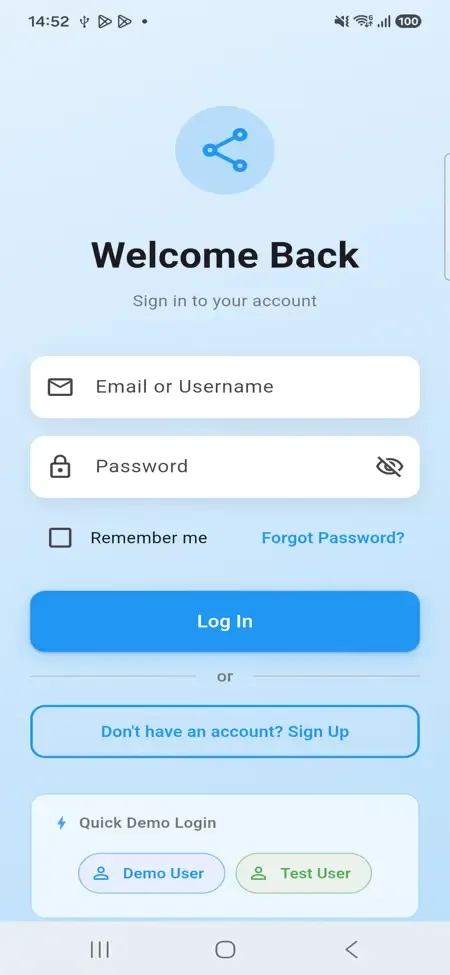
    Sign-in works with email and password or with Google. The server verifies the token on every request instead of trusting the browser. From the first session, the platform stores the address, device, browser, place and outcome of each login, so support has facts to point at later.

  2. A post goes out from the composer

    The author picks a format in one control: words, pictures, video, sound, a GIF, a poll, a quote or a chained thread. Scheduling and a content warning ride along. Edits and deletions check that the caller wrote the post, which stops a tampered client from touching anyone else's work.

  3. The timeline decides who sees it

    Followers read it in a chronological Following feed, while people who do not follow the author may meet it in the ranked For You feed. Counters for likes, reposts and views sit on the post itself, so drawing a page of posts does not trigger a calculation for each one.

  4. Readers react, search and talk privately

    A hashtag is extracted when the post is saved, which feeds search and trending lists. Readers can bookmark, quote or reply, and anyone can move the conversation into a direct or group message with voice notes, emoji reactions, read receipts and live typing signals.

  5. An advertiser buys attention beside it

    A marketer creates a promoted post, banner or sponsored campaign with a total budget and a daily limit. A reviewer approves it in the console before it runs. Spend accumulates against both limits, giving you a figure you can invoice without reconstructing it from logs.

  6. A member reports it and a moderator acts

    The report lands in a queue. The moderator can hide it, restore it, delete it, suspend the author or ban them, proportionate to the problem. Each action writes who acted, on what, and why, so an appeal months later has a written answer. Hiding first is the gentle option: the post disappears from view while the moderator reads the thread, and it returns untouched if the report was mistaken.

  7. A developer builds on the same data

    An outside team registers an OAuth application with chosen scopes, receives a key that is stored only as a hash, and calls the same routes the apps use. Per-key limits mean one heavy integration cannot slow the feed down for ordinary readers. If a key is abused, you withdraw that single key and leave every other integration running, which is far easier than rewriting access rules for everyone.

The Twitter Clone, on screen

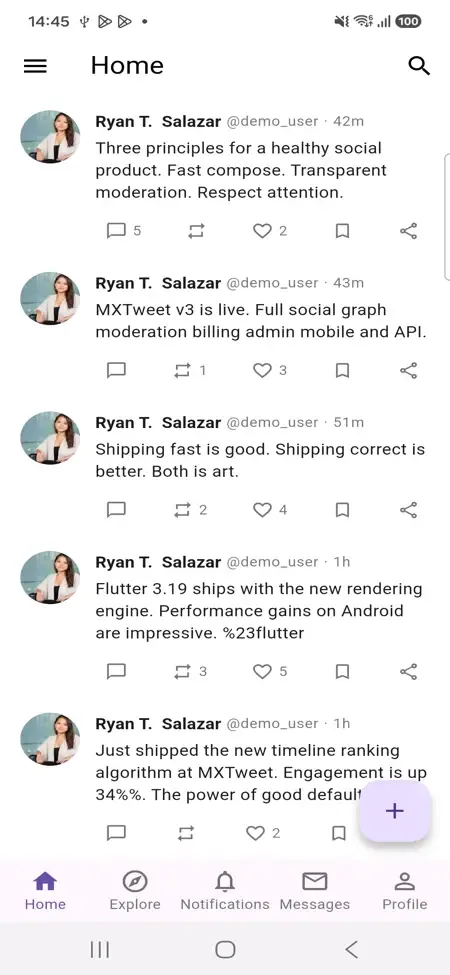
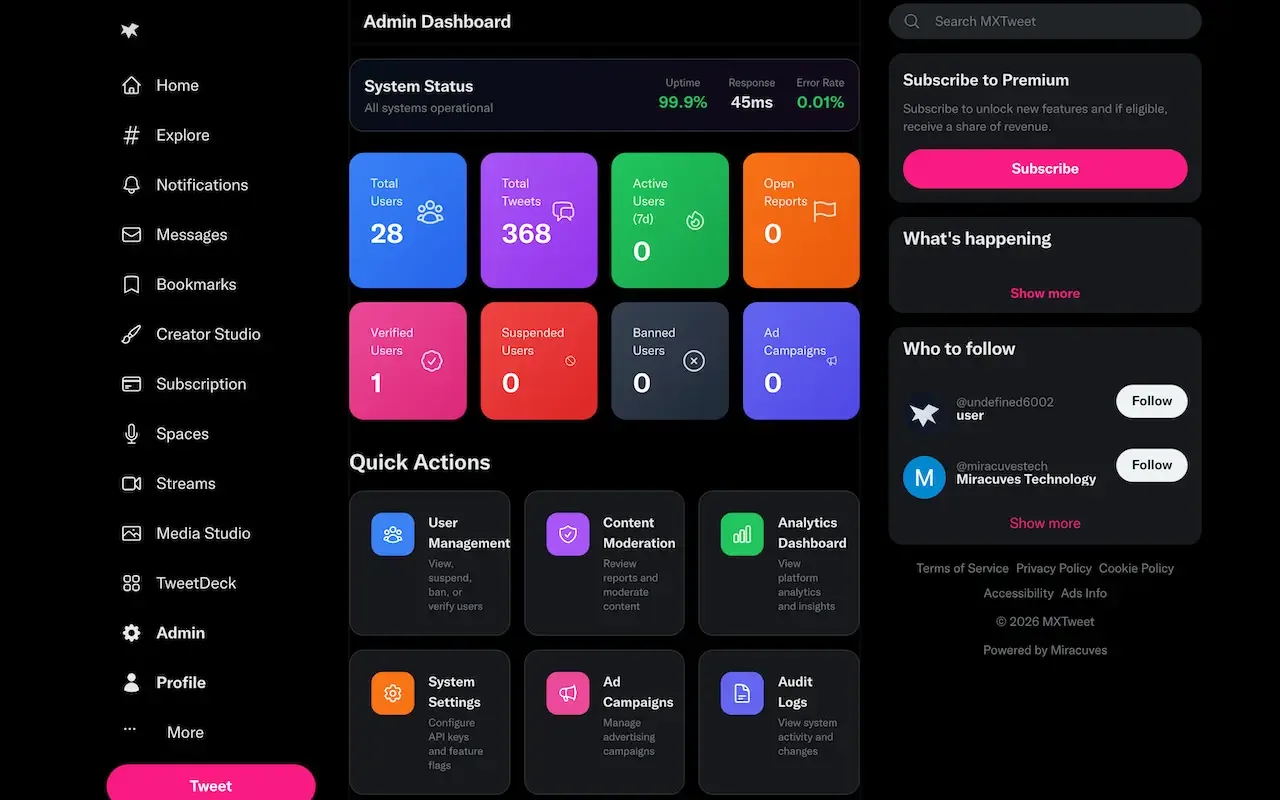
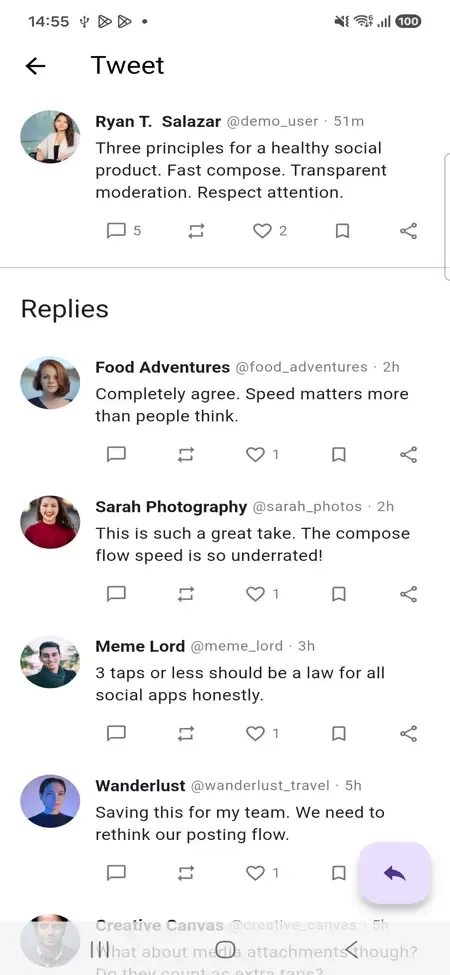
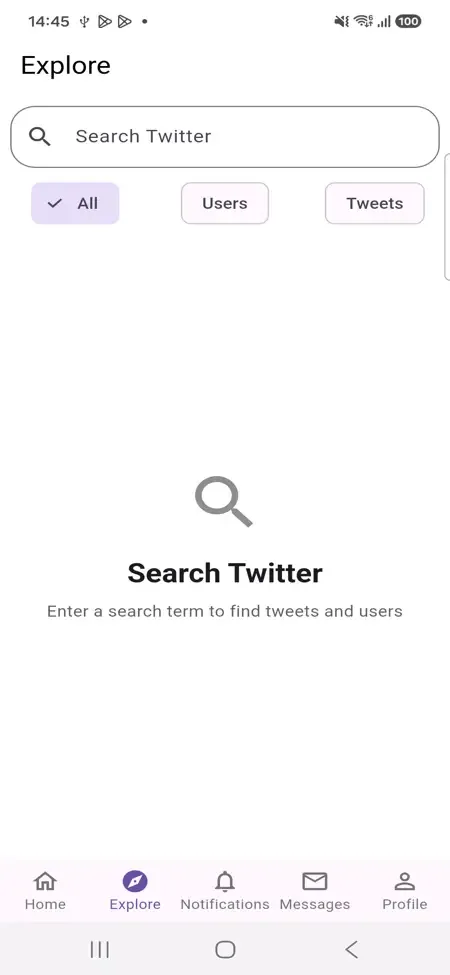
Real screens from the working product. Your platform ships rebranded with your name, logo and colors.

  • Dark admin dashboard with colored metric tiles, system status and quick action cards
    Admin panel
  • Phone post detail with the original post above a list of replies from other members
    User app
  • Phone explore screen with a search box, filter chips and an empty state
    User app
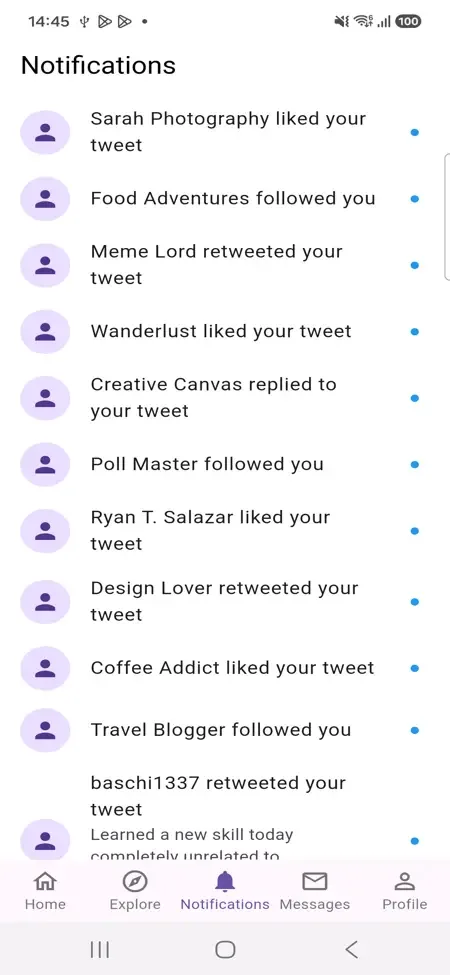
  • Phone notifications list showing likes, follows, retweets and replies with unread dots
    User app
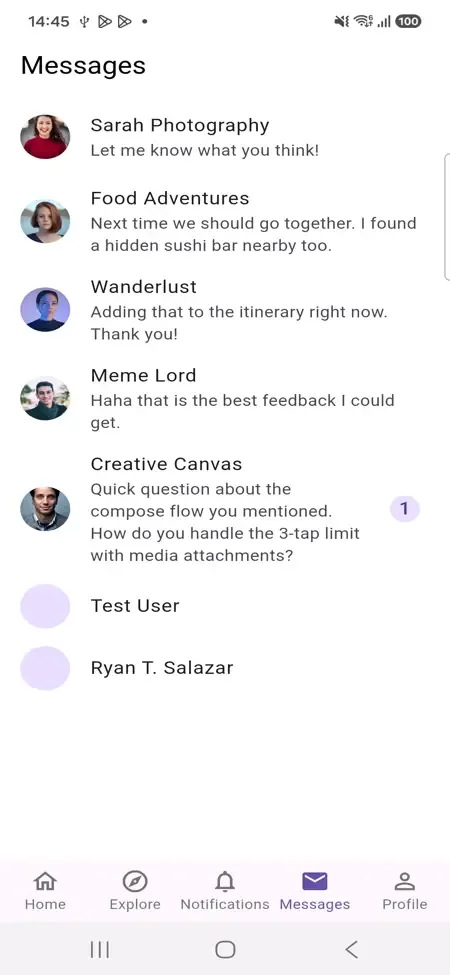
  • Phone messages list with member avatars, message previews and one unread badge
    User app

Twitter Clone Features That Pay Their Way

Every capability below was chosen because a public network breaks or stalls without it. For each one, the point is what it does for the operator rather than what it does for a feature list.

  • A report queue with proportional actions

    Moderators get five graded responses instead of a single delete button. Being able to hide something while you investigate, or suspend before you ban, means fewer wrongful removals and fewer angry appeals. It also keeps your policy readable to the community. A rule that says first offenses lead to a suspension and repeat offenses to a ban is easy to publish, and moderators can follow it without improvising each time.

  • Evidence for every privileged act

    The audit log records who acted, on whom, and the stated reason. If a regulator, a partner or an unhappy member asks why something happened, you answer from a record. That removes the most expensive kind of dispute, the one with no paper behind it. It also protects your own staff: a moderator who followed policy can show that they did, and a pattern of odd decisions becomes visible early.

  • Typed ad products

    Promoted post, banner and sponsored are separate campaign types with their own budgets and targeting keywords. That lets you price each format differently and explain it to buyers, rather than selling one vague slot that never quite fits what the advertiser wants. A local business wanting a small promoted post and a brand wanting a banner on every page are different customers, and each can have its own sensible price.

  • A developer program built in

    OAuth apps with scopes, hashed keys and limits per key mean outsiders can build bots, dashboards and integrations. Each one extends your reach for free, and access can be priced by tier or withdrawn from a single account without touching the others. A news bot or a community dashboard built by someone else brings new readers to your network without a single line of your own code.

  • Verification you control

    A badge is granted when a reviewer approves a request, and the decision is recorded. Because the mark is scarce and traceable, you can bundle it into a tier or sell it separately, and nobody can argue it was handed out arbitrarily. Publish what a reviewer checks before approval, so that applicants know the standard and a refusal does not look like favoritism toward anyone.

  • Feed reads that stay cheap

    Engagement counts are stored with the post instead of being counted at display time. As posts pile up, your monthly database bill grows slowly, which matters on a managed backend that charges for reads. A feed that shows likes, replies and reposts on every post would otherwise run many lookups per screen, and the cost of that habit grows with every new member you attract.

Twitter Clone Versus the Original and a Ground-Up Build

Twitter is the reference most buyers have in mind, but it is not software you can buy or host, and this comparison is only about operating model. The third column shows what you would be taking on if you wrote the same surface yourself.

Twitter Clone Versus the Original and a Ground-Up Build
AspectTwitterTwitter CloneBuilding from scratch
Who owns the rules One company decides policy, ranking and product directionYou set policy, tier boundaries and the moderation workflowYou do, after writing every control yourself
Source access Closed product, not offered for purchase or self-hostingComplete source code handed over at deliveryComplete, though only once the work is finished
Advertising model Sold and controlled centrally by the platform ownerYour own campaigns, budgets and review stepA separate project with billing and review to design
Developer access Terms and pricing are set by the platform ownerYou issue scoped keys and decide the limitsRarely planned until someone asks for it
Member data Held in the owner's systems under its policiesStored in a Firebase project that belongs to youIn whatever database you provision and secure
Time to first launch Not applicable, since it cannot be launched by youSix working days for a branded deploymentMany months of engineering before any moderation tools exist at all
Audience at day one A very large existing community, built over many yearsNone included, so you bring the community that will use itNone, and the budget is gone before it arrives

The Stack Behind the Twitter Clone

The technology is mainstream on purpose, so a small team can hire for it and an agency can extend it. Managed services carry the heavy infrastructure, which leaves your people free to work on the product and the community.

The Stack Behind the Twitter Clone
Web clientNext.js with React and TypeScript, using SWR for data fetching and caching across all member pages.
REST APIRoutes under /api/v1/ in eleven families, validated with Zod and returning one consistent response envelope.
DatabaseFirebase Firestore with typed converters and composite indexes tuned for the timeline, search and notification queries.
Mobile appA Flutter client calling the same REST API as the browser, with an Android build supplied and an iOS build available.
IdentityFirebase Authentication with Google sign-in, OAuth 2.0 applications and SHA-256 hashed API keys carrying their own rate limits.
HostingA Linux host running PM2 alongside twelve Cloud Functions, with Firestore rules and indexes kept as code.

What stays with you as the operator

Plain expectations save you from discovering them after launch. Each item here is either work that needs your own accounts, or work that depends on the shape of the community you are building, and we set up what we can around it.

  • An audience

    No software brings people with it. The network arrives complete and empty, and recruiting the first voices in your niche is the slowest and most valuable task on your list.

  • Automated moderation

    People work the report queue. Software that screens text or images before anyone reports them is an integration we add for you, which is worth confirming early if you expect heavy volume.

  • A video transcoding pipeline

    Video uploads and plays, but producing several quality levels for slow connections is something we set up when you need it, with scope confirmed with us.

  • Extra payment rails

    A Stripe setup is referenced in the build. Other processors, regional wallets and the merchant approvals behind them are integration work on your own accounts.

  • Finer operator roles

    The console is one operator role on a separate login. Splitting it so finance sees only ad spend and safety sees only reports is configuration we scope with you.

  • Store submission outcomes

    We help you prepare and submit the apps under your developer accounts. Whether Apple or Google approves them, and how quickly, is outside anyone's control but theirs.

Try the live Twitter Clone demo

The demo runs the shipped build with demo branding on live infrastructure. Two member accounts let you talk to yourself in a private window, and the operator console shows the same activity from the moderator side. An Android build sits on the same API as the web client.

  • Member app (web)

    Open the Member app (web) demo
    Login
    demo@mxtweet.com
    Password
    Demo@123

    Worth trying

    • Compose a thread and attach a poll
    • Switch between For You, Following and Bookmarks
    • Bookmark a post and find it again
    • Open a profile and follow it
  • Second member

    Open the Second member demo
    Login
    test@mxtweet.com
    Password
    Test@123

    Worth trying

    • Reply to and quote the first account
    • Open a direct message and send audio
    • React to a message and watch read receipts
    • Report a post for the console
  • Operator console

    Open the Operator console demo
    Login
    admin@demo.com
    Password
    Admin@123

    Worth trying

    • Open the report queue and resolve one
    • Read the audit log for your own action
    • Review an ad campaign and its spend
    • Check login history for a member
  • Android app

    Open the Android app demo
    Login
    demo@mxtweet.com
    Password
    Demo@123

    Worth trying

    • Install the build from the app portal
    • Sign in with the member account above
    • Compare the feed against the web version

Twitter Clone feature FAQs

Can I run only the parts I need at launch?

Yes. Ad campaigns, creator subscriptions, tips and developer keys exist as records and permissions, so you decide which are visible to members and outsiders. Many operators open with conversation, messaging and moderation, then enable the commercial surfaces once there is attention worth selling or a community worth charging for the first time.

How do the three timelines differ?

Following shows the accounts a member chose, in time order. For You is a ranked mix that can include accounts they do not follow, which is where discovery happens. Bookmarks is a private saved list. Per-member preferences set which one opens first, and you can tune the ranking. A quiet community can lean on Following, while a growing one benefits from For You surfacing voices a newcomer has not found yet.

What can a poll do in the composer?

A poll attaches to a post and closes at a time the author sets, so a question can run for an afternoon or stay open for days. It sits next to the other formats in the same composer, which keeps posting quick for ordinary members. Polls are also a cheap way to start a conversation, because voting asks less effort from a reader than writing a reply does.

Does the mobile app have every console feature?

No. The Flutter app focuses on the member experience and calls the same API as the website. Moderation, ad review and verification review live in the web console by design, since those jobs are done at a desk, not on a phone. Your staff therefore use a laptop for the console, and members never see a screen that was built for operators.

How are blocks and mutes enforced?

Each is stored as its own record rather than inferred or hidden in a client filter. Because the server knows about them, they apply everywhere a member could meet the blocked account, including search, replies and conversations. A muted account simply stops appearing for the member who muted it, while a blocked one also loses the ability to reach that member in any way.

What do developers actually receive?

An OAuth 2.0 application with a client id, secret, redirect address and chosen scopes, plus an API key shown once and stored hashed. Calls return one consistent envelope and page by cursor, so a third-party client behaves the same way on every endpoint.

Can members build lists and save searches?

Yes. Members can group accounts into lists, follow hashtags and keep searches they reuse. These are small features, but they are what turns a firehose into something a person can read daily, which supports retention. A member who builds a list of ten trusted voices has a reason to return that does not depend on the algorithm, and your network feels useful long before it feels busy.

→Start here

Tell us what you want to launch.

Share the platform and your market. You get a walkthrough of the live demo, the exact scope of what ships, and a fixed price in writing. First response in under 2 hours, Monday to Saturday, 10:00 to 19:00 IST.

We reply to every inquiry. No newsletters, no shared data. See our privacy policy.

Trademark and independence notice

This page uses the name Twitter to describe a type of platform. The product sold here is separate software, built independently, and Twitter has no part in it.

Why this name

"Twitter clone" is industry shorthand that founders use when searching for software with a comparable business model. It names a category of product, not a copy of Twitter.

Who built this

The platform is an original product designed and written by Miracuves. It contains no code, design, graphics or content originating from the Twitter website or applications, and it ships under your own brand.

Trademarks

Twitter and its logos are trademarks of their respective owner and are named here for reference only. GetFame is not affiliated with, sponsored by or endorsed by Twitter. Rights holders can write to legal@miracuves.com.

Operator responsibility. The operator of a launched platform is responsible for legal compliance in the markets it serves. Nothing on this page is legal advice.Read the full disclaimer