Netflix Clone Features for Viewers, Producers and Operators

A streaming product is judged on what happens between pressing play and getting paid. This page follows one title through the whole platform, then picks out the parts that change how a streaming business can be run, compares the build with the service people know, names the technology under it, and lists what stays with you.

5
apps and panels
3
ways to unlock a title
6 days
to go live
On this page10 sections
  1. All 49 Netflix Clone features, by role
  2. One title from upload to payout
  3. The Netflix Clone, on screen
  4. Netflix clone capabilities that change the business
  5. How the service you know compares with this build
  6. The technology under the Netflix clone
  7. What stays with you and what we set up around it
  8. Try the live Netflix Clone demo
  9. Netflix Clone feature FAQs
  10. Explore the Netflix Clone

All 49 Netflix Clone features, by role

The complete list, grouped by the person who uses each feature. Nothing is hidden behind a plan tier: this is what ships in the platform.

Viewers

13 features
Flexible sign-in
Email and password, social login, OTP and QR session options are supported where configured, with password recovery.
Household profiles
One account holds several profiles, each with its own watch history, so family members do not overwrite each other.
Kids mode with PIN
Kids profiles filter by maturity and use a PIN, which gives parents a lock that a child cannot toggle off.
Hero banners
Large featured banners at the top of the home screen let the operator promote a premiere or a campaign.
Genre and cast discovery
Viewers browse by genre, cast and crew, and see trending, new release and Top 10 rows.
Title detail pages
Each title shows trailers, description, rating, language, duration and an access label before the viewer commits.
Series structure
Shows are organized into seasons and episodes, alongside standalone videos and trailers in the same catalog.
Live TV channels
Channels with categories, stream URLs or embeds sit in the same app, and access can be free or tied to a plan.
Quality and subtitles
Playback offers quality selection, subtitles and alternate audio tracks per title.
Offline downloads
Viewers can download titles to watch without a connection, which suits commuters and low-bandwidth regions.
360 VR-ready playback
Compatible 360 content plays in a VR-ready workflow when the player setup and device support it.
Watchlist
A personal list of saved titles that follows the profile across devices.
Invoices and history
Subscription, rental and pay-per-view purchases appear as invoices in the viewer account.

Producers

11 features
Separate producer login
Producers sign in to their own panel with permissions that never reach operator functions.
Content proposals
A submission carries metadata, supporting documents and media together, so reviewers have what they need in one place.
Contract terms
Terms and documents can be attached to a submission, tying a title to the deal under which it was offered.
Catalog management
Producers manage their own uploaded titles, subject to operator approval, without touching anyone else content.
Approval status
Each submission shows whether it is awaiting review, approved or rejected, which removes status emails.
Watch-minute analytics
Views and minutes watched are reported for each title, which shows what audiences finish and not just what they open.
Revenue share view
Producers see the share calculated from their minutes, so the number they are paid is the number they can inspect.
Bank details
Payout details sit in the producer profile and are reviewed by the operator before any settlement.
Payout requests
A producer raises a request when ready, and the status is visible until the operator approves or declines it.
Acquisition API
Partner catalogs can arrive through a content acquisition API, using provider keys and metadata flows, for faster library growth.
Content status tracking
Acquired or submitted titles carry a status through the pipeline, so operators know what is still pending.

Monetization

12 features
Plan builder
Plans have a price, duration, access rules and limits, with weekly, monthly or yearly billing periods.
Plan limitations
Limits on what each plan can access let you separate a basic tier from a premium one.
Subscription invoices
Every plan purchase produces an invoice and billing history entry for the viewer and the operator.
Timed rentals
A rental opens one title for a window and stops playing when it expires, with the expiry tracked in the system.
Pay-per-view unlocks
Single events, episodes or premieres can be sold as one-off purchases separate from any plan.
Premium content access
A higher tier or grant can open premium titles, which lets you segment willingness to pay without splitting the library.
Coupons
Fixed or percentage discounts with validity windows can be mapped to plans or specific content.
Premium bundles
Themed collections such as sport, kids, regional film or education can be sold as a package.
Live event sales
Access to live channels, concerts, webinars and replays can be sold or gated by plan.
Tax and currency settings
Tax and currency are configured in the platform, with payment gateways installed per market.
Watch-minute revenue sharing
Minutes watched per title are logged and linked to producer payout calculation under the rules you configure.
Ads and sponsorship access
Optional ad-supported or sponsor-supported access can serve free tiers and campaigns, with the ad integration set up for your build.

Operators

13 features
Account administration
Manage viewer accounts, profiles, devices, sessions and account status from one console.
Catalog control
Create, edit, organize and publish movies, shows, episodes, videos, banners, trailers and metadata.
Producer approval workflow
Review producer-created content before it is published, and reject what does not fit your standard.
Plan and rental pricing
Set prices, durations and access rules for plans, rentals and pay-per-view in one place.
Coupon campaigns
Create and manage discounts for subscriptions, rentals and promotions, with validity windows.
Payout review
Check producer revenue, watch-minute logs, bank details and payout status before approving any settlement.
Live TV and banners
Manage channel listings and home banners without a developer.
Role-based access
Separate roles for viewer, producer, admin and super admin keep a finance clerk away from catalog publishing.
App version control
Announce updates per platform and choose between mandatory and optional updates.
Feature flags
Enable or disable modules per platform from the admin console.
Regional availability
Region-wise availability and content rules are settings, which supports country-specific launches.
Reports and backups
Reports cover users, titles, plans, rentals and payouts, and the console manages notifications, backups and app configuration.
SEO-friendly web pages
Public video pages with shareable links help the web version get found, and support tools allow light moderation.
One title from upload to payout

Follow a single film through the platform and you meet every role. The same journey shows where each setting lives and which person in your business owns it.

  1. A producer sends in a proposal

    A studio or creator signs in to the producer panel and files the film with its metadata, artwork, supporting documents and media. Everything the reviewer needs arrives as one submission, so there is no email thread of attachments to chase before a decision can be made.

  2. The operator reviews and decides

    The submission lands in an approval queue in the admin console. Your editor checks the files, the rights documents and the fit with the catalog, then approves or rejects it. The producer sees the status change on their own screen, which removes most status questions before they are asked.

  3. The title gets a price and a place

    Once approved, the operator decides how the film is sold. It can sit inside a plan, be offered as a timed rental, or be held as a pay-per-view premiere. It is then slotted into a banner, a genre shelf or a themed bundle so that viewers can actually find it.

  4. A viewer finds it and checks access

    On a profile of their own, the viewer sees the title on the home screen or through search by genre, cast or crew. The detail page shows trailers and a clear label for how access works, so nobody discovers a paywall only after pressing play.

  5. Payment confirms and playback opens

    If the viewer has no plan covering the title, the app routes them to plan checkout or a rental unlock, with a coupon field where you have enabled discounts. After the gateway confirms, an invoice is created and playback opens with quality, subtitle and audio choices.

  6. Watching is measured by the minute

    While the film plays, the platform records the minutes watched against that title. Resume points are stored per profile, so a parent and a child can stop and restart on the same account without overwriting each other. The same log later drives reporting and producer earnings.

  7. The producer sees the result

    Back in the producer panel, the studio reads views and minutes for the film and the revenue share calculated under your rule. Nobody has to send a spreadsheet, and the figure the producer disputes is the same figure the operator is looking at. A studio that sees a slow first week can also decide whether to supply more episodes or a better trailer, so the data feeds the next submission and not only the invoice.

  8. A payout request is reviewed

    When the producer is ready, they raise a payout request using the bank details held in their profile. The operator compares it against the minute logs and settles it outside the platform. The status stays visible to both parties until the request is closed.

The Netflix Clone, on screen

Real screens from the working product. Your platform ships rebranded with your name, logo and colors.

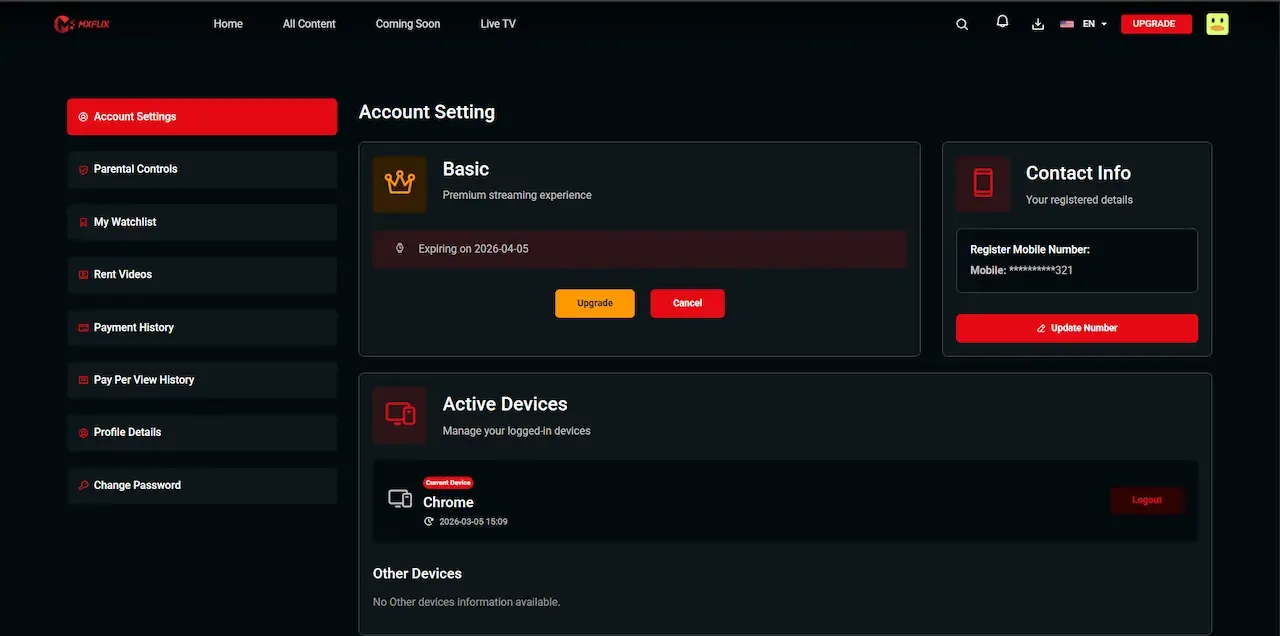
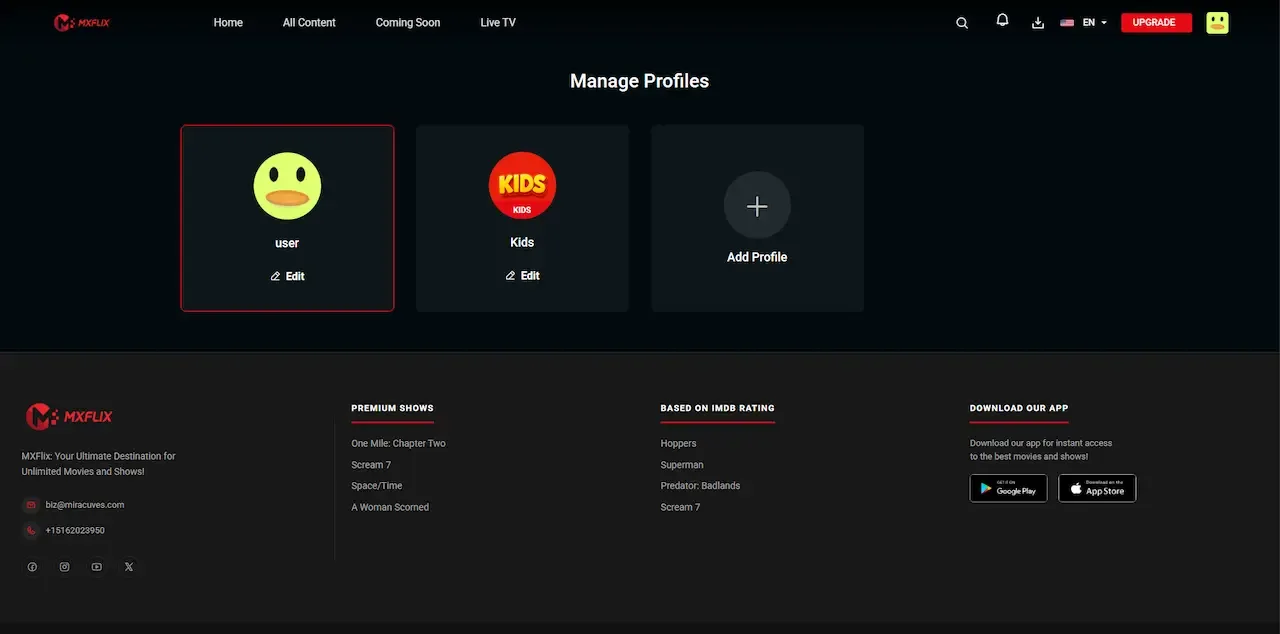
  • Dark web account settings with plan details, contact info and active device list
    Web app
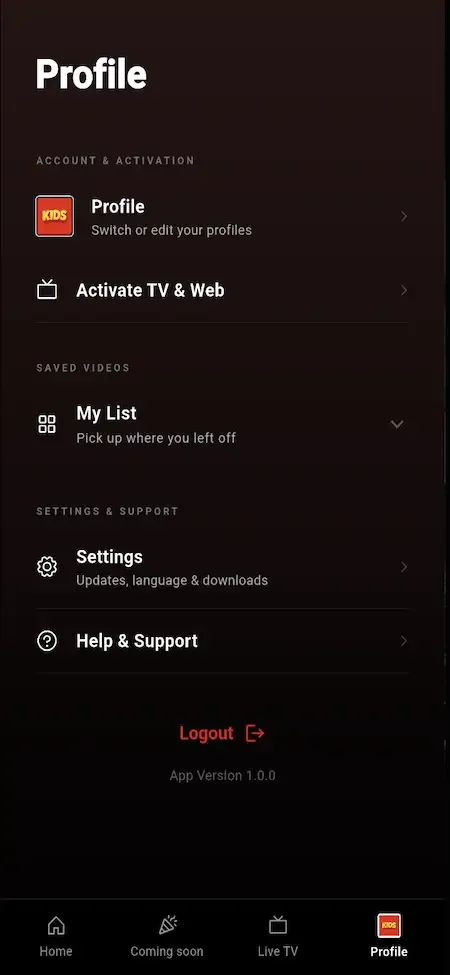
  • Phone profile menu with profile switch, activate TV and web, my list, settings and logout
    User app
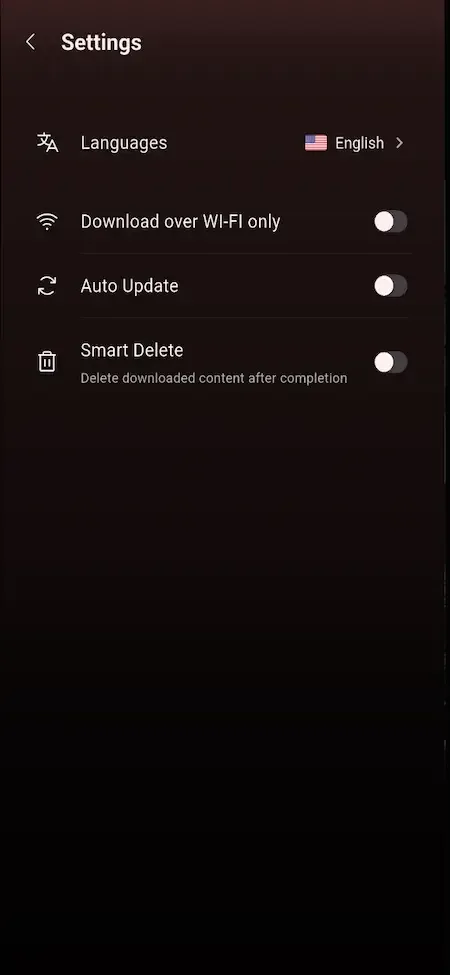
  • Phone settings list with language, Wi-Fi only downloads, auto update and smart delete toggles
    User app
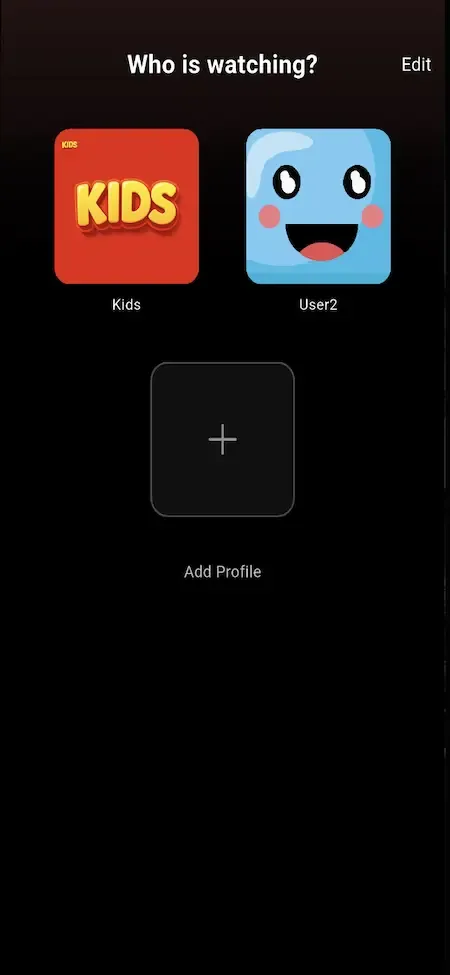
  • Phone profile picker with a kids tile, a smiley avatar and an add profile button
    User app
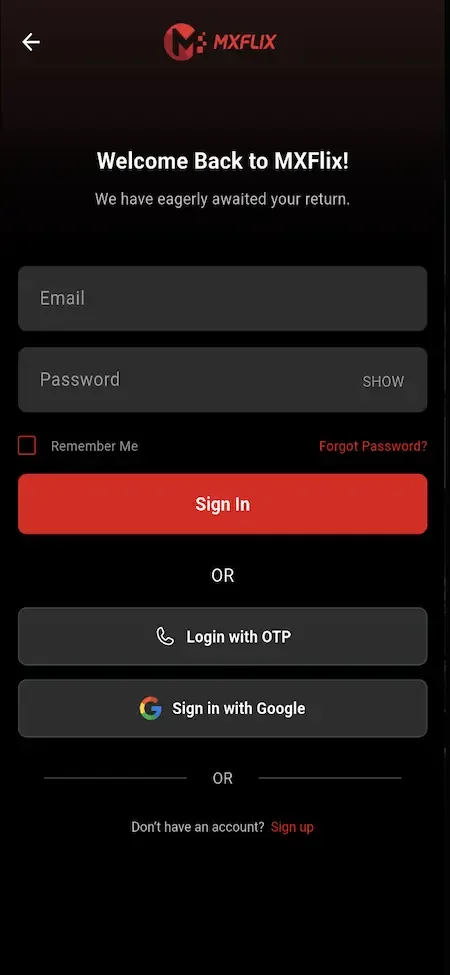
  • Phone sign-in screen with email and password fields and OTP and Google login options
    User app

Netflix clone capabilities that change the business

Most of the screens in a streaming app look alike. The following capabilities are the ones that decide what kind of company you can build on top of the codebase.

  • A separate producer panel

    Partners get their own login, their own catalog view and their own earnings screen, fully apart from operator tools. That separation is what lets a small team onboard many content owners without handing any of them the keys, and it is rare among off-the-shelf video scripts that stop at a single admin.

  • Payout from minutes watched

    Because minutes are logged per title, producer earnings can follow actual viewing instead of a flat guess. You agree the rule with partners once, and the platform produces numbers both sides can inspect. It turns a fixed licensing cost into one that moves with audience demand. If a film is opened often but abandoned early, its minutes stay low and so does its payout, which is exactly the signal an editor needs before commissioning more like it.

  • Three unlock paths on one title

    A single film can be included in a plan, rented for a window, or sold as a premium event. Access is configured per title, so you can test which route earns more without rebuilding anything. It captures the viewer who wants one film and would never subscribe. A recent release can start as a paid rental and move into the plan once its first rush has passed, which keeps the plan attractive without giving the premiere away.

  • Profiles with their own history

    Each profile on an account keeps its own watch history, watchlist and resume points, and kids profiles are protected by a PIN with maturity filtering. The commercial effect is retention: a household that keeps its own continuity is less likely to drift away from the app. A parent who sets up a kids profile once also stops worrying about what appears after bedtime, which is often why a family keeps paying.

  • Live TV beside on-demand

    Channels with categories, stream links or embeds sit in the same app as the film library, and each can be free or tied to a plan. You can sell a match or a concert as an event, then keep the replay in the catalog afterwards. A channel tied to a plan also gives subscribers a reason to open the app on days when no new film has arrived. You supply each stream source and are responsible for holding the rights to it.

  • Partner catalogs through an API

    A content acquisition workflow can pull titles from partner and aggregator catalogs using provider keys, so the shelves are not empty on opening day. Scope depends on your access and your rights, which we confirm with you before any work begins. A service with only a handful of titles looks abandoned, and viewers rarely return to an app that felt empty on the first visit, so partner titles can fill genre shelves while your own producers are still being onboarded.

  • Version and region control

    From the admin console you can announce app updates, make one mandatory, switch modules on or off per platform and set where content and builds are available. It means a market launch or a forced upgrade is a setting rather than an emergency release. A payment fix can be pushed as a required update so nobody keeps using a stale build, and a regional launch can start with a module visible only where you hold the rights.

  • Role-based staff access

    Separate roles for viewer, producer, admin and super admin keep each person inside their own lane. A finance clerk can review payouts without being able to publish a title, which matters the moment your team grows beyond the founders. Rights, finance and editorial usually belong to different people, and a login limited to one module means a mistaken click in one area cannot damage another.

How the service you know compares with this build

Netflix is known for one plan that opens a whole library across profiles and devices. This build keeps that viewing shape and adds sales and supply tools a small operator needs. The comparison covers the viewing model only, and the product is independent of the brand.

How the service you know compares with this build
AspectNetflixNetflix CloneBuilding from scratch
How access is sold A plan opens the library for each householdPlans, rentals, pay-per-view, coupons and bundles on one catalogEach sales model is a separate project to design and test
Where titles come from Licensed and commissioned by the company itselfYour library, partner catalogs and approved producer uploadsWhatever pipeline your team decides to build first
Partner payouts Handled through private commercial deals negotiated one rights holder at a timeMinute logs and payout requests inside a producer panelUsually postponed until partners start asking for it
Household profiles Several profiles per account, with kids options and per-profile historyProfiles with separate history, kids mode and a PINOften added late, after accounts are already shared
Live programming Mostly on-demand viewing, with live content treated as a special caseLive channels and event sales sit in the same app as the film libraryA separate live streaming stack, each with its own delivery planning
Catalog decisions Made inside the company by its own content and product teamsYou approve, price and merchandise every title yourself from the admin consoleEntirely yours, but you must write the tooling
Code and audience data Closed and held by the company, with no copy available to outside operatorsSource code, database and audience stay with youYours, once the long build is finished
Time to first stream Not applicable to an outside operator, who cannot buy or rent the originalDeployed in six working days, content permittingSeveral quarters of engineering before real viewers can press play

The technology under the Netflix clone

The stack is conventional on purpose. Any competent web or mobile team can read, extend and hire for it, and nothing about it ties the platform to a single hosting vendor. The table lists what the product page names for each layer.

The technology under the Netflix clone
Mobile appsFlutter builds for Android and iOS, so both viewer apps share one codebase and one set of screens.
Web platformPHP Laravel runs the viewer web app, which can behave as a progressive web app, plus the admin and producer panels.
Backend APIA Laravel API serves mobile, web and television-connected clients, with token-based sessions and HTTPS-ready deployment.
DatabaseMySQL or MariaDB holds accounts, profiles, titles, plans, rentals, watch history and payout records.
Playback formatsHLS, MP4 files and external stream links are supported, with 360 VR-ready playback for content that suits it.
Cloud hostingAWS, GCP or DigitalOcean can host the application, chosen with you during the launch week.
Storage and deliveryAWS S3, Bunny CDN or Cloudflare can hold and deliver video files and static assets.
API protectionRate limiting on sensitive routes and protected admin routes guard the interfaces the apps depend on.

What stays with you and what we set up around it

A ready-made platform removes a great deal of engineering, but a streaming business has parts that software cannot supply. These are the items you should plan for separately.

  • Any content at all

    The platform ships empty. Licensing films, signing producers or uploading your own library is the real work of the business, and the rights to stream each title in each territory are your responsibility.

  • DRM vendor integration

    Playback is built to be DRM-ready, and we connect the vendor and license URLs, scoped per deployment. If studios will license to you, raise the requirement before launch because it changes the plan.

  • Smart TV apps

    The package covers Android, iOS and web, with an API ready for television clients. We build native apps for each television store, scoped by platform and subject to each store process.

  • Video delivery bills

    Storage and CDN delivery run on your own cloud accounts and grow with minutes watched. They are an ongoing cost paid to the provider, not something the one-time price covers.

  • Payment and store approvals

    Merchant accounts, gateway approval and app store developer accounts are opened in your name. We help with setup and submission, but approval decisions belong to the providers.

  • Editorial and moderation staff

    Someone must review producer submissions, classify titles by maturity and answer viewer complaints. The workflow supports that person; it does not replace them. Decide before launch who owns the approval queue and who answers the inbox, because a producer network without a reviewer simply stalls.

  • Legal work

    Contracts with producers, consent notices, age rules and takedown handling depend on your markets. The operator is responsible for compliance, and we do not give legal advice.

Try the live Netflix Clone demo

The demo is a working copy of the streaming platform carrying demo branding and sample titles, so nothing in it is your final look. Open the viewer web app, then sign in to the producer panel and the admin console to follow one title from submission to playback. The sample logins below are public demo accounts.

  • Viewer web app

    Open the Viewer web app demo
    Login
    user@demo.com
    Password
    User_321

    Worth trying

    • Open a title page and read how access is labeled
    • Switch to a kids profile and look at what disappears
    • Start a video, leave, and return through Continue Watching
    • Walk through a plan purchase and open the invoice
  • Viewer Android app

    Open the Viewer Android app demo
    Login
    user@demo.com
    Password
    User_321

    Worth trying

    • Install the APK and browse the home screen shelves
    • Add a title to the watchlist from a detail page
    • Check the download option on a series episode
    • Compare the subtitle and quality choices in the player
  • Producer panel

    Open the Producer panel demo
    Login
    producer@demo.com
    Password
    Producer_321

    Worth trying

    • Open a content proposal and see which documents it carries
    • Read the views and watch minutes for a single title
    • Look at the revenue share figures and the payout request screen
  • Admin console

    Open the Admin console demo
    Login
    admin@demo.com
    Password
    Admin_$321

    Worth trying

    • Find the producer approval queue and review a submission
    • Open the plan and rental settings for a title
    • Create a coupon and see which plans it can attach to
    • Scan the reports and the app control screens

Netflix Clone feature FAQs

Can viewers on one account keep separate Continue Watching lists?

Yes. Resume points and history belong to the profile rather than to the account, so each person in a household returns to where they stopped. The watchlist also follows the profile, and a kids profile stays behind its PIN with maturity filtering applied.

Do subtitles and alternate audio come built in?

The player supports subtitles, alternate audio tracks and quality selection. What a given title offers depends on the files you upload for it, because each subtitle or audio track has to exist before a viewer can choose it. The platform does not generate them for you.

Can producers see how their own films perform?

Each producer sees views and watch minutes for their own titles only, along with the revenue share calculated from those minutes. They cannot see other partners or operator functions. The figures update from the same logs the admin console reads, so there is one version of the numbers.

What stops a producer from publishing anything they like?

Nothing goes live without operator approval. Submissions wait in a queue with their documents, and your editor approves or rejects each one. Rejected items stay visible to the producer with that status, so you can decline content without an argument about whether it arrived.

Is the live TV module a separate app?

No. Live channels appear inside the same viewer apps as on-demand titles, grouped by category, and each can be free or limited to a plan. Events can also be sold separately as pay-per-view. Delivery capacity during a busy broadcast depends on your CDN and hosting plan.

Can I switch features off for a smaller launch?

Yes. Modules can be enabled or disabled from the admin console, and feature flags work per platform. Many operators start with plans and a small catalog, then open rentals, live channels or producer submissions once the team is ready to run them well.

How do app updates reach viewers?

The console lets you announce a new version per platform and mark it optional or mandatory. Viewers see the prompt inside the app. You still publish the build through the store accounts you own, and we help prepare those submissions.

→Start here

Tell us what you want to launch.

Share the platform and your market. You get a walkthrough of the live demo, the exact scope of what ships, and a fixed price in writing. First response in under 2 hours, Monday to Saturday, 10:00 to 19:00 IST.

We reply to every inquiry. No newsletters, no shared data. See our privacy policy.

Trademark and independence notice

This page uses the name Netflix to describe a type of platform. The product sold here is separate software, built independently, and Netflix has no part in it.

Why this name

"Netflix clone" is industry shorthand that founders use when searching for software with a comparable business model. It names a category of product, not a copy of Netflix.

Who built this

The platform is an original product designed and written by Miracuves. It contains no code, design, graphics or content originating from the Netflix website or applications, and it ships under your own brand.

Trademarks

Netflix and its logos are trademarks of their respective owner and are named here for reference only. GetFame is not affiliated with, sponsored by or endorsed by Netflix. Rights holders can write to legal@miracuves.com.

Operator responsibility. The operator of a launched platform is responsible for legal compliance in the markets it serves. Nothing on this page is legal advice.Read the full disclaimer