Cameo Clone Features for a Personalized Video Marketplace

A shoutout marketplace is a chain of small promises: the fan describes what they want, the talent agrees to deliver, and the operator stands behind both. This page follows one order along that chain, explains the features that keep each link reliable, compares the product with the service it is named after, and states what we set up around the ready-made build.

3
interaction types sold
2
mobile apps shipped
6 days
to go live
On this page10 sections
  1. All 48 Cameo Clone features, by role
  2. One shoutout order, from brief to review
  3. The Cameo Clone, on screen
  4. The Cameo clone features that carry the marketplace
  5. Cameo, this clone and a custom build compared
  6. What the Cameo clone is built with
  7. What we set up around the Cameo clone package
  8. Try the live Cameo Clone demo
  9. Cameo Clone feature FAQs
  10. Explore the Cameo Clone

All 48 Cameo Clone features, by role

The complete list, grouped by the person who uses each feature. Nothing is hidden behind a plan tier: this is what ships in the platform.

Fans

15 features
Occasion-led requests
A fan frames the order around an event such as a birthday, an anniversary, a pep talk or a roast.
Talent directory
A list of available celebrities and profiles lets the fan compare people before choosing one.
Request brief form
Instructions and details are typed into the order so the message matches what the fan wants said.
Video shoutouts
The classic product: a short personalized video recorded by the chosen talent for a named person.
Audio messages
Fans can ask for a custom audio message as a lighter and often cheaper alternative to video.
Virtual meetings
Fans can schedule a one-on-one meeting with talent, for people who want conversation rather than a clip.
Business endorsements
Companies can request an endorsement or promotion from a celebrity for a product or service.
Calendar scheduling
Booking uses calendar integration so shoutout deliveries and meetings land on a date.
Live order status
The fan watches the request move toward completion instead of waiting without information.
Delivery notification
An alert tells the fan when the video is ready to open.
Download and share
The finished video can be saved or posted to social channels, which brings new visitors back to your platform.
Ratings and reviews
Fans score each interaction and leave feedback, which builds visible trust in each talent profile.
Favorites and wishlist
Fans keep a list of celebrities they like and interactions they hope to order later.
Received-video showcase
A dedicated space where users show off the videos they received, adding a community feel to the marketplace.
Refund eligibility
When a request is not delivered in the agreed timeframe, the fan may qualify for a refund under your rules.
Talent

11 features
Application profile
A prospective talent submits name, bio, category such as actor, athlete or influencer, and pricing.
Verification document
An identity document is attached to the application so an admin can confirm who the person is.
Approval before orders
Talent start accepting requests only after the profile is approved.
Self-set prices
Each talent decides what a message costs, which lets prices follow demand and personal time.
Request alerts
New orders reach talent by email and in-app notification so nothing waits unseen.
Order details view
The fan instructions arrive with the order, giving the talent what they need to prepare.
In-app recording
The camera is built into the app, so a talent can record and submit without leaving it.
Fan messaging
Direct chat lets talent ask a short question when a brief is unclear.
Earnings wallet
Money from fulfilled orders accumulates in a wallet the talent can see.
Tips received
Extra tips sent after delivery add to earnings beyond the listed price.
Delivery window
Talent work to a set timeframe, for example 24-72 hours, which defines what fans can expect.

Admins

14 features
Commission per order
The operator defines a commission percentage that applies to each video request or transaction.
Talent onboarding queue
New applicants appear for review, with their category, price and verification document in view.
User account management
Admins manage fan accounts to keep sign-up and engagement running smoothly.
Content approval
Talent-made content can be reviewed and approved to hold the platform to a quality standard.
Refund decisions
Admins review refund requests and issue refunds when a request has not been fulfilled.
Dispute handling
Complaints between fans and talent are reviewed in one place, together with policy violations.
Featured talent slots
Top-selling talent can be highlighted on the homepage to steer fans toward proven performers.
Promotion tools
Marketing campaigns, discount offers and referral programs help attract and keep users.
Payment oversight
Transactions are monitored so payouts to talent and billing to fans stay accurate and on time.
Revenue reports
Real-time reports show revenue, so the operator sees the money without exporting data first.
Engagement analytics
User behavior data shows how fans move through browsing, ordering and sharing.
Top-performer ranking
Reports identify the best-performing talent, useful for homepage placement and negotiating.
Policy and pricing settings
Appearance, pricing structure and policies are tailored to match market conditions and user needs.
Multi-currency and language
The platform supports several currencies and languages for audiences in different countries.

Mobile apps

8 features
Push notifications
Alerts about new celebrity arrivals, bookings and promotions keep users returning to the app.
Geo-location recommendations
Location data supports tailored suggestions and a more personal experience.
Camera capture
Requests and recordings are made straight from the phone camera.
In-app chat
Fans and talent talk inside the app, so order questions never move to outside channels.
Digital wallet payments
Mobile payment methods give a quick checkout on the phone.
Booking history
Users track past bookings and engagement from their profile.
AI-driven matching
Algorithms suggest celebrities that fit a user preferences and interests.
Separate talent app
Celebrities use their own app instead of a cut-down version of the fan app.

One shoutout order, from brief to review

Every order in this product follows the same path, which makes it easy to explain to talent and to test before launch. The steps below show what each person does and where your admin tools stand ready to help if something goes wrong.

  1. A fan finds a name worth paying for

    The fan browses talent profiles, saves favorites and keeps a wishlist of interactions they want. Featured talent can be pushed to the homepage by your team, and location-based recommendations in the apps can surface names that suit the fan. The aim is to turn browsing into a specific choice quickly.

  2. The interaction type is selected

    On a talent's page the fan chooses between a video shoutout, a virtual meeting or an endorsement. Each is priced by the talent, so the choice also sets the cost. Offering three clearly different products from the same profile gives you more ways to earn from one set of names.

  3. The brief is written and scheduled

    The fan types personalized instructions describing the occasion, the recipient and the tone. Where timing matters, such as a birthday, calendar integration lets them schedule the delivery or book the meeting slot. A good brief form is what separates a delighted recipient from a disappointing clip.

  4. Payment is taken up front

    The fan pays through a gateway such as Stripe, Razorpay or PayPal, or with a mobile wallet in the app. Because payment is collected before the work starts, talent can trust that a request is real, and you can apply your commission to a confirmed amount.

  5. Talent receives and records

    The request reaches the talent by email and in-app alert. They can message the fan to clarify, then record the video using the camera in the app and submit it. The fan can watch the status change, so waiting never feels like silence. If the brief is unclear, a quick question before recording saves a re-shoot and a disappointed buyer.

  6. The fan receives, rates and shares

    When the video is ready the fan is notified, can download or share it on social media and rates the interaction. A tip can be added after delivery. Ratings feed back into how talent appear to future buyers, which rewards reliable names. A fan who shares the clip also advertises your marketplace to people who have never visited it, at no cost to you.

  7. The operator settles and resolves

    Meanwhile your admin panel records the commission and the talent payout, and holds any refund request or dispute for review. Content can be approved before it reaches fans. If an order goes wrong, one screen shows what happened and lets you decide fairly. Having the order, the clip and the money trail in one place keeps a dispute from turning into a long exchange of emails.

The Cameo Clone, on screen

Real screens from the working product. Your platform ships rebranded with your name, logo and colors.

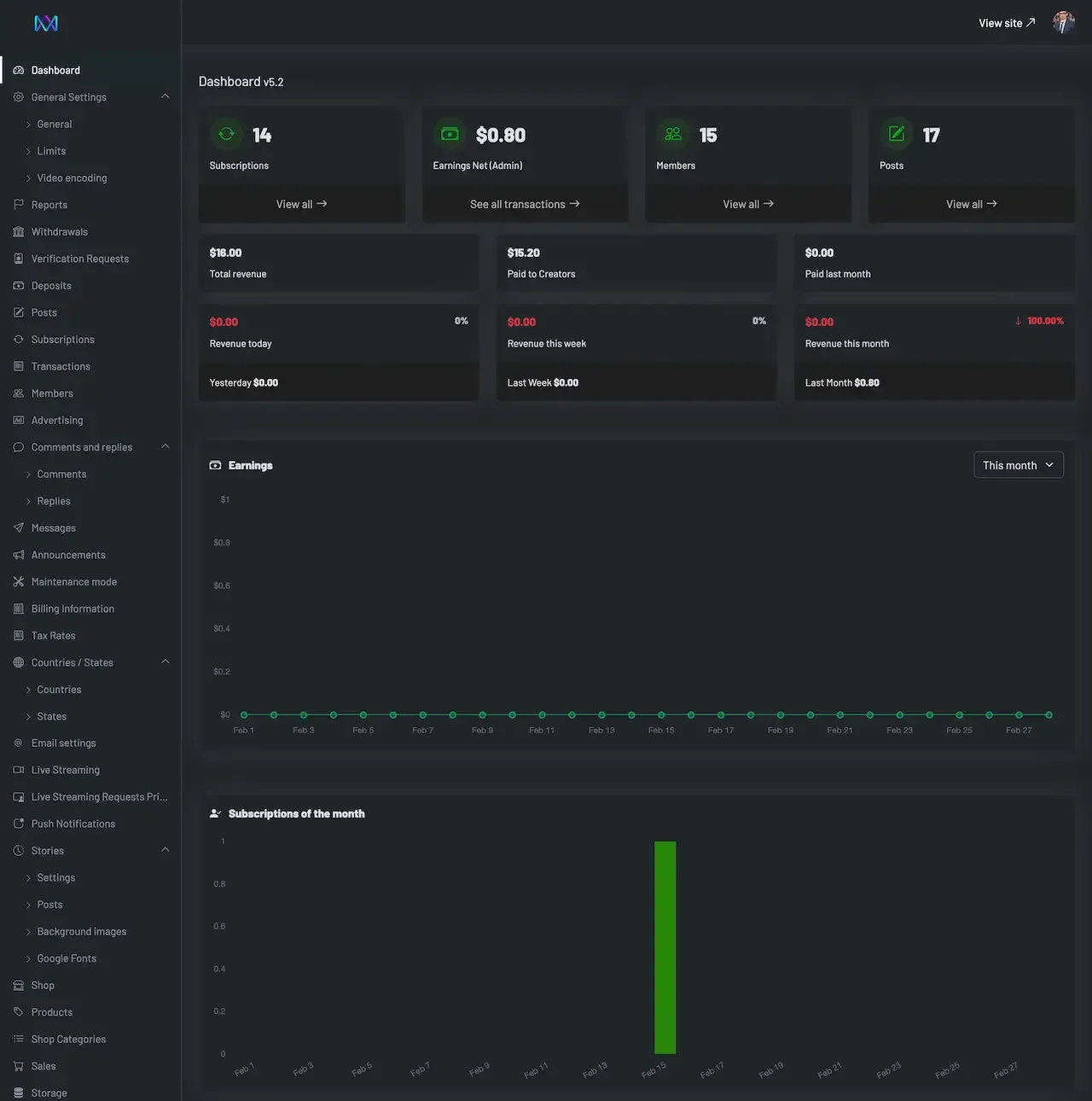
  • Dark admin dashboard with summary cards, an earnings chart and a subscriptions chart
    Admin panel
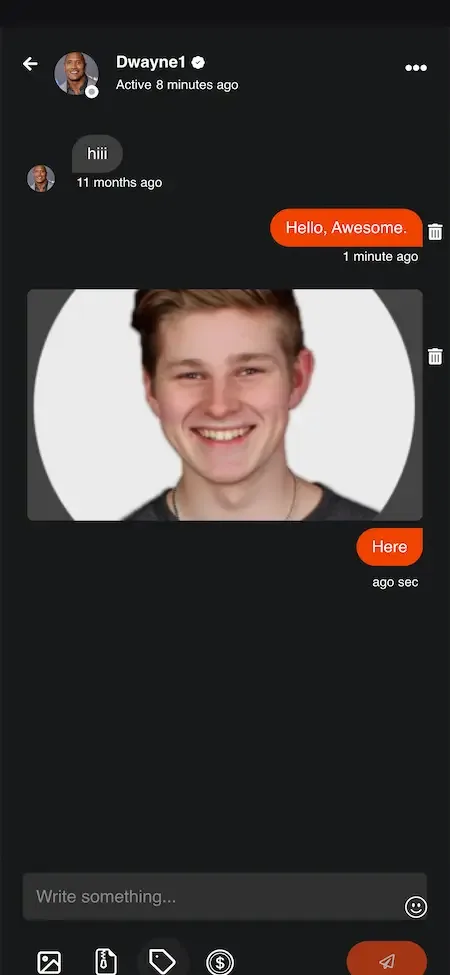
  • Phone chat conversation with sent messages, a photo attachment and a reply field below
    Fan app
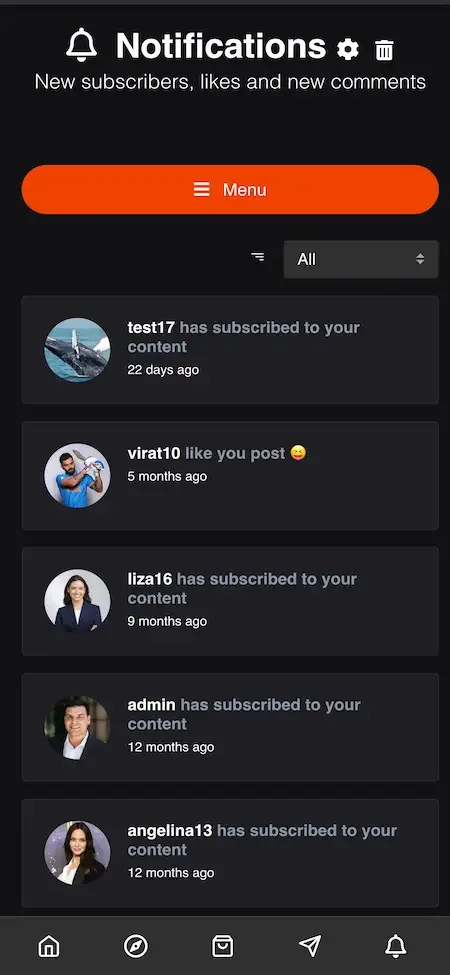
  • Phone notifications list showing new subscribers, likes and comments with small profile photos
    Fan app
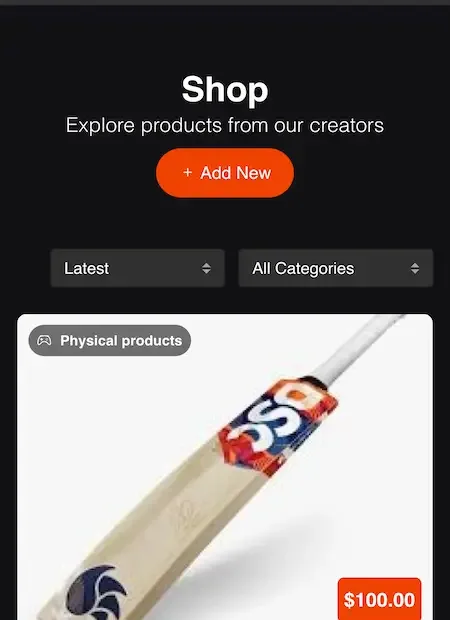
  • Phone shop screen with category filters and a cricket bat product priced at one hundred dollars
    Creator studio
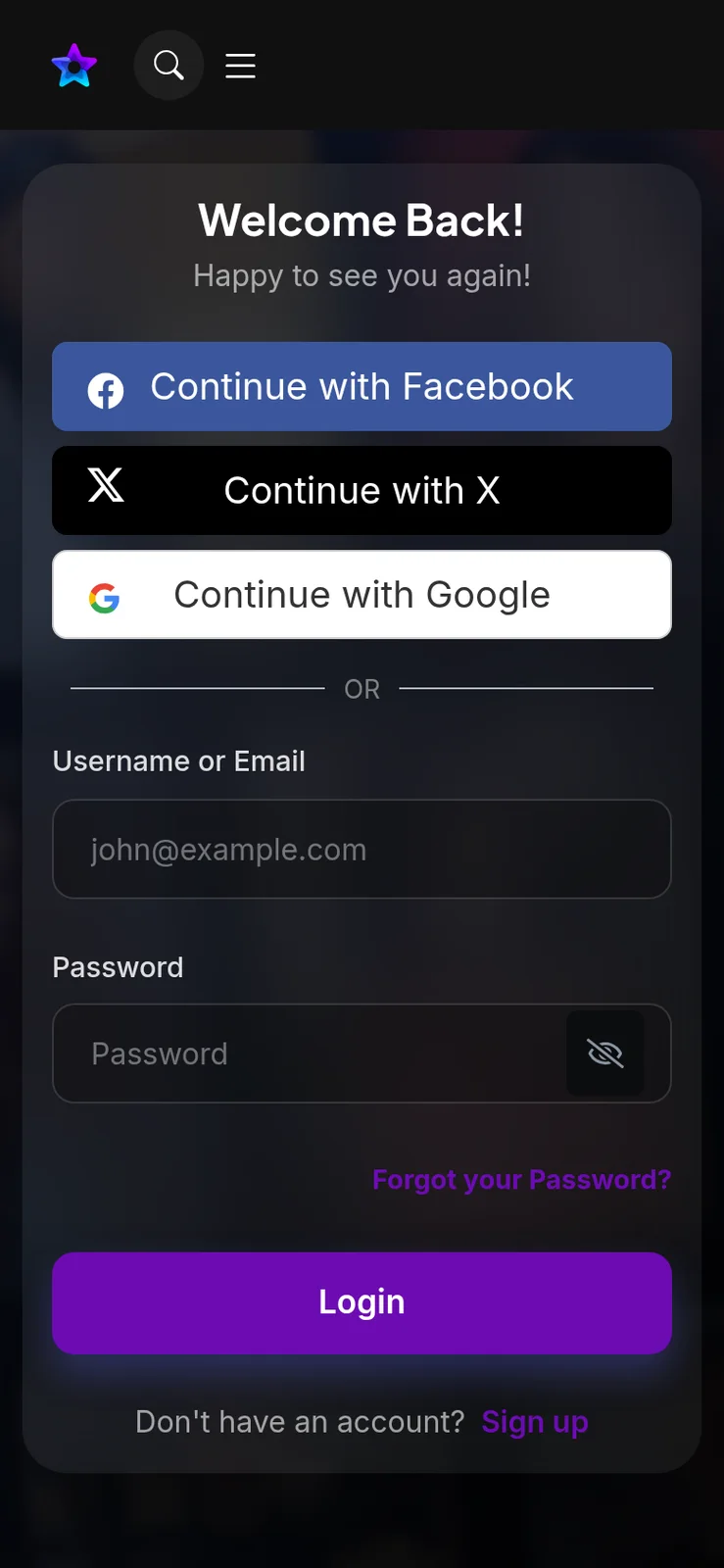
  • Login screen with Facebook, X and Google buttons above username and password fields
    Web app

The Cameo clone features that carry the marketplace

Any app can host a video. These are the capabilities that turn a video app into a marketplace people can trust with money, with the commercial reason each one matters to you as operator.

  • Three kinds of interaction

    Video shoutouts, virtual meetings and business endorsements are sold from the same profile. A fan who wants a message, a conversation or a promotion can find it in one place, and your revenue is not tied to a single product that might go out of fashion. A talent who is booked solid for shoutouts can still offer meetings at a higher price.

  • Talent-set pricing

    Each talent sets the price for each type of message, so a famous name and a rising one can both earn what their audience will bear. Operators can also differ pricing by talent level. It keeps the marketplace flexible without any manual price list on your side. When a talent's demand grows, they can raise their own price, and your commission rises with it.

  • Verification before the first order

    Talent apply with a name, bio, category, pricing and a verification document, and they accept requests only once approved. Because a buyer is paying for a specific person, this gate protects the whole marketplace from impersonation and keeps trust high. One fake profile that takes payments and never delivers can damage the reputation of every genuine name on the platform.

  • Commission control per request

    You set the commission percentage on each video request or transaction from the admin panel. That makes the marketplace's core earning model a setting, not a code change, so you can adjust it as you recruit talent or run promotions. A lower share for a launch period can attract your first names, and you can raise it later once they see steady orders.

  • Refunds and disputes in one place

    Admins review refund requests, disputes and policy violations and issue refunds from the dashboard. Clear handling here is what gives fans the confidence to pay up front, and it keeps small problems from becoming public complaints. A late order with a prompt, fair refund usually ends the matter, whereas silence turns a small loss into a bad review.

  • Content approval before delivery

    Talent-generated content can be reviewed and approved before it reaches fans. Not every clip needs a check, but new talent and endorsements deserve one. It is a quality and reputation safeguard that you control, with rules written by you. Trusted names can deliver freely while newcomers are checked, so approval effort goes where the risk is highest.

  • Order tracking and alerts

    Fans follow the status of each request and receive a notification when the video is ready, while talent get request alerts. Visibility on both sides reduces support enquiries, since nobody has to ask where an order stands. Talent who see new requests promptly also respond faster, which shortens delivery and lifts the ratings fans leave.

  • Featured talent and promotions

    Admins can highlight top-selling names on the homepage and run campaigns, discount offers and referral programs. These tools let you steer attention toward the talent and offers that earn the most, without touching the code. Featuring a name who is about to release something, or who fits a seasonal occasion, puts the right profile in front of buyers at the right moment.

Cameo, this clone and a custom build compared

The service is widely known for personalized video messages from public figures, and its software is not for sale. This table shows how the same idea looks when you operate it, and what building a similar product from nothing would involve.

Cameo, this clone and a custom build compared
AspectCameoCameo CloneBuilding from scratch
Whose marketplace The brand runs it with its own rosterYours, with your own name, talent roster and domainYours, after a long design and build phase
Choosing talent Talent accepted under the brand's own criteriaApplications reviewed by your team before approvalA vetting workflow your team must design
Commission terms Set by the brand for everyone on itA percentage you set in the admin panelDesigned, built and checked by your engineers
Market focus Broad and international in its reach, serving every kind of buyerAny niche or region, with multi-language and multi-currency supportWhatever niche you choose to build, with every feature written by your team
Customer relationship Fans belong to the brand and its own platformFans sign up under your brand and your dataFans belong to you, once the product exists
Mobile apps One shared app used by every talent and fanYour own fan and talent apps for both storesSeparate app projects for each platform, each needing its own team
Source code Not available to outside buyers, since the platform is never soldComplete and unencrypted code delivered to youYours in the end, but only once it has been written
Time to launch Not applicable to an outside buyer, who cannot launch itSix working days to a branded marketplaceMany months of building before the first order can be taken

What the Cameo clone is built with

The marketplace has a web side, an admin side and mobile apps, and the product description names the technology behind each. These are listed exactly as stated, with no extra components added to make the stack look longer.

What the Cameo clone is built with
Web panelsPHP with the Bootstrap framework and NodeJS serve the fan panel and the talent panel.
Admin panelThe same PHP, Bootstrap and NodeJS stack runs the operator console for talent, orders and money.
DatabasesBoth MySQL and MongoDB appear in the stack, holding accounts, orders and other platform records.
Android appsJava and Kotlin full-component apps built with the latest dependencies, for fans and for talent.
iOS appsFlutter full-component apps built with the latest dependencies, for fans and for talent.
Messages and alertsTwilio and Firebase are listed as third-party APIs for messages and push notifications.
Maps and translationGoogle Maps powers location features, and a translation service supports the multiple languages offered.
PaymentsStripe, Razorpay and PayPal are named among supported gateways, with others available.

What we set up around the Cameo clone package

The ready-made build covers the core shoutout, meeting and endorsement flows. Several things are set up around it for your build, and it is better to read them now than to meet them in the middle of a launch.

  • Auctions and challenges

    Celebrity auctions and fan engagement challenges are optional enhancements. We set them up if you want them, with rules written to match your marketplace and scope confirmed with us.

  • Augmented reality extras

    Augmented reality enhancements and fully customizable page templates are further work we set up for you. The ready-made product ships with the standard interfaces, rebranded with your logo, icons and color scheme.

  • Bespoke fulfilment rules

    Delivery windows and refund conditions are configurable. Rules that go further, such as different deadlines by talent tier or automatic penalties, are custom fulfilment work we set up after you describe them.

  • Gateway and developer accounts

    Payments run through gateways you connect and apps publish on your developer accounts. Merchant approval, store review and the fees charged by those parties stay with you.

  • Talent rights and legal terms

    Who owns a recorded video, what a talent may endorse and how advertising must be labeled are your decisions. We provide tooling, not legal advice, so take advice in the markets where you operate.

  • Talent supply

    We do not provide celebrities or creators. Recruiting names that fans want to pay for is the central task of your business, and it usually costs more time than the platform does.

Try the live Cameo Clone demo

The demo is a live deployment of the shoutout marketplace with demo branding in place of yours. Sign in as a fan to place an order, then as talent to see how that order arrives in a queue, and finally open the admin address to see where commission and disputes are handled. The sample accounts below are public and open to anyone.

  • Fan app

    Open the Fan app demo
    Login
    user@demo.com
    Password
    User_321

    Worth trying

    • Browse talent profiles and open the options for one name
    • Start a request and see what the brief form asks for
    • Look at order tracking and where a finished video appears
  • Talent app

    Open the Talent app demo
    Login
    celeb@demo.com
    Password
    Celeb_321

    Worth trying

    • See how an incoming request is presented to the talent
    • Check where prices for each type of message are set
    • Find the recording screen and the wallet balance
  • Fan and talent web panels

    Open the Fan and talent web panels demo

    Worth trying

    • Sign in with either demo account and compare web with app
    • Follow a booking from talent page to payment
    • See what the talent panel shows for earnings and requests
  • Admin panel

    Open the Admin panel demo

    Worth trying

    • Look for commission settings and talent application review
    • Find refund requests, disputes and content approval
    • Open featured talent, promotions and the reports section

Cameo Clone feature FAQs

Can fans save talent they like for later?

Yes. Fans can add talent to favorites and keep a wishlist of interactions they would like to buy. That helps with gifts and special dates, because a fan can come back and order without searching again. Your promotions and notifications can then remind them when an occasion is approaching.

Can talent talk to fans before recording?

Yes. Direct messaging between fans and talent is included so a request can be clarified before the video is made. It reduces mistakes, such as a misspelled name or a wrong occasion, and it saves refund requests that would otherwise result from a misunderstood brief.

What do fans see once a video is delivered?

They receive a notification, can watch, download or share the video on social media, rate the interaction and send an extra tip. Every step appears in the booking history in the app, so a fan can come back to a delivered video whenever they like.

Can I highlight certain talent on the homepage?

Yes. Admins can feature top-selling talent on the homepage and run special promotions, discount offers and referral programs. It gives you a lever to push attention toward the names that earn most, or toward newcomers you want to help establish.

Does the platform track what the marketplace earns?

The admin panel includes reports on revenue, engagement and top-performing talent, along with views of transactions, talent payouts and billing. These help you see which names and offers drive income, and they give finance a record to reconcile against your gateways.

Do talent need a smartphone to record?

Talent can record and submit video from the app using the camera integration, and the web panel is available for managing requests. A phone is the easiest way to record, but what they upload and how you review it is something your policy can define.

→Start here

Tell us what you want to launch.

Share the platform and your market. You get a walkthrough of the live demo, the exact scope of what ships, and a fixed price in writing. First response in under 2 hours, Monday to Saturday, 10:00 to 19:00 IST.

We reply to every inquiry. No newsletters, no shared data. See our privacy policy.

Trademark and independence notice

This page uses the name Cameo to describe a type of platform. The product sold here is separate software, built independently, and Cameo has no part in it.

Why this name

"Cameo clone" is industry shorthand that founders use when searching for software with a comparable business model. It names a category of product, not a copy of Cameo.

Who built this

The platform is an original product designed and written by Miracuves. It contains no code, design, graphics or content originating from the Cameo website or applications, and it ships under your own brand.

Trademarks

Cameo and its logos are trademarks of their respective owner and are named here for reference only. GetFame is not affiliated with, sponsored by or endorsed by Cameo. Rights holders can write to legal@miracuves.com.

Operator responsibility. The operator of a launched platform is responsible for legal compliance in the markets it serves. Nothing on this page is legal advice.Read the full disclaimer