Threads Clone Features: A Text-First Network With Governance Built In

Text-first publishing looks simple from the outside and runs on a tightly sequenced pipeline underneath: identity, publishing, distribution, private conversation, earning and governance. This page walks through how each stage of that pipeline behaves in the Threads clone, who touches it and which design decisions keep a young network usable while it grows.

4
Distinct feed variants
16
API route families
6 days
To a branded launch
On this page10 sections
  1. All 53 Threads Clone features, by role
  2. From Sign-Up to a Governed, Earning Network
  3. The Threads Clone, on screen
  4. Threads Clone Features That Matter Commercially
  5. Threads Clone Versus the Original and a Ground-Up Build
  6. The Stack Behind the Threads Clone
  7. What We Set Up Around the Threads Clone Platform
  8. Try the live Threads Clone demo
  9. Threads Clone feature FAQs
  10. Explore the Threads Clone

All 53 Threads Clone features, by role

The complete list, grouped by the person who uses each feature. Nothing is hidden behind a plan tier: this is what ships in the platform.

Members

20 features
Registration and recovery
Register, log in and recover a password with a controlled reset token lifecycle.
Optional TOTP second factor
Members who want stronger security set up, verify and disable an authenticator code themselves.
Public or private accounts
An account can be open or approval-based, which changes how followers and replies behave.
Visibility toggles
Privacy settings apply per surface, so a member can show a profile but hide other areas.
Account deletion pathway
A real route lets members remove their account and the data attached to it.
Follow graph
Follow and unfollow, with follower and following views and suggestions for who to follow next.
Block and restrict
Blocks and restrictions are enforced in queries, so hiding is not only a matter of interface.
Threaded posts with media
Posts can be created, edited and deleted with images or video attached and alt text added.
Polls
A poll collects votes inside the thread, so a question gets answered where it was asked.
Hashtags and mentions
Tags and mentions link posts to topics and people, and they feed discovery.
Nested replies
Replies form parent and child chains, so a long conversation stays readable.
Reposts and quotes
Members amplify a post by reposting it or add their own comment by quoting it.
Likes and saves
Likes count appreciation and saves keep a post for later retrieval.
Drafts
A half-written post can be saved and resumed, which suits longer threads.
For You feed
A personalized ranking mixes accounts a member follows with others worth discovering.
Following feed
A chronological timeline of followed accounts for people who prefer order.
Ghost and Public feeds
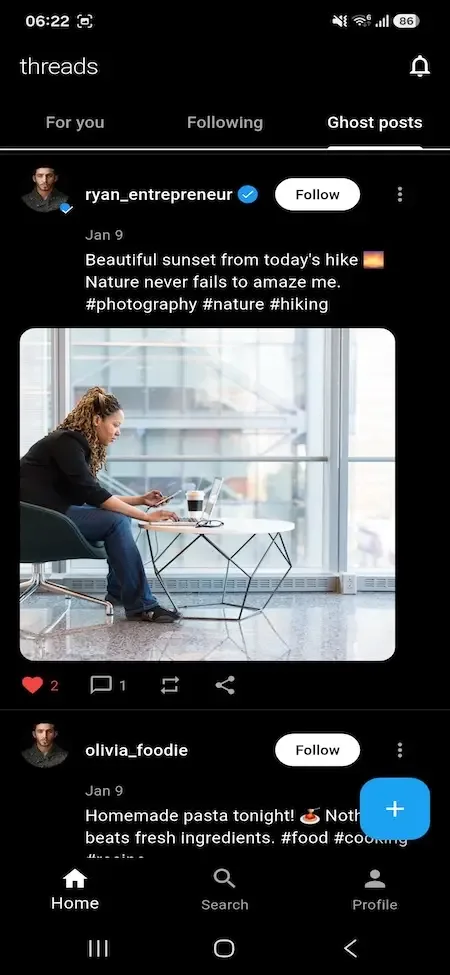
A ghost variant and a public feed serve discovery and logged-out browsing from one content graph.
Search and saved searches
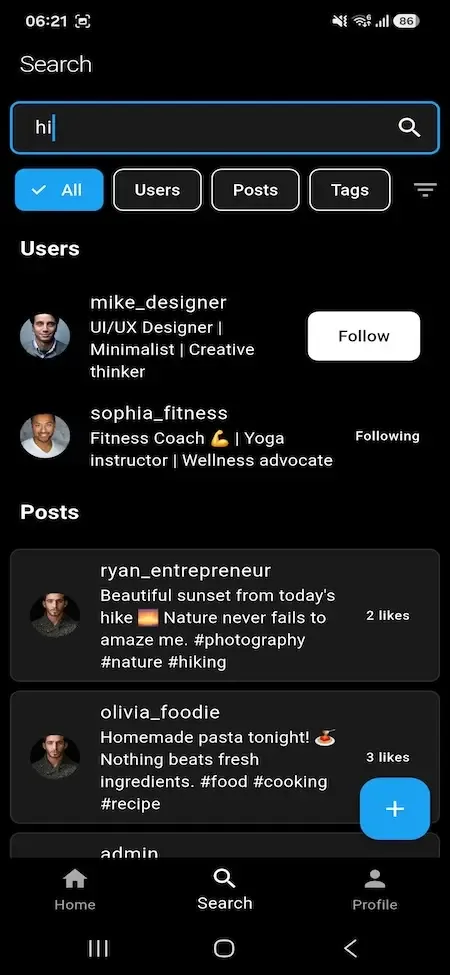
Search covers people and content, keeps history and lets members save queries.
Hashtag follow and trending
Members follow a tag, and trending topics are ranked by score and count fields.
Notification centre
An in-app list of alerts with read and bulk-read actions.
Creators

10 features
Post analytics
Creators see how individual posts perform, which tells them what to write next.
Profile analytics
Profile-level numbers show how an audience grows over time.
Verification plans
Plans have monthly pricing and recurring billing through Stripe, set up by the operator.
Billing portal
Members manage a subscription themselves, which reduces support requests.
Subscription lifecycle
Each plan moves through pending, active, past due and canceled states driven by Stripe webhooks.
KYC submission
Creators send identity details for review, feeding the trust and verification path.
Creator bonus enrolment
Creators opt in to the bonus program whose economics the operator configures.
Bonus payout records
Payouts are recorded separately from enrolment, so incentives can be audited later.
Reply and quote limits
A creator sets who can reply to or quote a post, taking control of their own conversation.
Instagram connect and import
Creators link an Instagram account, import from it and disconnect when they choose.

Advertisers

9 features
Ad account provisioning
Each advertiser gets an account that holds campaigns, creatives, funds and history.
Campaigns
A campaign defines the goal, budget and schedule that creatives run inside.
Creatives
Several creatives sit under one campaign, so advertisers can test variations.
Targeting
Targeting settings tell the system who should see an ad.
Event-based spend
Spend accrues from ad events, and events are stored apart from transactions.
CPC and CPV pricing
Cost per click and cost per view are both modeled, with operator price floors.
Stripe funding
Advertisers add money to their account through Stripe checkout.
Transaction records
Funding and spend create records that both advertiser and operator can read.
Approval before spend
Campaigns and creatives wait for an operator decision, in pending, approved or rejected states.

Operators

14 features
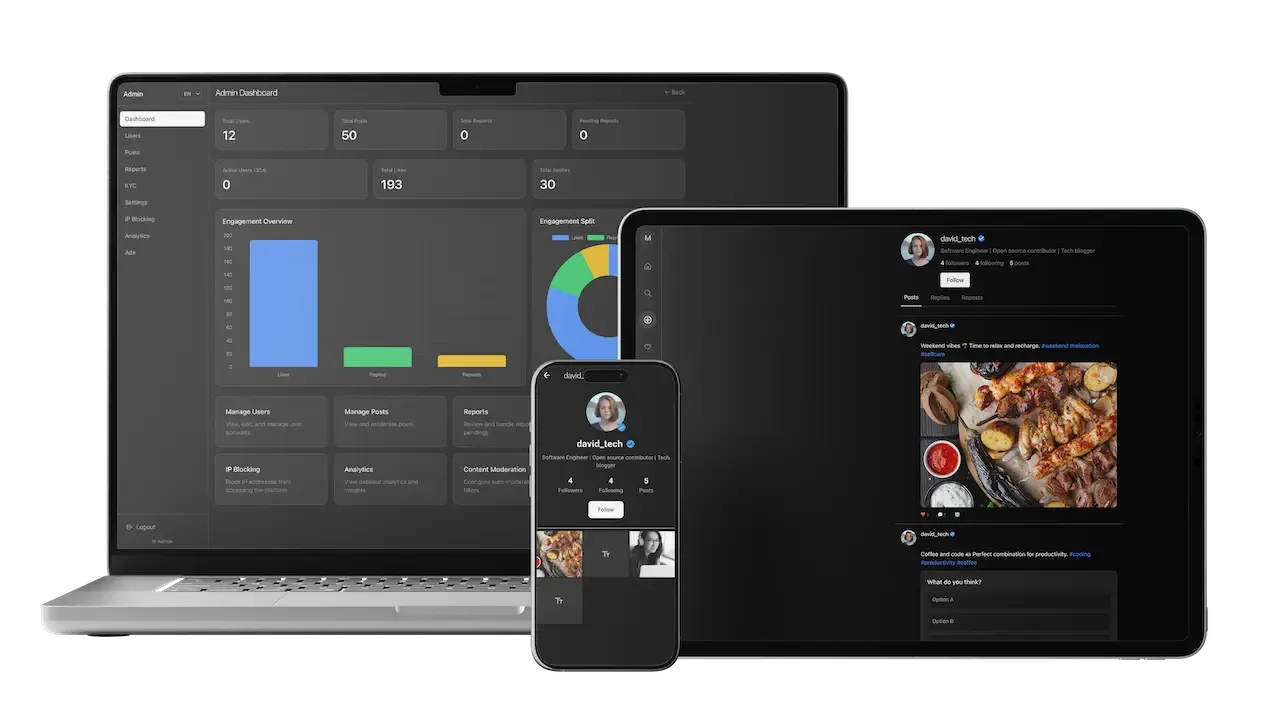
Dashboard and stats
Platform metrics and recent activity show what needs attention first each day.
User moderation
Operators view full account records, assign roles and suspend or restore accounts.
Report triage
Reports move through pending, reviewed, resolved and dismissed, so moderation is a workflow.
Content moderation
Post-level review and removal are tied to the report lifecycle with a decision recorded.
KYC review queue
Submissions are approved or rejected, and the rationale for rejection is preserved.
Ad review queue
Campaigns and creatives are gated by approval before any spend starts.
Verification plan manager
Operators create tiers with prices and Stripe price links without touching code.
Branding singleton
Name, tagline, logo and favicons are runtime settings that change without a deployment.
Media policy
Upload size, type and count limits are settings an operator controls.
Ad economics
Price floors and revenue-share controls decide how advertisers and creators are paid.
Gateway and email settings
Payment gateway and email provider configuration is stored, with gateway secrets encrypted.
IP blocking with expiry
Block lists carry expiry policies so a temporary problem does not become a permanent ban.
Abuse detection
Suspicious activity is evaluated, and defensive actions can trigger without waiting for a person.
Role guards
User, admin and superadmin scopes are enforced on protected route families, not just hidden menus.

From Sign-Up to a Governed, Earning Network

The path below follows one community through its first loop. Each stage names the surface a person uses and the record that the platform writes, so you can see how a conversation product turns into something that can be moderated and monetized.

  1. Onboarding that protects the account

    A member registers, can recover a lost password and may add authenticator-based two-factor sign-in. The profile gets an avatar and privacy settings, including whether the account is public or private. The first session decides whether a newcomer stays, so the feed they land on is already populated with posts rather than an empty screen.

  2. Composing a post with the right controls

    A post can carry media, a poll, hashtags and mentions, and the author decides who may reply or quote it. Drafts are saved and can be resumed, and posts may be queued for a later time. Replies nest in parent and child chains, so a long exchange stays readable instead of collapsing into a flat comment list.

  3. Distribution across four feeds

    Content travels through For You, Following, Ghost and Public feeds, plus hashtag pages and trending topics. These are distinct surfaces over one content graph, not filters on a single query, so personalized discovery, chronological recency and logged-out browsing do not degrade each other as the network grows beyond the author's own followers.

  4. Private conversation by consent

    Members who follow each other chat directly. Everyone else sends a message request that sits in a separate lane with four states: pending, accepted, declined or reported. The recipient chooses what happens next. Group chats add member roles and reactions, and typing, delivery and read signals update live over a persistent connection.

  5. Earning from three directions

    An advertiser funds an ad account and builds campaigns with creatives and targeting. A member subscribes to a verification plan and manages billing in a self-service portal. A creator enrolls in the bonus program and sees post analytics. Each line has its own records, so revenue and costs can be reconciled separately.

  6. Governance through explicit queues

    Reports, identity submissions and ad creatives each flow through their own queue with a clear outcome: pending, reviewed, resolved or dismissed for reports, approved or rejected for identity checks and campaigns. The rejection rationale is kept, and abusive networks of accounts can be contained at the address level.

The Threads Clone, on screen

Real screens from the working product. Your platform ships rebranded with your name, logo and colors.

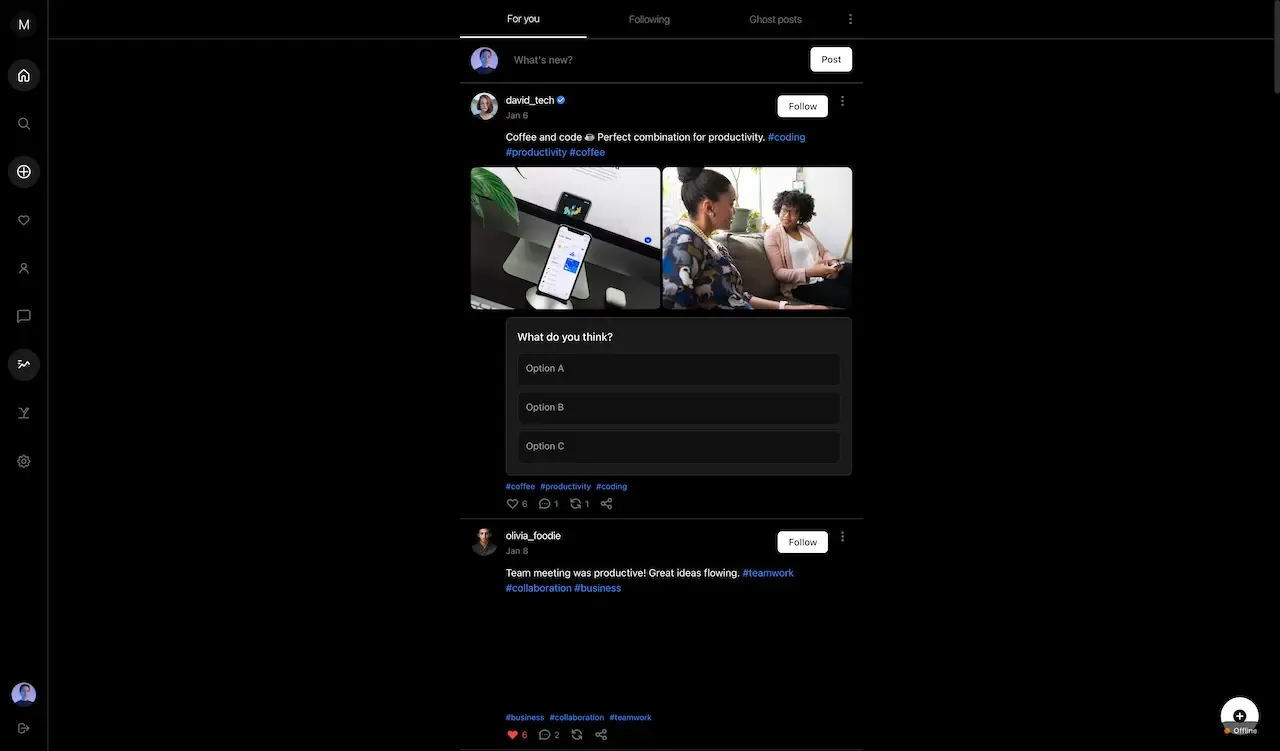
  • Dark web feed with a left icon menu, a photo post, a poll and login panel
    Web app
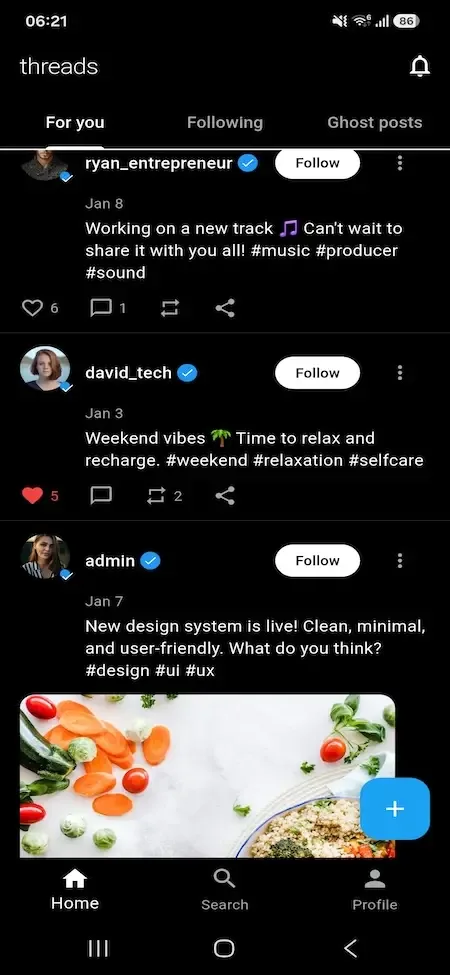
  • Phone for you feed with tabs, text posts, follow buttons and a compose button
    User app
  • Phone ghost posts tab with a photo post and follow buttons
    User app
  • Phone search results with filter chips for users, posts and tags and matching profiles
    User app
  • Phone new post screen with a text box, a counter and media icons
    User app

Threads Clone Features That Matter Commercially

A feature list tells you what exists. The items below explain what each one is worth to an operator, and what it would cost you in time or trouble to lack it once the network has real members and real money moving through it.

  • Consent-gated messaging

    Messages from people who are not mutual connections land as requests instead of reaching the inbox. That keeps unwanted messages out during the period when a network is growing fastest and can least afford to moderate by hand, and it spares you the cost of cleaning up after a spam wave.

  • Four feeds as separate surfaces

    Because For You, Following, Ghost and Public are separate surfaces, you can tune discovery without breaking chronological reading, and offer logged-out browsing that helps search visibility. Content reaches beyond an author's followers, which is how a new network grows without paying for every visitor. A member who only wants friends in order is never forced into an algorithm, and a curious visitor can still see what the network is about.

  • Threaded replies that stay readable

    Nested parent and child chains keep a conversation coherent, with per-post controls over who may reply or quote. Depth of discussion is what brings people back to a text product, and it is very difficult to retrofit once flat comments have trained members to behave differently. An author who limits replies on a sensitive post can keep a thread calm without deleting anyone's contribution afterward.

  • Verification as a recurring plan

    Members subscribe to a verification plan through Stripe and manage it in a billing portal. Plans carry pricing and lifecycle states that you control, so you can package status, perks and visibility in whatever mix suits your community, and it earns predictable revenue at small scale. Because members manage their own billing, cancellations and card changes do not land on your support desk.

  • Creator analytics and bonus tracking

    Creators see how individual posts and their whole profile perform, and bonus enrollment and payout records are tracked separately. That gives you evidence to decide who deserves incentives, instead of paying accounts that contribute little and would have stayed anyway. A creator who can see which posts started conversations learns what the community wants, and that improves the content you are paying to attract.

  • Runtime white-label settings

    Name, tagline, logo, favicons, media policy and ad economics are stored as settings you change from the console. Rebranding or repricing is an operator action rather than a release, which also makes it simple to license one deployment to a partner under its own identity. A change to the name or a media rule takes effect without any redeployment, which lets you respond to a policy question within the day.

Threads Clone Versus the Original and a Ground-Up Build

Threads is the reference point for a text-first conversation app, though it is not software you can purchase or host. This comparison covers operating model only, and the third column shows what you would take on by writing the same surface yourself.

Threads Clone Versus the Original and a Ground-Up Build
AspectThreadsThreads CloneBuilding from scratch
Control of policy The owning company sets rules, ranking and product directionYou set moderation policy, media rules and ad economicsYou do, after building each control yourself
Source code access Closed product, not offered for purchase or self-hostingComplete source code transferred to you at handoverComplete, but only after months of engineering work
Message spam control Managed centrally with restrictions set by the ownerConsent-gated requests with four lifecycle states, so strangers cannot flood an inboxUsually reactive, added after the first spam problem
Monetization model Advertising controlled by the platform owner itselfAds, verification plans and creator bonuses you controlA separate billing workstream with its own review tools
Moderation tooling Run internally by the owner without operator accessQueues, triage, identity review and address-level blockingThe reason many launches stay invitation-only for long
Brand identity One fixed brand and identity that no other operator can alterChangeable at runtime from console settings, with no new deployment neededHardcoded and changed only by a new deployment
Time to launch Not available to you at any priceSix working days to a branded deploymentMany months before the first public post

The Stack Behind the Threads Clone

The technology is mainstream and typed end to end, so most development teams can read it and extend it. The API is stateless, which lets the realtime layer scale separately from ordinary requests instead of pinning members to a single server.

The Stack Behind the Threads Clone
Web appNext.js and React written in TypeScript, serving the member, creator, advertiser and operator surfaces from one codebase.
API serviceNode.js with Express in TypeScript, organized as sixteen route families with role guards on the protected ones.
DatabasePostgreSQL accessed through Prisma, with more than forty models plus migrations and a seed workflow for repeatable setup.
RealtimeSocket.io rooms that authenticate a connection before it can join, carrying typing, delivery and read signals.
SecurityHelmet headers, JWT with pinned algorithms, optional TOTP two-factor sign-in and Zod validation of incoming data.
Billing and integrationsStripe for verification plans and ad funding, a configurable email provider and Instagram connect and import.
MobileA branded Android build running on the same API and Socket.io contracts as the responsive web application.

What We Set Up Around the Threads Clone Platform

The platform is complete and demonstrable as shipped. The items below are what we most often set up around it, either because they need a third-party account or because scale, security review or procurement requirements call for more.

  • A native iOS app

    A branded Android build is supplied. Because the API and socket contracts are platform-neutral, an iOS build is an additive step, but native packaging is configuration work and Apple accounts and review remain yours.

  • Push notification delivery

    The notification model and member preferences ship complete. Registering devices and delivering through Apple and Google push services is integration work that needs your own accounts and credentials.

  • The scheduled-post worker

    Draft and scheduled-post records are in the data model. The worker that publishes at the chosen time is specific to your deployment and is wired up during rollout rather than pre-configured.

  • Retention and audit storage

    Event logging exists. A dedicated store with retention schedules, export tools and legal holds is something we set up for enterprise buyers, and it matters if your compliance posture or customers demand formal evidence trails.

  • Scale infrastructure and telemetry

    Rate limiting and caching run in-process by default. A shared store, a multi-instance socket adapter and centralized logging with alerting are named steps for when concurrency and oversight needs grow.

  • Enterprise sign-on and dedicated search

    Sign-in is email, password and optional authenticator codes. SAML or OIDC for corporate identity, and a dedicated search engine for large content volumes, are things we set up when needed, with scope confirmed with us.

  • Your Stripe account and hardening

    Stripe needs an account of your own, and checking webhook signatures is a deployment requirement. Strict origin rules and secret rotation are configuration steps we complete with you.

Try the live Threads Clone demo

The demo is the shipped build running with demo branding, with a working login for every role so you can follow one thread of activity across the whole product. Publish a post, send a message request, launch an ad campaign and resolve a report, each from the account that would really do it.

  • Member app

    Open the Member app demo
    Login
    alex@example.com
    Password
    password123

    Worth trying

    • Compose a thread with media and a poll
    • Compare the For You and Following feeds
    • Reply, repost, quote and save a post
    • Restrict who may reply to your post
  • Messaging and groups

    Open the Messaging and groups demo
    Login
    mike@example.com
    Password
    password123

    Worth trying

    • Sign in as lisa@example.com in a second browser
    • Send a message request and accept it
    • Start a group chat and add reactions
    • Watch typing and delivery signals update live
  • Creator tools

    Open the Creator tools demo
    Login
    emma@example.com
    Password
    password123

    Worth trying

    • Open post and profile analytics
    • Review the verification plan options
    • Open the KYC submission form
    • Check enrollment status in the creator bonus program
  • Ads manager

    Open the Ads manager demo
    Login
    alex@example.com
    Password
    password123

    Worth trying

    • Open an ad account and review funding
    • Build a campaign and attach a creative
    • Set targeting for the campaign
    • Look at event-based spend records
  • Admin console

    Open the Admin console demo
    Login
    admin@demo.com
    Password
    Admin_$321

    Worth trying

    • Work a report from pending to resolved
    • Approve or reject a KYC submission
    • Review an ad campaign before it runs
    • Open branding, media and payment settings
  • Android app

    Open the Android app demo
    Login
    alex@example.com
    Password
    password123

    Worth trying

    • Download the build from the app portal
    • Sign in with any member login above
    • Compose a post and open messages

Threads Clone feature FAQs

What makes the Ghost feed different from the others?

Ghost is one of four distinct feed surfaces alongside For You, Following and Public. Each serves a different reading habit over the same content graph, so you can tune personalized discovery, chronological reading and logged-out browsing independently. Treat Ghost as a surface you can shape to your own community's needs.

Can authors control who replies to their posts?

Yes. Each post carries its own reply and quote restrictions, so a creator governs their own comment space rather than leaving it to site-wide rules. This helps contentious accounts stay usable and gives members a reason to publish controversial opinions without fear of pile-ons.

How do drafts and scheduled posts work?

Drafts are saved and can be resumed from any session. Scheduled posts store a publish time. The worker that releases them at that time is part of deployment, so we wire it with you during rollout instead of treating it as pre-configured. Test it by scheduling a post a few minutes ahead and confirming it appears, before you tell members the feature exists.

What can members control about their privacy?

Accounts can be public or private, visibility can be toggled per surface and notification preferences are adjustable. Members can also delete their account through a real removal path that clears associated data, which supports the privacy expectations of many markets. Make these options easy to find in your own guidelines, since members who understand their controls report fewer problems.

How do block, restrict and report differ?

Block cuts contact entirely, restrict limits what an account can do around the member without alerting it, and report sends an item to the operator queue. All three are enforced in data queries rather than only hidden in the interface, so they cannot be bypassed from a modified client.

What does the Instagram connection do?

Creators can connect and disconnect an Instagram account and bring content across, which lowers the effort of moving an existing audience. It is an optional convenience and does not change the core product, so you can leave it unused if it does not suit your community. For a new network, it is a useful way to ask established creators to bring their followers along.

→Start here

Tell us what you want to launch.

Share the platform and your market. You get a walkthrough of the live demo, the exact scope of what ships, and a fixed price in writing. First response in under 2 hours, Monday to Saturday, 10:00 to 19:00 IST.

We reply to every inquiry. No newsletters, no shared data. See our privacy policy.

Trademark and independence notice

This page uses the name Threads to describe a type of platform. The product sold here is separate software, built independently, and Threads has no part in it.

Why this name

"Threads clone" is industry shorthand that founders use when searching for software with a comparable business model. It names a category of product, not a copy of Threads.

Who built this

The platform is an original product designed and written by Miracuves. It contains no code, design, graphics or content originating from the Threads website or applications, and it ships under your own brand.

Trademarks

Threads and its logos are trademarks of their respective owner and are named here for reference only. GetFame is not affiliated with, sponsored by or endorsed by Threads. Rights holders can write to legal@miracuves.com.

Operator responsibility. The operator of a launched platform is responsible for legal compliance in the markets it serves. Nothing on this page is legal advice.Read the full disclaimer