Facebook Clone Features: A Social Network With Built-In Income

A social network is a web of people, communities and content, and each of those can also be a source of income if the platform is built for it. This page follows a member through the network, picks out the capabilities that carry commercial weight, compares the package with the alternatives and states what we set up around the platform.

7
payment gateways
3
subscribable spaces
6 days
to launch
On this page10 sections
  1. All 59 Facebook Clone features, by role
  2. One member from sign-up to a paid purchase
  3. The Facebook Clone, on screen
  4. The capabilities that carry the business
  5. Facebook, Facebook Clone and building a network yourself
  6. What the platform is built on
  7. What we set up around the platform
  8. Try the live Facebook Clone demo
  9. Facebook Clone feature FAQs
  10. Explore the Facebook Clone

All 59 Facebook Clone features, by role

The complete list, grouped by the person who uses each feature. Nothing is hidden behind a plan tier: this is what ships in the platform.

Members

16 features
Profile customization
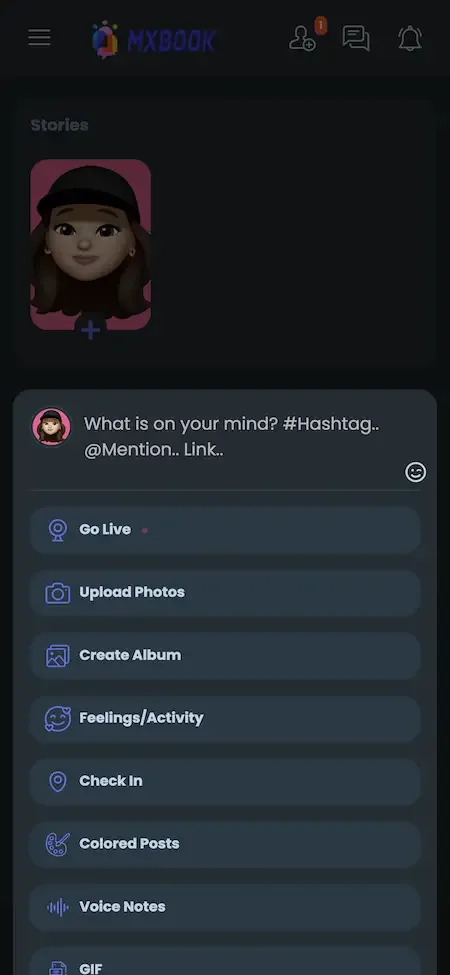
Members personalize a profile with photos, status updates and interests, and can share it with others.
News feed
A dynamic feed gathers updates from friends, pages and groups so the home screen stays populated.
Friend requests
People connect by sending and accepting requests, which builds the friend graph the feed draws on.
Real-time messaging
Private conversations run in real time, with push notifications on the mobile apps for new messages.
Group and event chat boxes
Groups and events each get a chat box, so discussion happens where the community already gathers.
Pages and groups
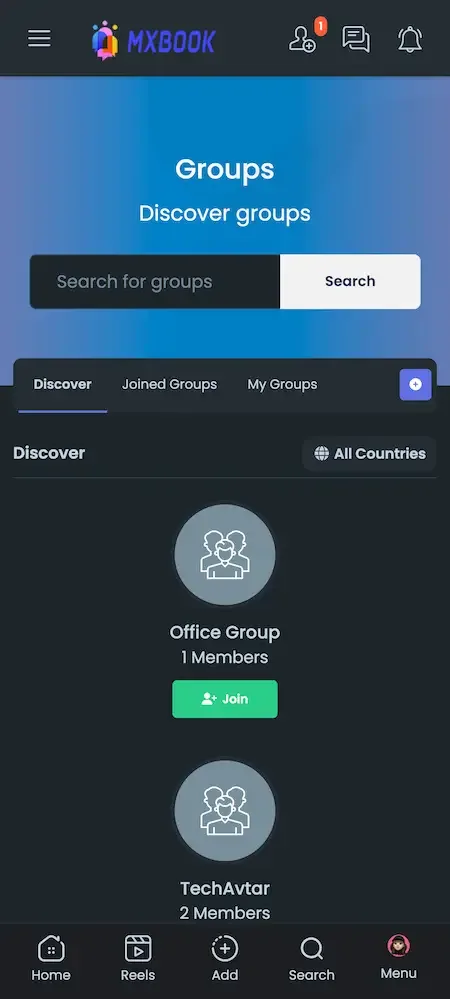
Members create and join pages for businesses and groups for shared interests, hobbies or causes.
Events with RSVP
Events can be created, shared and answered with an RSVP, which supports offline gatherings.
Reviews on pages and groups
Pages, groups, events and posts can carry reviews, with admin switches to turn each on or off.
Watch module
A video hub lists videos from across the network and detects the visitor country automatically.
Live streaming
Members go live at 720p or higher, and a screen-share mode supports tutorials and demonstrations.
Stories and reels
Short-form formats sit beside regular posts for people who prefer quick visual updates.
Share to timeline, pages, groups or events
The share plugin lets a member send a post to any of those destinations, not just their own timeline.
Interactive map posts
Posts with a location show an interactive map instead of a static image, and members can share where they are.
Search inside surfaces
Members search posts within a profile, a page, a group or an event, so they find things without scrolling.
Country filters
Pages, groups, events, jobs, offers, courses, blogs and funding can all be filtered by country.
Privacy settings
Members control who sees their posts, and admins can set the default privacy applied to new accounts.
Creators and pages

14 features
Paid posts
A creator sets a price on a post, and viewers pay to unlock it, including blog posts.
Blurred paid previews
Locked posts show a blurred preview, so followers see enough to know what they are buying.
Subscribers-only posts
A post can be limited to subscribers and toggled from the edit menu, for posts, blogs and live streams.
Paid posts for subscribers too
A creator can keep a post behind payment even for subscribers, for premium drops beyond the plan.
Subscription plans
Creators define recurring plans that members buy, with Stripe and PayPal handling recurring payments.
Free trials
A plan can start with a trial, which lowers the barrier for a fan deciding whether to subscribe.
Minute and hour plans
Plans can be measured in minutes or hours, which suits short passes and event access.
Subscribe buttons
Profiles, pages and groups each show a subscribe button, so any of them can sell a membership.
Quick tips in live posts
Viewers tip a streamer with preset buttons during a live stream without leaving the video.
Paid chat messages
Creators can charge fans for private messages, turning inbox access into revenue.
Paid audio and video calls
Calls can be priced, so one-to-one time with a creator becomes a product.
Donations from wallet
Members donate from their wallet balance, and an admin switch turns the feature on or off.
Points for engagement
Authors earn points for comments and reactions on their posts, and admins can disable points monetization.
Affiliate system
Members earn through referrals, payable by bank transfer, and it works recursively with Pro packages.

Commerce

14 features
Marketplace with cart
People list items for sale and buyers check out through a shopping cart that admins can switch off.
Products on pages
A page can sell its own products, which gives a business a storefront inside the network.
Products in groups and events
Groups and events can sell items too, from community merchandise to event extras.
Digital products
Sellers can offer downloadable goods, not only physical items.
Direct payment at checkout
The marketplace can accept payment directly and does not need to rely only on wallet credit.
Wallet recharge
Members top up a wallet, and the interface offers recharge when a balance is too low for a purchase.
Withdrawal requests
Sellers request to withdraw earnings, and the option is hidden when the cart is disabled.
Invoices with seller details
Invoices carry seller information, which helps buyers and your bookkeeping.
Jobs board
Members publish jobs and applicants can attach a CV to their application.
Offers
Offers show an original price and several images, and the expiry date is optional.
Courses
A courses module lets educators publish learning content to the community.
Funding campaigns
Members raise money for projects or causes, and the funding area has its own permission and country filter.
Blogs
Long-form articles can be published, made paid or restricted to subscribers.
Paid movies
A paid movies system sells video access, with its own earnings dashboard for administrators.

Administrators

15 features
User management
Admins oversee accounts, list non-activated users, resend activation emails and export users to CSV.
User approval system
New sign-ups wait for approval, with email notifications to the user about the outcome.
Post approval system
Posts can be held for review before publication, with email notifications on approval.
Content moderation
Admins monitor and control user content, respond to reports and remove material that breaks the rules.
Verification requirements
Verification can be required before publishing, before monetizing or before posting adult content.
Adult content mode
An admin setting that governs adult content, to be used within the law of the operator market.
Analytics dashboard
Charts of user engagement, content performance and trends, plus unique post views.
Earnings dashboard
Admins see platform earnings, including a dashboard for the paid movies system.
Visitor insights
Statistics on visitors help the operator understand where traffic comes from.
Advertising management
Admins manage and monitor ad campaigns, targeting and revenue from the panel.
VAT by user country
A payments VAT system can apply tax rates according to the buyer country.
Platform fees
Operators set the fees charged on payments, which is how the platform earns from transactions.
Price caps
Admins set maximum paid post prices and maximum monetization plan prices.
Permission groups
Groups control who can publish posts, jobs and offers, with custom points per group.
Content protection settings
Admins can disable image downloads and right click, and add a username watermark to media.

One member from sign-up to a paid purchase

Follow a single member through the network and you can see how the social side and the commercial side feed one another. The path shows why a network built with money in mind differs from one that adds payments as an afterthought.

  1. A member joins and sets up

    The member registers with an email address, a phone number or a social account, then adds photos, a short bio and interests. Admins can require approval or verification at this stage, which is the first and cheapest place to keep spam and fake accounts out.

  2. Friends and spaces fill the feed

    Friend requests, followed pages and joined groups decide what the news feed shows. A new member who connects with a handful of people and spaces sees a lively feed at once, which matters because a quiet first session is the main reason new accounts are abandoned.

  3. Members post and talk

    They share updates, photos, videos and reels, comment, react and chat in real time. Chat privacy can be set to everyone, friends or nobody, and members decide who sees their data, so the network can feel safe enough for people to be themselves. Friends lists, groups and pages decide whose posts reach whom, so a member who connects with a handful of people sees a lively feed from day one, which is what keeps new sign-ups from drifting away.

  4. Gatherings turn into events

    A member or page creates an event, and others respond with an RSVP. Events carry their own posts, chat and product listings, so an event is not just a date on a calendar but a small community that can also sell tickets or merchandise.

  5. Creators lock content behind payment

    A creator marks a post as paid, with a blurred preview for those who have not paid, or restricts content to subscribers. The maximum price is capped by the administrator, so you decide how much any one post can charge on your network. A photographer might post a gallery with a blurred preview and a price, and a coach might keep weekly notes for subscribers only, so one network can host many kinds of paid content with a single set of rules.

  6. Members pay from a wallet

    A member tops up the wallet through one of the supported gateways and spends it on posts, subscriptions, donations or marketplace goods. If the balance falls short at checkout, the member is prompted to top up, which keeps the purchase from stalling. One wallet across posts, subscriptions, tips and goods means a member tops up once and spends in many places, which raises how often money moves and reduces the number of separate payment screens.

  7. The operator takes a controlled share

    Payment fees and tax rules, including VAT by country, apply to each transaction, and the earnings dashboard shows what came in. Because the administrator sets these rules, the economics of the network belong to you and not to a third party. A creator who sees fees and tax already deducted knows exactly what will be paid out, which avoids disputes, and you get one view of what the whole network earned.

The Facebook Clone, on screen

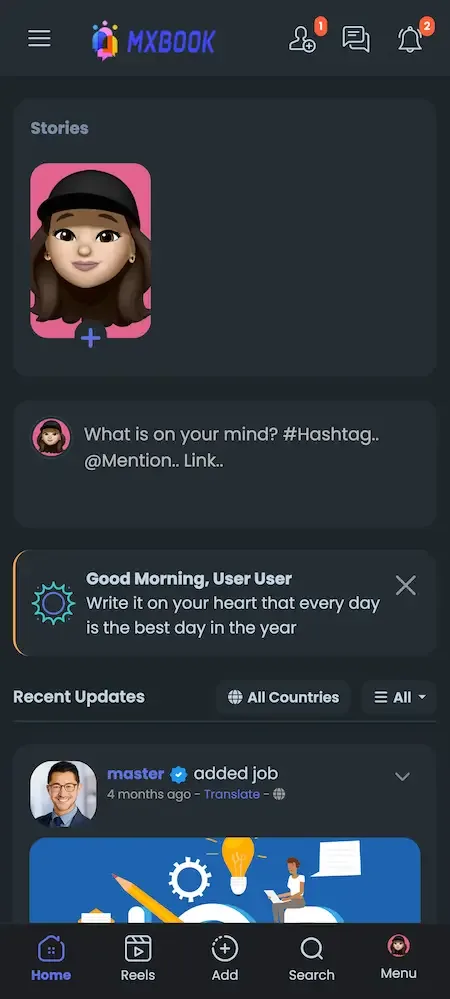
Real screens from the working product. Your platform ships rebranded with your name, logo and colors.

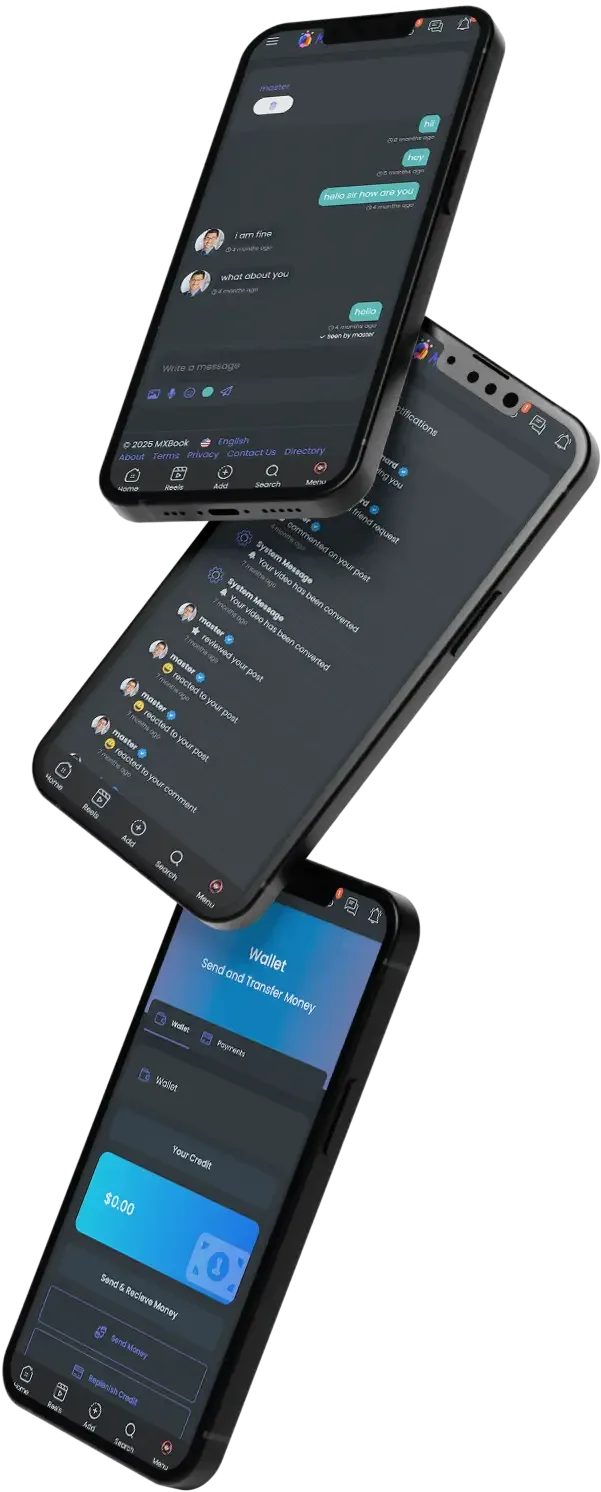
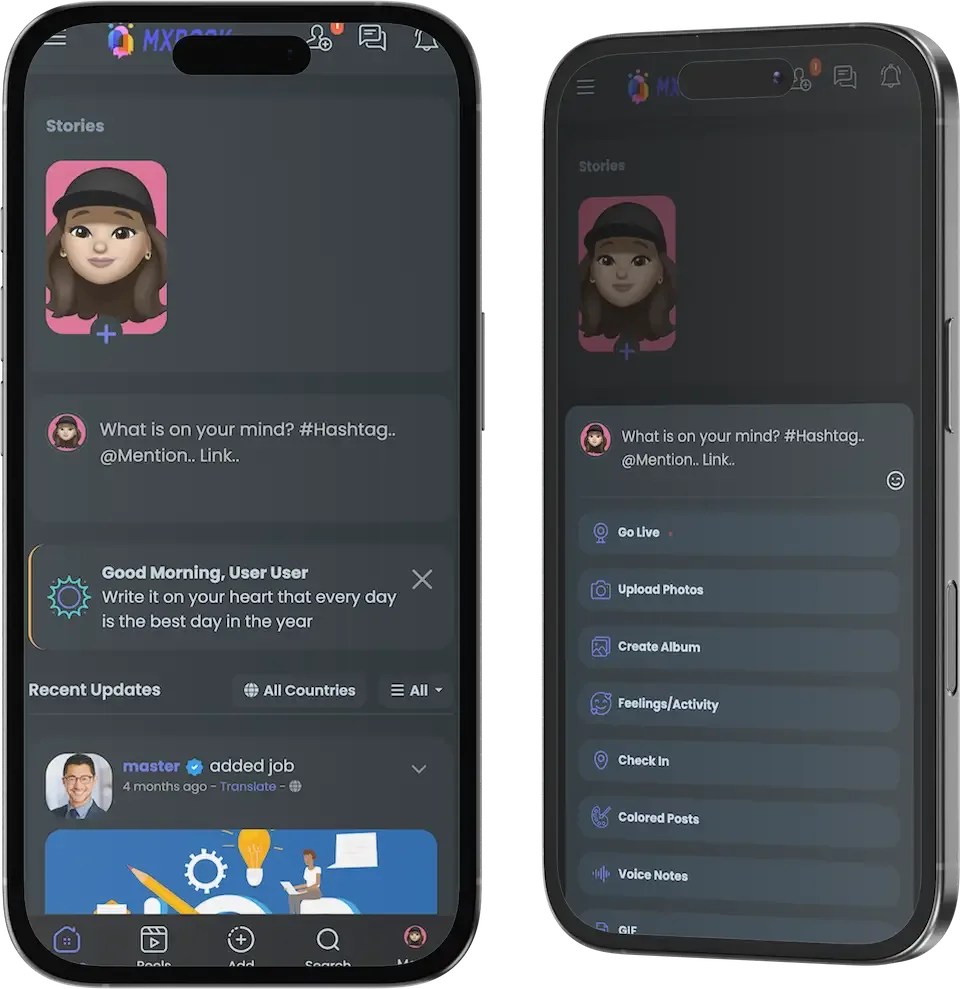
  • Three tilted phone mockups showing a chat, a feed and a blue card screen
    Overview
  • Phone groups page with a blue header, a search box and group cards with join buttons
    User app
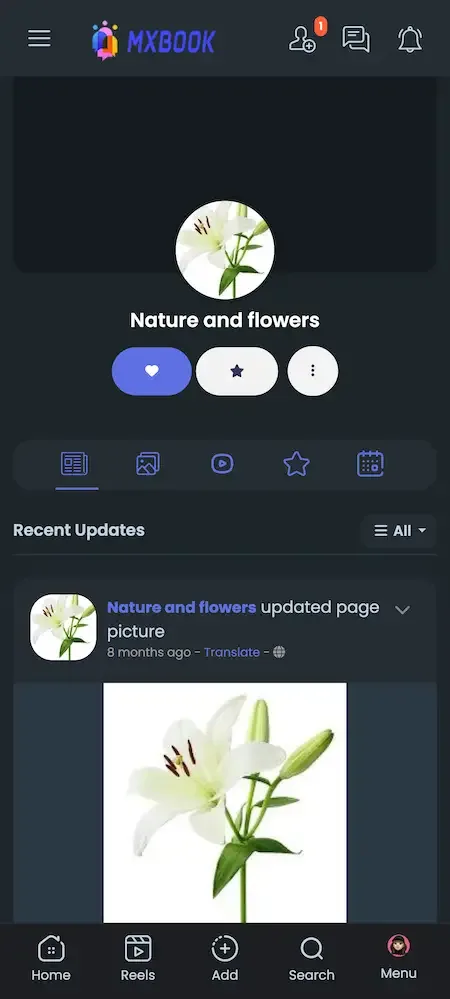
  • Phone page profile with a round logo, action buttons, content tabs and a recent update
    User app
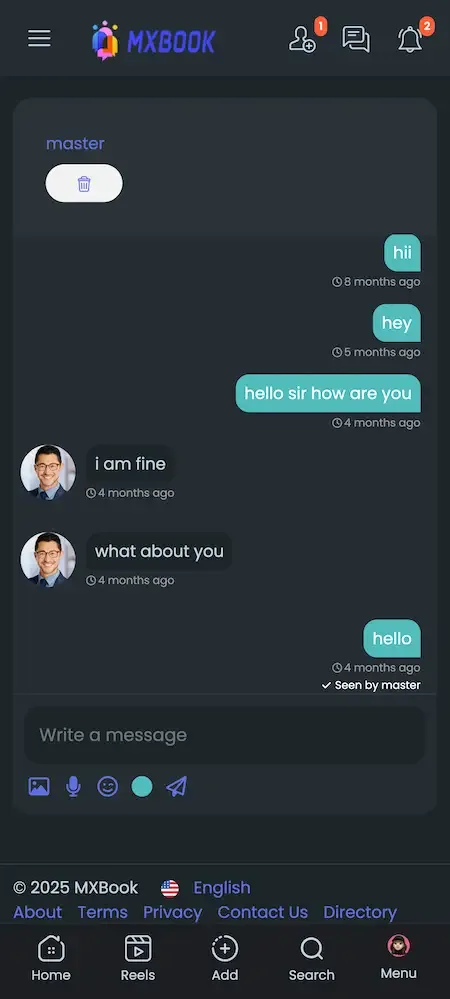
  • Phone chat conversation with teal and grey message bubbles and a message box with attachment icons
    User app
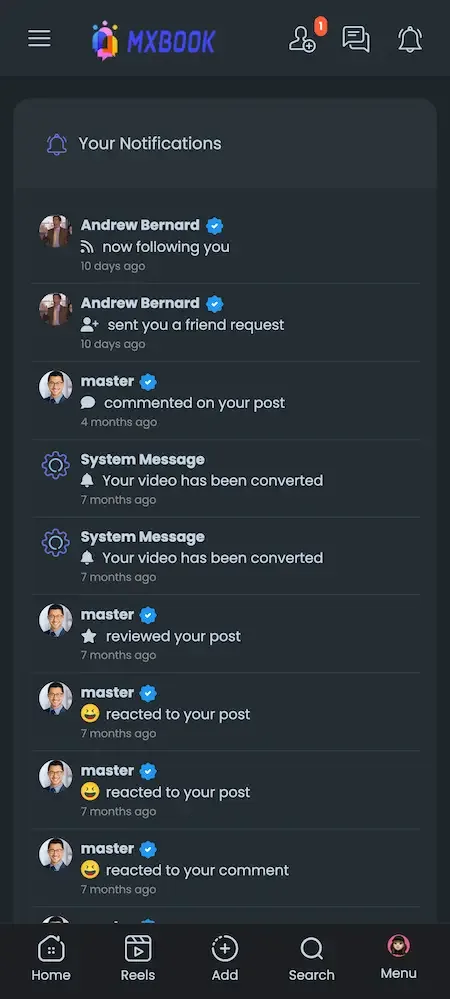
  • Phone notifications list showing follows, friend requests, comments, reactions and system messages
    User app

The capabilities that carry the business

Plenty of products can show profiles and a feed. These are the components that take the longest to build well, and the ones that decide whether creators earn, members stay and the operator keeps control of a growing network.

  • Groups and pages with their own tools

    Communities and businesses get chat boxes, reviews, events, products and subscription buttons inside their own space. That makes every group and page a small business unit, so the network can grow through the people who run them, not just through your own marketing. A bakery page that takes orders in chat, shows reviews and lists a weekly event gives members a reason to open the app even when none of their friends has posted.

  • Subscriptions in three places

    Members can subscribe to profiles, pages and groups, with plans priced by minutes, hours or longer and optional free trials. Recurring billing runs through Stripe or PayPal. Because subscription can attach to a person or a community, creators and organizations can both earn. A free trial lets a visitor sample a creator before paying, while longer plans reward people who stay, and attaching plans to a page means a business can charge for a members area as well.

  • Paid chat and calls

    Direct conversations can be charged per message, and audio and video calls can be priced too. This suits advisers, coaches and public figures whose attention is the product, and it gives your network an earning route that a plain feed cannot offer. A coach can answer messages for a fee, a consultant can sell a scheduled call, and a public figure can reduce unwanted messages because paying signals real interest.

  • Live with tips

    Broadcasters can preview before going live, switch cameras, share their screen and receive quick tips from viewers. Tips cluster around live moments, which is why live is often where a creator's strongest earnings happen, and why it is built into the same wallet. A preview step helps creators check lighting and sound before viewers join, and screen sharing makes live lessons and product demos possible, which broadens who is willing to broadcast.

  • Marketplace and listings

    Members can buy and sell items, and pages, groups and events can list products of their own, including digital goods. Jobs, offers, courses and funding campaigns sit beside them, turning the network into a local economy where people have reasons to visit daily. A neighborhood group can sell used furniture, post a job for a part-time role and run a fundraiser for a local cause, all through the same interface, so members visit for more than updates.

  • Fees, VAT and ads in one panel

    The admin panel manages payment fees, VAT rules, banner placements and ad campaigns together with approvals and reports. Having these in one place means you can adjust the economics of the whole network without touching code. Changing a payment fee for a promotion or adding VAT for a new country is a settings task for an administrator, and campaigns can be approved before they run.

  • Switchable modules

    Each major module can be turned on or off, and settings such as maximum prices and upload limits are editable. You can launch with a focused set and add more as your audience grows, so the network starts simple and gains depth when members ask for it. If you are launching a creator network, you might hold back the marketplace and jobs at first, then enable them once members ask, rather than showing an empty section to everyone.

Facebook, Facebook Clone and building a network yourself

The original network is not something you can buy, host or rebrand, so the practical comparison is between the second and third columns. The first column describes the category as it is generally understood, to show what changes when you own the platform and its money rules.

Facebook, Facebook Clone and building a network yourself
AspectFacebookFacebook CloneBuilding from scratch
Who runs it The company that operates it, under its own termsYou, on your own servers under your own brandYou, once every part has been designed and built
Community tools Profiles, groups, pages and events at global scaleProfiles, groups, pages and events with their own toolsA basic feed until each community feature is built
Creator income Set by the owner's programs and rulesPaid posts, subscriptions, tips and paid chat built inDesigned and tested by you, with payments written from scratch
Trading area A large trading area run by the ownerMarketplace, jobs, offers and courses includedA major module of its own, often added late
Time to launch Not for sale, so not applicable to a buyerSix working days for the ready-made platformA long program for an experienced team
Fees and taxes Set by the owner of the service and not open to youPayment fees and VAT by country set by youRules you must research, build and maintain
Mobile apps Official apps built and published by the owner itselfFlutter apps for Android and iOS includedSeparate builds for each platform, each with its own budget
Source code Closed and inaccessible to anyone outside the owning companyComplete and unencrypted code that is yours to changeYours, once every line has been written and paid for

What the platform is built on

The package documentation names its technologies openly, because your engineers or a reviewer will want to know them. We describe only what it names, since claiming more would mean guessing at details the product page does not state.

What the platform is built on
Web and adminPHP with the Bootstrap framework and NodeJS, serving both the member web panel and the administrator panel.
DatabasesMySQL and MongoDB, holding accounts, posts, relationships and activity for the whole network.
Mobile appsFlutter for both the Android and iOS apps, built with current dependencies at the time of delivery.
Payment gatewaysStripe, PayPal with recurring payments and payouts, Flutterwave, NyFatoorah, Epayco, Verotel and Cashfree, connected to your accounts.
Video and storageFFmpeg for video resolutions, the Plyr player, and storage options including DigitalOcean Spaces and Yandex Cloud Storage.
ServicesGoogle Maps for location features, Twilio for SMS, Firebase for push and a translation API for several languages.

What we set up around the platform

A social network has costs and duties around it that software cannot take over. We list them here so you can plan before launch, and not discover them when real members and real money are already on the platform.

  • Video storage and delivery

    Photos, reels and live streams take space and bandwidth. Storage is arranged on a provider you choose, and as your members upload more, the bill grows, so decide early on size limits and where media will live.

  • Your own gateway accounts

    Payment processors are connected to merchant accounts in your name. Each gateway supports certain countries and has its own terms and approval process, so check that your choice serves the markets you want before you commit.

  • Tax and accounting decisions

    VAT by user country and payment fee systems are built in, but deciding which taxes apply to your network and how you report them is a matter for you and your adviser, and not something we can decide.

  • Moderation staff and policies

    Approval queues, reports and verification tools are provided. Hiring reviewers, writing community rules and responding to reports quickly remain your duties, and they matter most for a social platform where content arrives without warning.

  • Gateways not on the list

    Seven gateways are supported. If your market needs another one, we can set up an integration, with scope confirmed with us, which takes longer than it looks because each provider has its own onboarding and testing.

  • Legal duties

    Rules on minors, user content, data protection and payments differ by market. We supply tooling, not legal advice, so please take qualified local advice and tell us what needs building to meet it.

Try the live Facebook Clone demo

The demo is a running copy of the platform with demo branding. The web panel, the admin panel and an Android app are all linked below, and the sample member account works in the app. Sign in as a member to build a feed and open the monetization screens, then look at the admin side to see how approvals, fees and ads are controlled.

  • Member web panel

    Open the Member web panel demo
    Login
    user@demo.com
    Password
    User_321

    Worth trying

    • Open the news feed and a group page
    • Create an event and look at the RSVP list
    • Open the wallet and the subscription options
    • Browse the marketplace and the jobs module
  • Admin panel

    Open the Admin panel demo

    Worth trying

    • Look at user approval and the content queue
    • Open the fees, VAT and maximum price settings
    • Read the earnings dashboard and ad tools
  • Android app

    Open the Android app demo
    Login
    user@demo.com
    Password
    User_321

    Worth trying

    • Install the app and sign in
    • Scroll the feed and open the reels area
    • Send a message and check chat privacy

Facebook Clone feature FAQs

How does the blurred preview on paid posts work?

When a creator marks a post as paid, members who have not paid see a blurred version of the image with a prompt to unlock it. After payment the full post appears. The administrator caps the maximum price a creator can set.

Can a creator limit content to subscribers only?

Yes. Posts, blogs and live streams can be restricted to subscribers, switched on or off from the post menu. This lets a creator mix free posts that attract new followers with exclusive material for paying members.

What does the watch area do?

The watch area lists video content in one place and detects the visitor's country, helping show relevant material. It sits beside the reels module, so members have both short clips and longer videos without leaving your network.

Can members run their own jobs or offers?

Yes. Members can publish jobs with CV attachments and offers with an original price, several images and optional expiry dates. These give people everyday reasons to visit, and the modules can be switched off if you prefer a simpler network.

Is there a movies or courses area?

A paid movies system and a courses module are included as separate modules, with the movies area having its own earnings dashboard in the admin panel. Courses and funding campaigns can be filtered by country, which suits regional networks.

How do affiliates work?

An affiliate system rewards members for bringing new users, and it works with bank transfers and with Pro packages. The administrator can switch it on or off, so you can try it as a growth lever without committing.

Can members control their privacy?

Yes. Members choose who sees their data, set chat privacy to everyone, friends or no one, and control subscription privacy. Administrators set the default privacy for new accounts, which matters if your audience expects a more private network.

→Start here

Tell us what you want to launch.

Share the platform and your market. You get a walkthrough of the live demo, the exact scope of what ships, and a fixed price in writing. First response in under 2 hours, Monday to Saturday, 10:00 to 19:00 IST.

We reply to every inquiry. No newsletters, no shared data. See our privacy policy.

Trademark and independence notice

This page uses the name Facebook to describe a type of platform. The product sold here is separate software, built independently, and Facebook has no part in it.

Why this name

"Facebook clone" is industry shorthand that founders use when searching for software with a comparable business model. It names a category of product, not a copy of Facebook.

Who built this

The platform is an original product designed and written by Miracuves. It contains no code, design, graphics or content originating from the Facebook website or applications, and it ships under your own brand.

Trademarks

Facebook and its logos are trademarks of their respective owner and are named here for reference only. GetFame is not affiliated with, sponsored by or endorsed by Facebook. Rights holders can write to legal@miracuves.com.

Operator responsibility. The operator of a launched platform is responsible for legal compliance in the markets it serves. Nothing on this page is legal advice.Read the full disclaimer