ReelShort Clone Features: Wallet, Unlock Paths and Console

Short drama looks like a video product, yet the hard engineering sits behind the lock: pricing a single episode, keeping coins honest, and making the web app and the store app agree about what a viewer owns. This page walks through how those parts behave in practice, who touches each one, and what we set up around the platform.

3
ways to open an episode
2
coin balances per viewer
24
console permission modules
On this page10 sections
  1. All 48 ReelShort Clone features, by role
  2. One viewer, one episode, from first rail to repeat purchase
  3. The ReelShort Clone, on screen
  4. Capabilities that decide whether a drama service earns
  5. ReelShort, this platform and a from-scratch build, capability by capability
  6. What the features run on
  7. What we set up around the platform
  8. Try the live ReelShort Clone demo
  9. ReelShort Clone feature FAQs
  10. Explore the ReelShort Clone

All 48 ReelShort Clone features, by role

The complete list, grouped by the person who uses each feature. Nothing is hidden behind a plan tier: this is what ships in the platform.

Viewers

13 features
Persistent guest identity
A visitor without an account still gets a durable identity, so coins earned and titles saved are not lost when sign-up happens later.
Email sign-in
Email and password registration works on both the web app and the store app, alongside guest entry.
Episode zero trailers
A trailer lives inside the title as episode zero, so it plays, orders and targets exactly like any other episode.
Coming soon rail
Unreleased titles show an announce date on their own shelf and are kept out of every other rail until release.
Remind Me
A viewer can ask to be reminded about a title that has not released, which gives launch day a ready audience.
Browse tabs
Dedicated browse tabs for Anime, Fandom and Interactive sit beside the main rails for viewers who search by taste.
Interactive choices
An episode can branch on viewer choices, and a Choice Pass option sits next to auto-unlock for the rest of a title.
Subtitle and audio tracks
Several subtitle tracks and selectable audio tracks play from the files stored against each episode.
HD for members
Higher quality playback is reserved for VIP members, which gives the pass a visible benefit beyond unlocking.
Gem balance
Gems are a second currency spent on gem-priced items, tracked apart from coins with their own history.
Premium plan
A Premium plan sits beside VIP plans and is defined the same way, by validity window and validity type.
Coupon redemption
A viewer can enter a redeem code that grants coins or VIP days, issued by the operator for campaigns.
Capped comments
Episode comments are limited to 400 characters, with likes and report buttons on every thread.

Operators

14 features
Movie or series typing
Each title is typed as a movie or a web series, which changes how its episodes and shelves behave.
Artwork toggles
Poster, banner and an auto-animated hero are switched on per title, along with trending, coming soon and active flags.
Region chips
Each title carries region chips and dated licence windows, so catalog targeting is a property of the record.
Signed playback links
Playback links are signed and expire, with geo rules applied, which limits casual sharing of raw file addresses.
Subtitle upload
VTT and SRT files upload against a single episode, with the language and format recorded beside them.
Reorder and relock
Dragging an episode to a new position renumbers the run and reapplies locks, so a re-cut never strands a viewer.
Store product keys
Each coin pack carries a store product key, tying the console record to the in-app purchase it represents.
Order history
Coin and VIP purchases each keep an order history the operator can review and reconcile.
Ad caps and reset
Rewarded ad rewards are capped per title per day, and a midnight job resets the counters automatically.
Overview dashboards
Date-bounded counts, user and revenue charts and a paid revenue trend read straight from live operating data.
Country filter
User lists and analytics can be filtered by country, which shows how each market behaves.
Economy analytics
Revenue by series, top revenue episodes and coin figures are tied to the seven ledger codes behind every movement.
Settings tabs
General, storage, payment, ads, language, currency and profile tabs hold the configuration that would otherwise live in files.
Legal pages
Policy pages and store links are managed as content in the console and rendered by the web app.

Staff and moderators

11 features
Module and action grants
A role is a list of modules and actions, so an editor can create episodes without ever seeing the economy screens.
One role per account
Each staff account is attached to exactly one named role, which keeps responsibility traceable.
Role-filtered sidebar
Menu entries a role cannot use are removed, so staff are not shown screens that will refuse them.
Short console session
The console signs a user out after one hour, which limits the exposure of an unattended screen.
Custom report reasons
The reasons a viewer can pick when reporting are written by the operator and appear in the app report sheet.
Reporter notification
Marking a report solved sends a notice to the person who filed it, closing the loop without manual email.
Template library
Campaign templates are written once and reused, with the audience chosen separately at send time.
Timed dispatch
A job that runs every minute sends any campaign that has come due, inside the API process.
Delivery statistics
Each campaign shows what was sent and delivered, so message timing can be judged on evidence.
Inbox without push
An inbox row is created for every targeted viewer, and device push is added only if you connect Firebase.
Account data requests
Staff can export an account, anonymize it or remove it permanently to answer a data request.

Mobile

10 features
Immersive fullscreen
The store app plays episodes in an immersive fullscreen view designed for one-handed vertical watching.
Comment sheet
Comments open in a sheet over the player so a viewer can read and reply without leaving the episode.
Rewarded video
AdMob rewarded video runs on your own unit IDs, giving a viewer without coins a way to open an episode.
Server-charged checkout
Purchases in the store app are charged and recorded on the server, and not by trusting the device.
Referral history
A viewer can see who joined through their code and what each referral paid.
Quests tab
Daily and weekly quests list their progress and give a claim button when the target is reached.
In-app inbox
Campaign messages arrive in an inbox inside the app, readable whether or not push is enabled.
Reminders
A reminder set on a coming soon title is kept with the account and shown in the app.
Screenshot restriction
Release builds block screenshots natively, a basic guard for catalogs under licence.
One binary, five languages
The same build carries all five locales, so a language change needs no separate release.

One viewer, one episode, from first rail to repeat purchase

The platform is easiest to understand by following a single evening of viewing. These steps cross the viewer app, the wallet and the console, and show where each role leaves a trace.

  1. A guest lands on a shelf

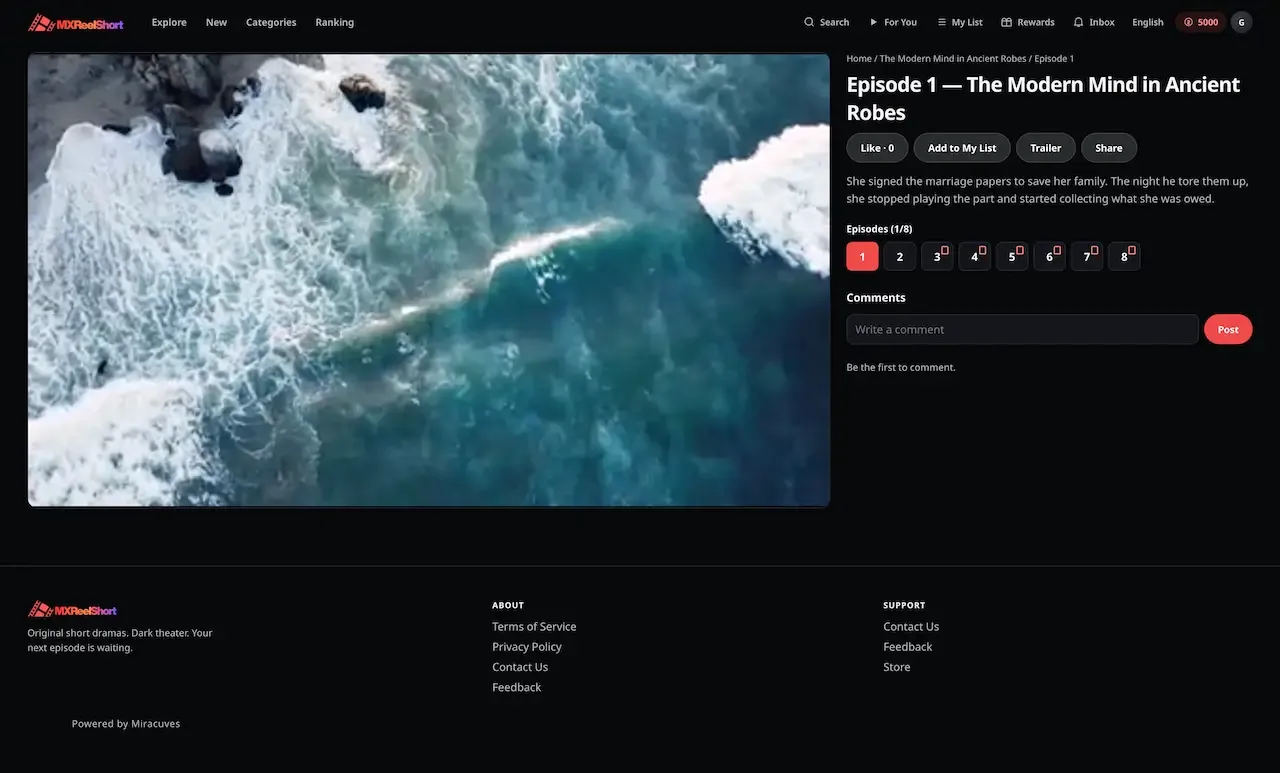
    Nobody has to register to look around. The home screen shows a banner carousel, trending and new release rails, and a coming soon shelf with announce dates. Coming soon titles are held out of the other rails, so a viewer never taps a story that cannot play yet. The first trailer is simply episode zero of the title, stored like any other episode.

  2. The free window carries them in

    The opening run of episodes plays without a charge, controlled by a single setting the operator can change at any time. Playback is sequential and vertical, with an optional subtitle file and selectable audio. The point of this stage is investment: by the time the lock appears, the viewer has a reason to care about the next four minutes.

  3. The lock offers a choice

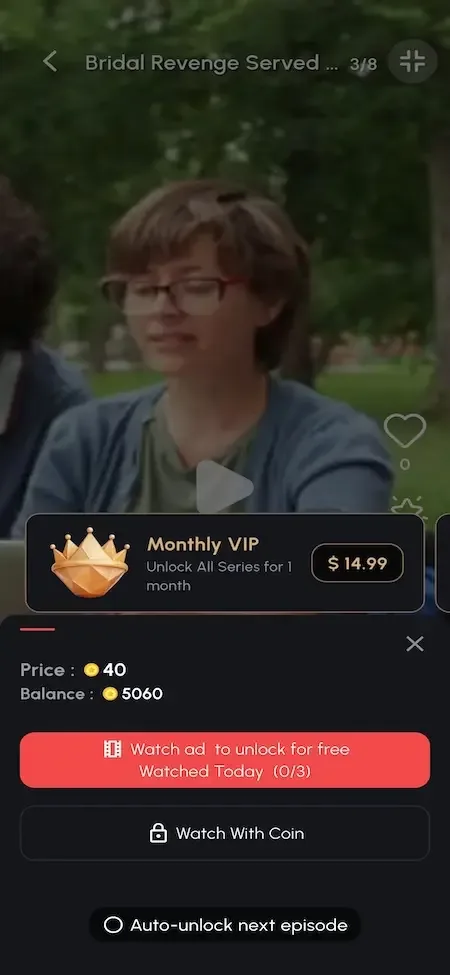
    At the first locked episode the viewer sees coins, a rewarded ad and a VIP pass side by side, plus an option to open the rest of the title automatically. Whatever they choose, the server writes the same per-user unlock record. That single record is why the answer to "does this person own this episode" never depends on which app asked.

  4. The wallet decides what leaves

    Spending takes from reward coins first and from purchased coins second, so promotional balance is consumed before money the viewer paid. Each movement is written to the ledger with a type, which means a disputed spend can be reconstructed rather than argued about. A separate gem balance exists for gem-priced items and never mixes with coins.

  5. A top-up happens at the right moment

    When coins run out mid-story, the viewer buys a pack through hosted checkout or store billing. Packs can carry bonus coins and an offer price, which gives the operator two levers over basket size. Purchased coins do not expire, which keeps support conversations short and makes larger packs easier to sell.

  6. Rewards bring them back

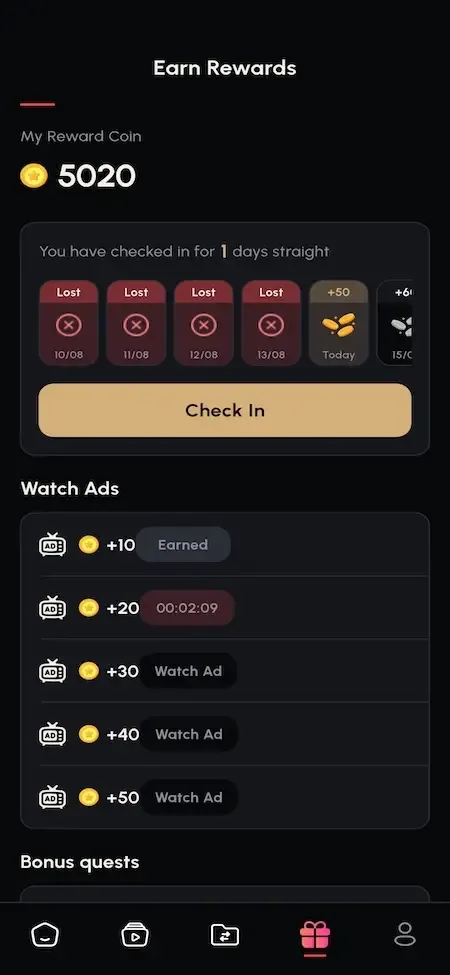
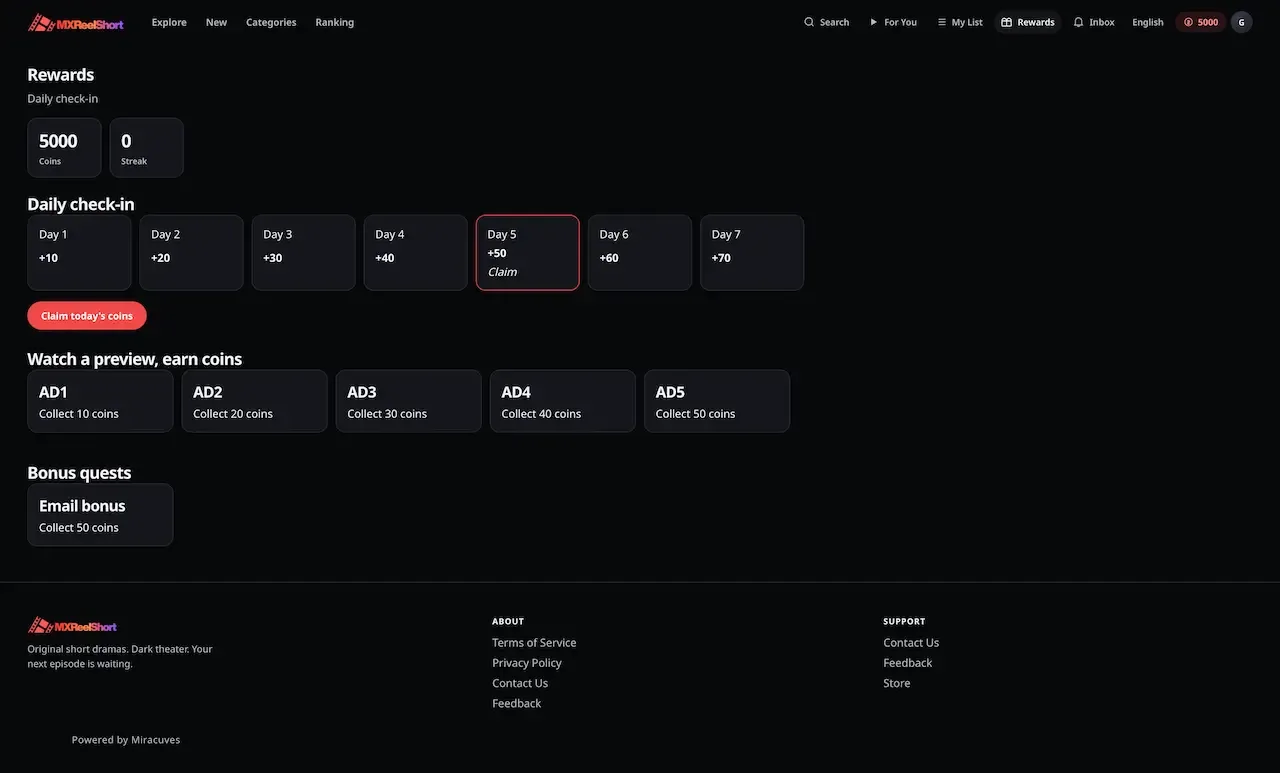
    A seven day check-in streak, daily and weekly quests, ad reward tasks, social follow bonuses and a referral code all pay out in coins. These are retention tools, not revenue lines, but they decide whether a viewer is still around when the next cliffhanger lands. The quests tab shows progress and a claim button when a target is met.

  7. The operator watches the economy

    Behind the scenes the console reports revenue by series and by episode, plus coin analytics tied to the ledger codes. A catalog editor can drag an episode to a new position and the numbering and locks follow. A moderator works the report queue, and the person who filed a report is notified once it is solved.

The ReelShort Clone, on screen

Real screens from the working product. Your platform ships rebranded with your name, logo and colors.

  • Dark web rewards page with a seven day check-in strip, watch ad tiles and bonus quests
    Web app
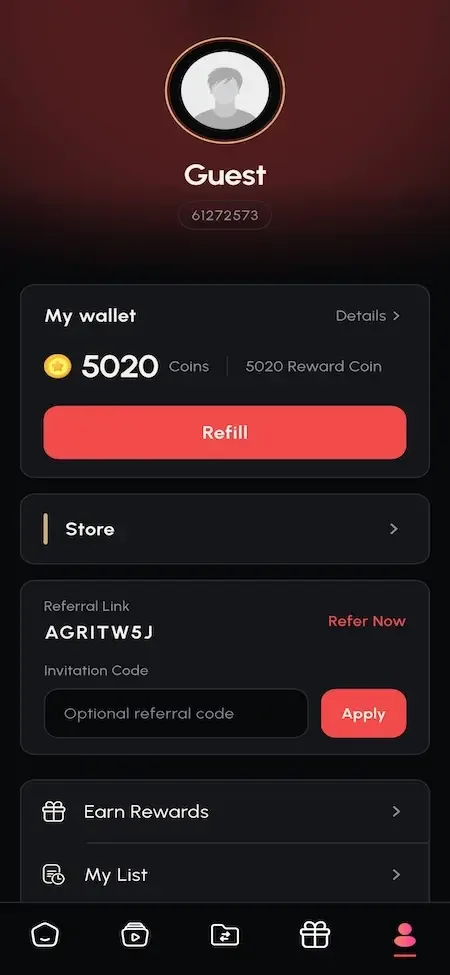
  • Phone profile page with guest avatar, coin wallet, refill button and referral code field
    User app
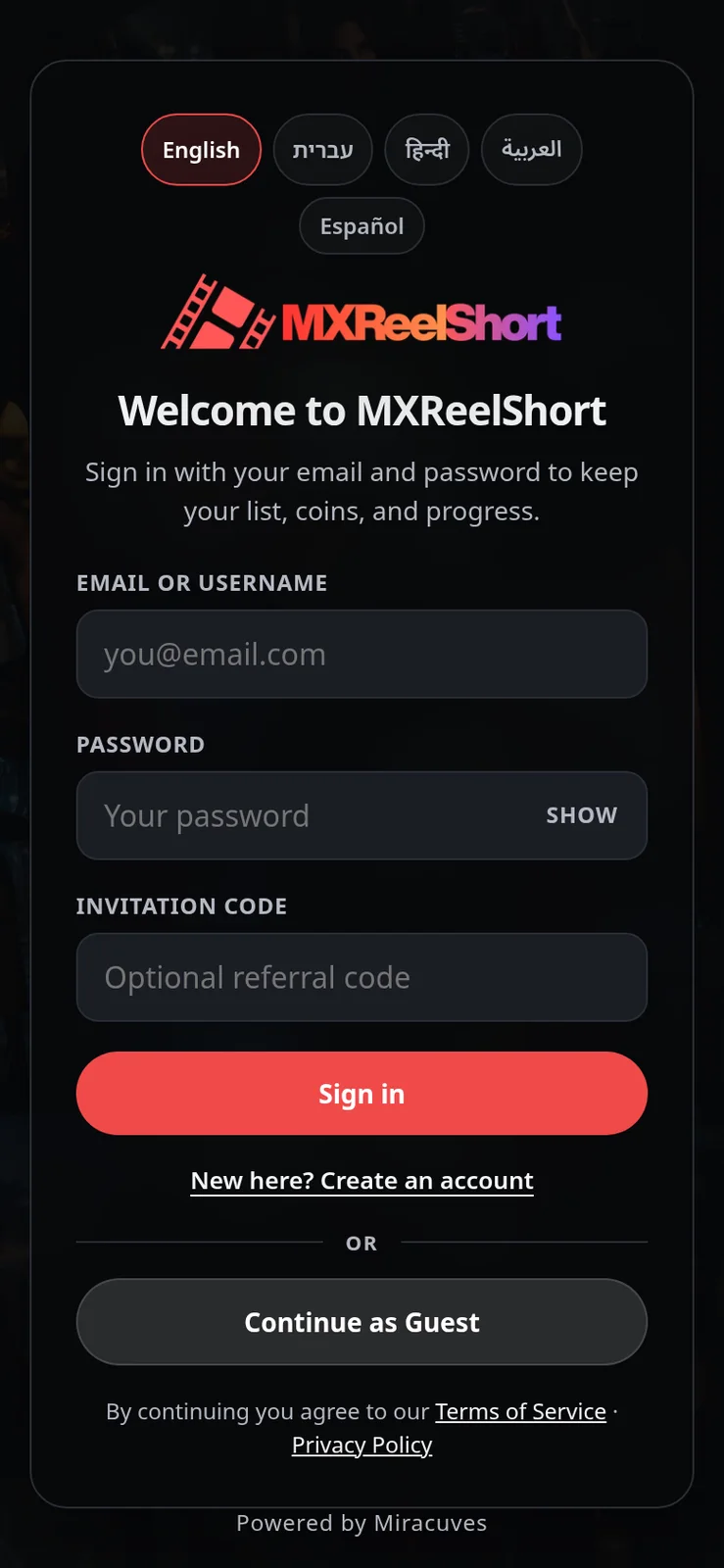
  • Sign in screen with language chips, email, password and invitation code fields
    Web app
  • Phone episode paywall offering a monthly VIP plan, a coin unlock and a watch ad option
    User app
  • Phone rewards screen with a coin balance, a daily check-in streak and watch ad earnings
    User app

Capabilities that decide whether a drama service earns

Most of the list is expected in this category. These are the parts that behave differently from a generic streaming script, and the reasons an operator should look at them before comparing prices.

  • Unlock decided at read time

    Access is calculated each time an episode is requested, from the catalog lock, the free window, any active VIP window and the unlock record. Nothing is cached on the device. Commercially this prevents the worst support ticket in the category: a viewer who paid on one device and finds the episode locked on another.

  • Two coin balances, one total

    Viewers see a single number, while the wallet keeps reward coins and purchased coins apart. That separation lets you expire a promotion without touching money someone paid, and it keeps the liability on your books honest. Because reward coins are spent first, a generous ladder costs less than it looks.

  • Price on the episode itself

    The coin price sits on each episode record, so a finale can cost more than an opener and a back catalog title can be discounted without touching new releases. This is the cheapest experiment an operator can run: change a field, wait a few days, read the series report, and decide whether the curve moved.

  • Drag-to-reorder with relocking

    Editors can move an episode and the platform renumbers the title and reapplies the locks in one action. Viewers who already paid keep their access because unlock records are attached to the person and the episode. Re-cutting a series after launch becomes routine editing instead of a risky database job.

  • Rewarded ads with a title cap

    A viewer without coins can earn an episode by watching a rewarded unit, limited per title per day. The cap is the commercial control: it keeps ads from quietly replacing coin sales. Live ad income runs through your own AdMob units in the store app, which is why the mobile app matters for this line.

  • Role-based staff access

    Each staff account carries one named role built from modules and actions, and the sidebar hides what the role cannot use. A catalog editor can add episodes without seeing the economy screens. The console also signs staff out after a short idle period, which limits damage from an unattended screen.

  • Campaign desk with inbox

    Templates are written once, an audience is picked at send time, and a job dispatches due campaigns every minute. An inbox row is created for each targeted viewer, so reach does not depend on push being configured. If you connect Firebase later, device push is layered on top of the same campaign.

  • Right-to-left across clients

    Hebrew and Arabic mirror the layout in the web app, the store app and the console, and an in-console editor lets you change client wording without a rebuild. For operators targeting those markets this removes a retrofit that otherwise touches every screen you have already built. A paywall line, a coin-pack label or a quest name can be reworded in an afternoon by whoever runs the console, which matters when the same sentence converts differently in each market.

ReelShort, this platform and a from-scratch build, capability by capability

The first column describes the widely known pattern of the ReelShort app, not its private systems. The other two show what you would receive here and what your own team would have to design and test before the first viewer arrives.

ReelShort, this platform and a from-scratch build, capability by capability
AspectReelShortReelShort CloneBuilding from scratch
Per-episode pricing Early episodes play free, then later episodes cost coinsCoin price stored on every episode, free window in settingsNeeds an entitlement model designed before a player
Ways to open an episode Coins, passes and ad rewards are commonCoins, rewarded ad or VIP window, plus auto-unlockEach route is a separate integration with its own edge cases
Wallet structure Promotional and paid balances are commonly kept distinctReward and purchased balances kept apart with expiry rulesA single balance field is the usual first version
Audit of coin movement Kept inside the company's own systems and not offered to outside operatorsTyped ledger entries you can query in your own databaseOften added after the first reconciliation dispute
Retention tools Check-ins, streaks and bonus rewards are familiar in this categorySeven day ladder, quests, follow bonuses and referral loopUsually deferred until the cost of acquiring viewers starts to hurt
Operator console Kept internal and not offered to outside operatorsCatalog, economy, moderation, staff and settings screensUsually the largest line of unplanned work
Right-to-left layouts Depends on the markets the company servesHebrew and Arabic mirrored on web, app and consoleA retrofit across every screen already built
Source code Not available to buy as a product or to inspectFull source for every client, yours to modifyYours, once the whole thing is written

What the features run on

The stack is conventional on purpose. Any team that knows Node and MongoDB can operate it, and the three clients are separate builds that talk to the same API. That keeps a change to one surface from disturbing the others.

What the features run on
Consumer web appA Vite and React single page app delivered as a static build, so browsing and playback do not load the API process.
Mobile appsA Flutter app built with GetX for iOS and Android, carrying the same wallet, catalog and locales as the web.
Operator consoleA Next.js 14 application on its own subdomain, with charts drawn in the browser through ApexCharts.
APINode.js with Express behind nginx and PM2, with separate client and admin routers sharing one service.
DatabaseMongoDB through Mongoose models, with unique compound keys on unlock rows to stop a double charge.
Media storageA storage switch across local disk, AWS S3 and DigitalOcean Spaces, with uploads inspected by content signature.
Scheduled jobsCron inside the API resets ad counters at midnight and dispatches due campaigns every minute.

What we set up around the platform

A feature list is only useful if what surrounds it is stated beside it. These are the items a buyer should know about before comparing quotes, so none of them arrives as a surprise during launch week.

  • Simulated web ad unlock

    On the web app the rewarded ad is a timed preview that demonstrates the flow. Live ad revenue comes from the store app through your own AdMob units, so plan ad income around the mobile build.

  • Cash-out is set up for your market

    Withdrawal records and thresholds exist in the schema, and we build the viewer cash-out screen, payout desk and bank connection around them. Coins are spent on episodes today. We confirm the scope of a payout flow with you, since it depends on your market.

  • Purchase verification extras

    Some card and store purchases are confirmed on the server already, but wider processor-side verification for every gateway is something we set up with you. Ask which gateways you will enable and what you expect confirmed.

  • Hardening backlog

    The security reference lists items such as stronger password hashing, request rate limiting, an origin allow-list and wider enforcement of staff permissions. We agree with you which to close before launch.

  • Partly translated strings

    Five locales ship, but some later strings in the web app still fall back to English in the non-English locales. Completing that wording is a configuration task your team or ours can handle.

  • Ranking and catalog

    Shelves are assembled by your editors, and we can build ranking personalization as tailored work. The catalog is also yours to produce or license: the demo titles are seed material, not licensed drama.

Try the live ReelShort Clone demo

The demo runs the product end to end: a viewer app on the web and on Android, plus a view-only operator console. It carries our demo branding and a seed catalog of royalty-free stills, so use it to judge the unlock flow, the wallet and the console, not the content.

  • Viewer web app

    Open the Viewer web app demo
    Login
    webuser@demo.com
    Password
    User_$321

    Worth trying

    • Play the free episodes, then hit the first locked one
    • Open the wallet and read the history behind the total
    • Claim the daily check-in and look at the quests
    • Unlock an episode, then check the same title in the app
  • Operator console

    Open the Operator console demo
    Login
    admin@demo.com
    Password
    Admin_$321

    Worth trying

    • Open a title and look at how episodes are numbered and priced
    • Read the coin packs and VIP plans screens
    • Browse revenue by series and by episode
    • Notice that edits are refused: this login is view-only
  • Android viewer app

    Open the Android viewer app demo
    Login
    webuser@demo.com
    Password
    User_$321

    Worth trying

    • Watch an episode in the fullscreen vertical player
    • Open the comment sheet over a playing episode
    • Open the quests tab and the referral history
    • Switch the interface language, including a right-to-left one

ReelShort Clone feature FAQs

Can a viewer lose access to an episode they already opened?

Not through the platform. The unlock is a stored record tied to the viewer and the episode, so it survives reinstalling the app, switching devices and re-cutting a series. If an editor moves an episode to a new position, the record stays attached to that episode and the viewer keeps what they paid for. Only an account deletion or a manual correction by staff removes it.

Does auto-unlock charge everything at once?

Auto-unlock is an option the viewer turns on for a title, so the next locked episodes open as they reach them and coins are spent episode by episode. It does not take the whole price up front. The wallet and the ledger still record each spend separately, which keeps the history readable if the viewer later asks what an episode cost.

What does the viewer see when coins and rewards are mixed?

One combined total in the app, with the history underneath showing each movement. The split between reward and purchased coins matters to you as the operator, because expiry and spend order depend on it. Operators and support staff can inspect a wallet from the console to see how a balance was built.

Can I run different free windows for different titles?

The free window is a single global setting, so it applies across the catalog. The price per episode is stored on each episode, and that is where per-title variation lives today. If you need a free window that differs by title or by campaign, that is a modest change we would scope with you.

How are reports and comments handled?

Viewers can like, comment and report from the player. Reasons for reports are written by you, staff work them from a queue, and solving one sends a notice to the person who filed it. A moderator can hide a comment or block an account directly. Who reads the queue and how fast is an operating decision for your team.

Can I change the interface wording without a new app release?

Yes for the client copy, which is edited in the console and served to the apps, so a wording fix does not need a store submission. Some structural changes, such as adding a new screen, still need a rebuild. The five shipped locales cover English, Hebrew, Hindi, Arabic and Spanish.

Is there a way to preview episodes before they are public?

Titles carry active and coming soon toggles, and a coming soon title is held out of the main rails until you release it. Staff can use the console to review episodes, subtitles and artwork before flipping a title live. There is no separate staging channel inside the viewer apps, so a full dress rehearsal means a test environment.

→Start here

Tell us what you want to launch.

Share the platform and your market. You get a walkthrough of the live demo, the exact scope of what ships, and a fixed price in writing. First response in under 2 hours, Monday to Saturday, 10:00 to 19:00 IST.

We reply to every inquiry. No newsletters, no shared data. See our privacy policy.

Trademark and independence notice

This page uses the name ReelShort to describe a type of platform. The product sold here is separate software, built independently, and ReelShort has no part in it.

Why this name

"ReelShort clone" is industry shorthand that founders use when searching for software with a comparable business model. It names a category of product, not a copy of ReelShort.

Who built this

The platform is an original product designed and written by Miracuves. It contains no code, design, graphics or content originating from the ReelShort website or applications, and it ships under your own brand.

Trademarks

ReelShort and its logos are trademarks of their respective owner and are named here for reference only. GetFame is not affiliated with, sponsored by or endorsed by ReelShort. Rights holders can write to legal@miracuves.com.

Operator responsibility. The operator of a launched platform is responsible for legal compliance in the markets it serves. Nothing on this page is legal advice.Read the full disclaimer