ChillChat Clone Features: Voice Rooms, Gifts and Retention

Most social apps bolt audio onto a feed. This platform works the other way round: the voice room is the center, and streaming, gifting, missions, games and messaging all hang from it. The sections below follow one member through a session, explain the parts that carry commercial weight, compare the package with the alternatives and state what we set up around the platform.

3
surfaces on one API
10
gift tiers
6 days
to launch
On this page10 sections
  1. All 51 ChillChat Clone features, by role
  2. A member session from room to withdrawal
  3. The ChillChat Clone, on screen
  4. The parts that carry commercial weight
  5. ChillChat, ChillChat Clone and a ground-up build compared
  6. The technology under the rooms
  7. What we set up around the platform
  8. Try the live ChillChat Clone demo
  9. ChillChat Clone feature FAQs
  10. Explore the ChillChat Clone

All 51 ChillChat Clone features, by role

The complete list, grouped by the person who uses each feature. Nothing is hidden behind a plan tier: this is what ships in the platform.

Members

13 features
Live and scheduled rooms
Rooms can start immediately or be set for later, so communities can announce a weekly event and members can plan around it.
Host, speaker, listener roles
Each participant holds a role that controls whether they can speak, and the host can change it during the room.
Hand-raise promotion
A listener raises a hand, the host sees it, and promoting that person to speaker is a single action for everyone.
Per-participant mute
Mute and unmute states are broadcast to every connected participant, so the room always agrees on who is audible.
Configurable capacity
A room can hold between 2 and 500 participants, which covers a private chat and a large town hall alike.
Late-join consistency
The full room state is sent on entry, so someone arriving halfway through sees the same speakers and settings as everyone else.
Persisted room chat
Messages are stored and rate limited to 30 per 10 seconds, which keeps busy rooms readable while preserving history.
Four-format feed
Posts can be video, audio, meme or room highlight, with For You and Following tabs and cursor pagination.
Stories
Stories expire after 24 hours and track views, giving members a light way to share without cluttering the main feed.
Direct and group messaging
Conversations deliver in real time with read receipts and unread counts, limited to 20 direct messages per 10 seconds.
Random-match video calls
Beyond one-to-one and group calls, a random-match mode pairs members who have not met, with history and duration tracked.
In-room trivia and charades
Game sessions run with readiness, scoring and turn flow held on the server, so every participant sees the same state.
AI companion
Six personas keep conversation history per member, and the same layer can offer matchmaking suggestions and text moderation.

Broadcasters

12 features
One-action go live
Starting a stream creates the room and the Agora token on the server, which removes setup steps for the broadcaster.
Live viewer counts
Counts update for every client in real time, which helps broadcasters see whether a topic is landing.
Stream discovery feeds
Separate feeds list active streams and active battles, so viewers can jump straight to the action.
PK challenge and accept
One broadcaster challenges another, the second accepts, and the battle begins with a shared scoreboard.
Live battle voting
Viewers vote during the battle and the tally is pushed to everyone instantly, which gives spectators a way to take part.
Ten gift tiers
From a one-coin heart up to a 5,000-coin castle, the range lets small gestures and spectacular moments both have a price.
Six coin packages
Packages run from $0.99 to $99.99 with escalating bonuses, sold through Stripe on web and RevenueCat-verified purchases on mobile.
Coin to diamond conversion
Coins convert to diamonds at 100 to 1, and back again with a 10 percent fee, so conversion is a managed step.
Withdrawal minimum
Broadcasters can withdraw once they hold 1,000 coins or more, which keeps payout requests worth reviewing.
Avatar shop
Hats, glasses, backgrounds, frames and animations are sold in four rarity tiers, with inventory, equip and unequip.
Profile cosmetics mirror
Equipped items are copied onto the profile for fast reads, so status shows instantly wherever the member appears.
Transactional ledger
Gifts, transfers, conversions and withdrawals run inside database transactions, so a balance cannot land halfway between states.

Engagement

13 features
XP accrual
Platform activity earns experience points that count toward levels, so ordinary use feels like progress.
47 level thresholds
A long ladder of levels gives early members quick wins and committed members something distant to aim for.
Level-up coin credit
Every level gained credits 50 coins, which seeds the wallet and invites a first small gift.
Daily missions
Short recurring tasks award XP and coins, creating a reason to open the app every day.
Weekly missions
Longer goals reward members who return across the week, which supports habit formation beyond a single visit.
Streaks
Consecutive-day tracking rewards consistency, and breaking a streak creates a gentle pull to come back.
Achievements
Achievements are tracked per member alongside badges, giving people a visible record of what they have done on the platform.
Rarity-tier badges
Badges come in tiers of rarity, so collecting them signals effort and status on the profile.
Time-boxed leaderboards
Rankings are kept by week, month and individual room, so a newcomer can compete in a narrow board before a long-term one.
Eight notification types
In-app notifications cover the main events, with unread counts and Firebase push to registered devices.
Segment broadcast
Operators send announcements to everyone, only active members or only the VIP segment, which keeps messages relevant.
Social graph
Follow and unfollow, follower lists, blocking with reciprocal follow removal, user search and follow checks are included.
Event analytics
Twelve event types from four sources feed the console, which shows whether the engagement mechanics are working.

Operators

13 features
Member administration
Search with role and status filters, then open a detail view showing XP, level, coins, diamonds and reports filed.
Member actions
Ban, unban, change role or reset a password directly from the member page, with no database access needed.
Room oversight
A paginated room list with status filter opens into a live participant list that refreshes without a page reload.
Room controls
Start, end or delete a room and remove a participant, which answers a disruption while the session is still running.
Report queue
Reports target three object types and move through three states, with the activity log and target card in one view.
Resolve, dismiss, ban
Actions sit on the same screen as the evidence, so a moderator does not have to jump between tabs.
Analytics view
Thirty-day and real-time metrics cover DAU, new users, revenue and DAU to MAU, with retention cohorts and top rooms.
Revenue panel
ARPU, active subscriptions, gross revenue, platform fee and creator payout sit beside a transaction list with CSV export.
Avatar catalog
Create, edit and remove cosmetic items, price them in coins, assign a rarity and flag featured items.
Game catalog
Define source type, minimum and maximum players, activation state and sort order for each in-room game.
Platform settings
Identity, maintenance mode, room defaults, user policy, banned words, auto-ban thresholds and notification toggles are editable.
Gamification controls
Staff can view achievements and missions, complete a mission on a member behalf, grant XP and award badges.
Four-role access
User, VIP, moderator and admin roles are enforced by a guard on every admin route, and custom tiers are configuration.
A member session from room to withdrawal

Trace one member through an evening on the platform. The sequence shows how the room, the economy and the retention loop share the same events, so nothing has to be stitched together by an integration after launch.

  1. A room opens with a topic

    A host creates a live or scheduled room with a free-form topic, a capacity limit and, if wanted, a password. Scheduled rooms appear in the same list as live ones, so a community can plan a session in advance rather than only stumbling into whatever happens to be open.

  2. Roles keep the room listenable

    Host, speaker and listener are three separate tiers rather than a single permission flag. A listener raises a hand, the host promotes them, and any participant can be muted individually. Presence and mute changes travel over sockets, so the room on screen matches the room in the air.

  3. Going live adds a competitive hook

    Any member can start a broadcast, with the media token generated on the server and viewer counts pushed to everyone watching. Two broadcasters can challenge each other to a PK battle, where viewers vote and the tally moves live. Competition turns passive watching into participation.

  4. Coins go in and diamonds come out

    Members buy coin packages, through Stripe on the web or verified in-app purchase on mobile. A gift from one of ten tiers moves coins from the sender to the recipient inside a single transaction. Coins convert to diamonds, and diamonds convert to a withdrawable balance after your platform fee.

  5. The same action earns progress

    That gift also awards experience points, moves daily and weekly missions forward, extends a streak, may unlock a badge with its own rarity and shifts the weekly leaderboard. Retention is built into the same event as the payment, so it never depends on a separate loyalty tool reading your data.

  6. Games fill the quiet moments

    Trivia and charades run as sessions inside the room, with readiness and scoring held on the server. Because the state lives there and not in a browser tab, one person closing the app cannot end the game for everyone else who is still playing.

  7. The operator sees the same activity

    In the console, the same session shows up as a live room that can be force-ended, a report that can be resolved, a line in analytics and revenue, and a transaction that can be exported. One platform records it all, so staff do not reconcile several systems.

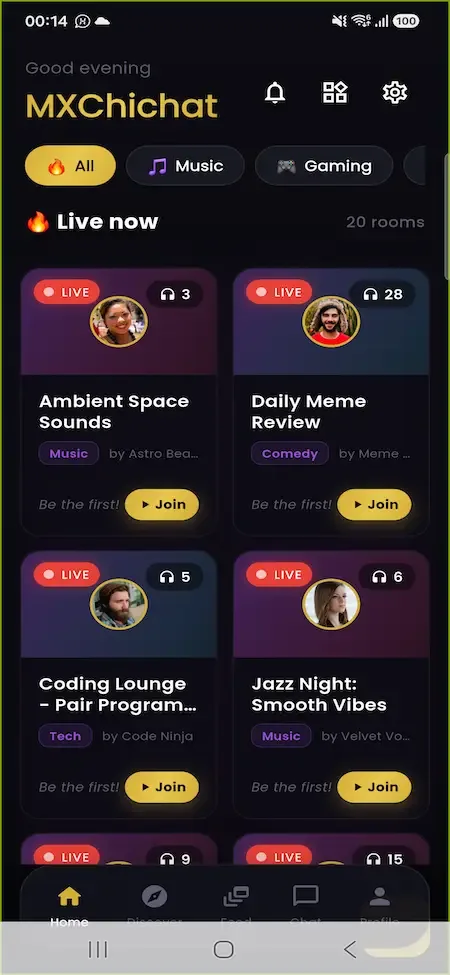
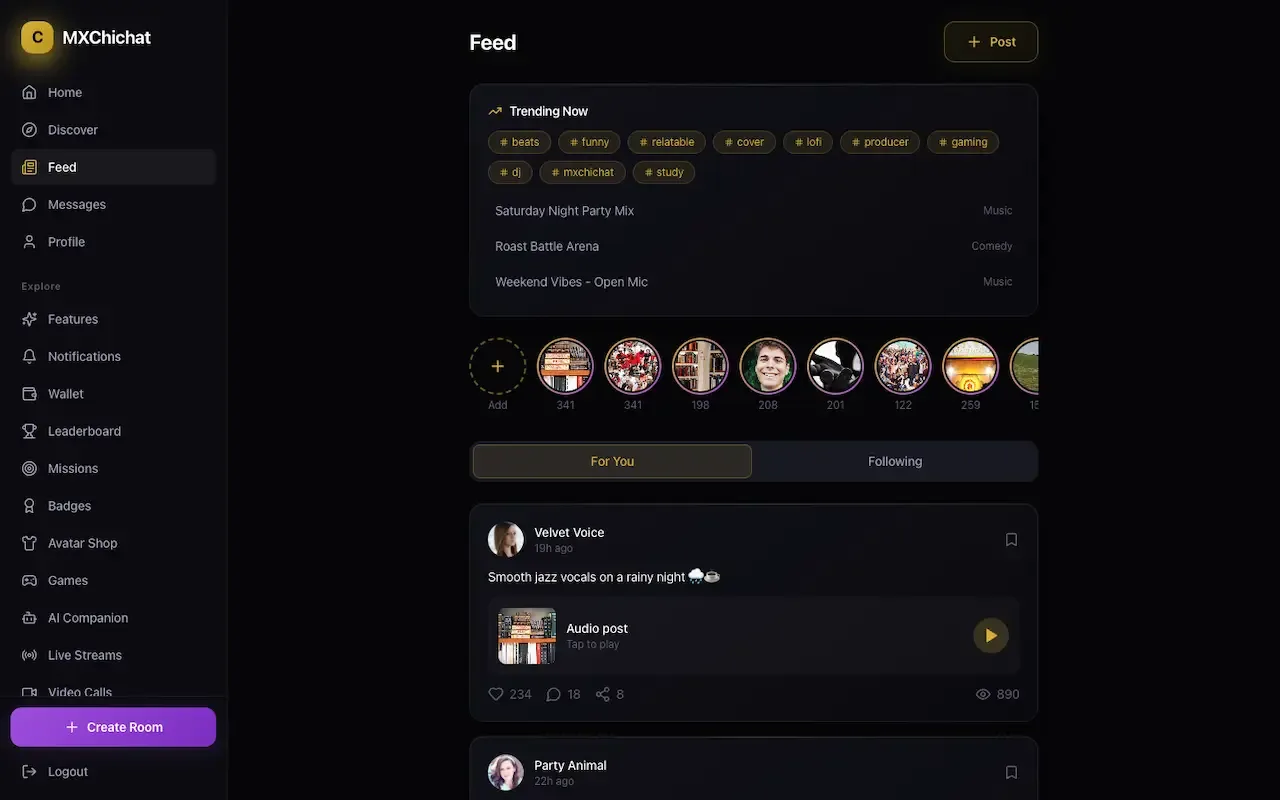
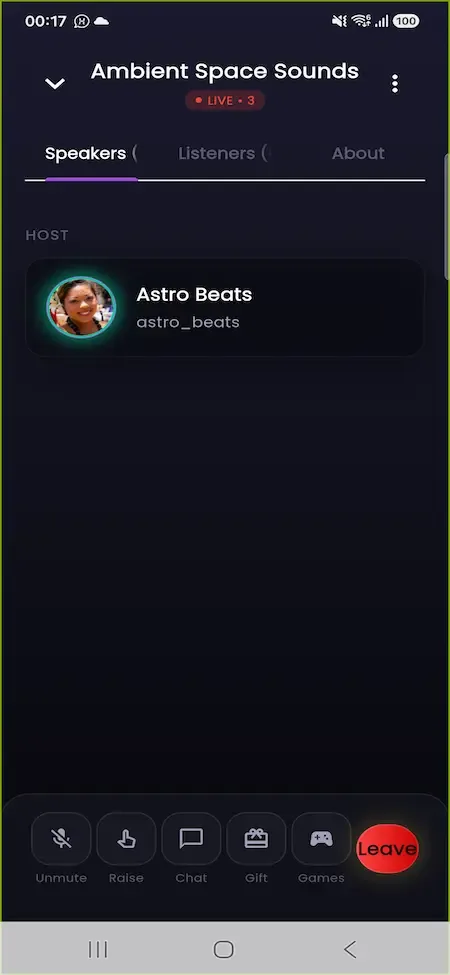
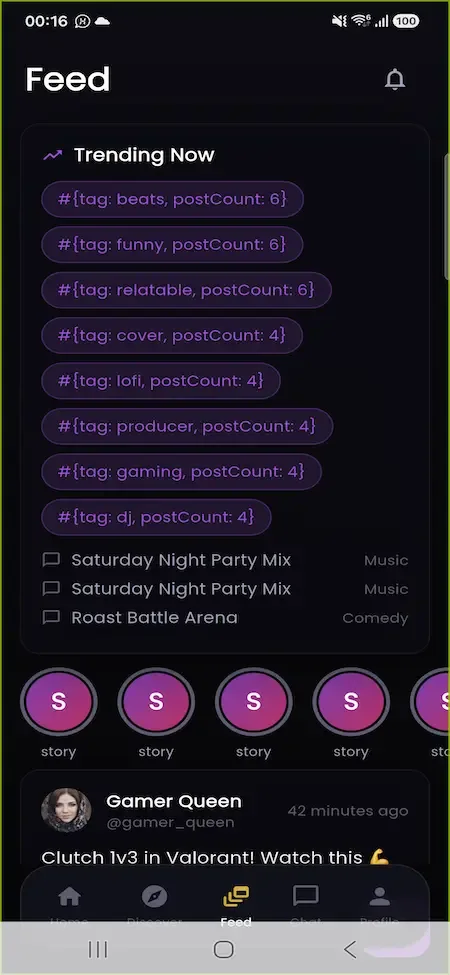
The ChillChat Clone, on screen

Real screens from the working product. Your platform ships rebranded with your name, logo and colors.

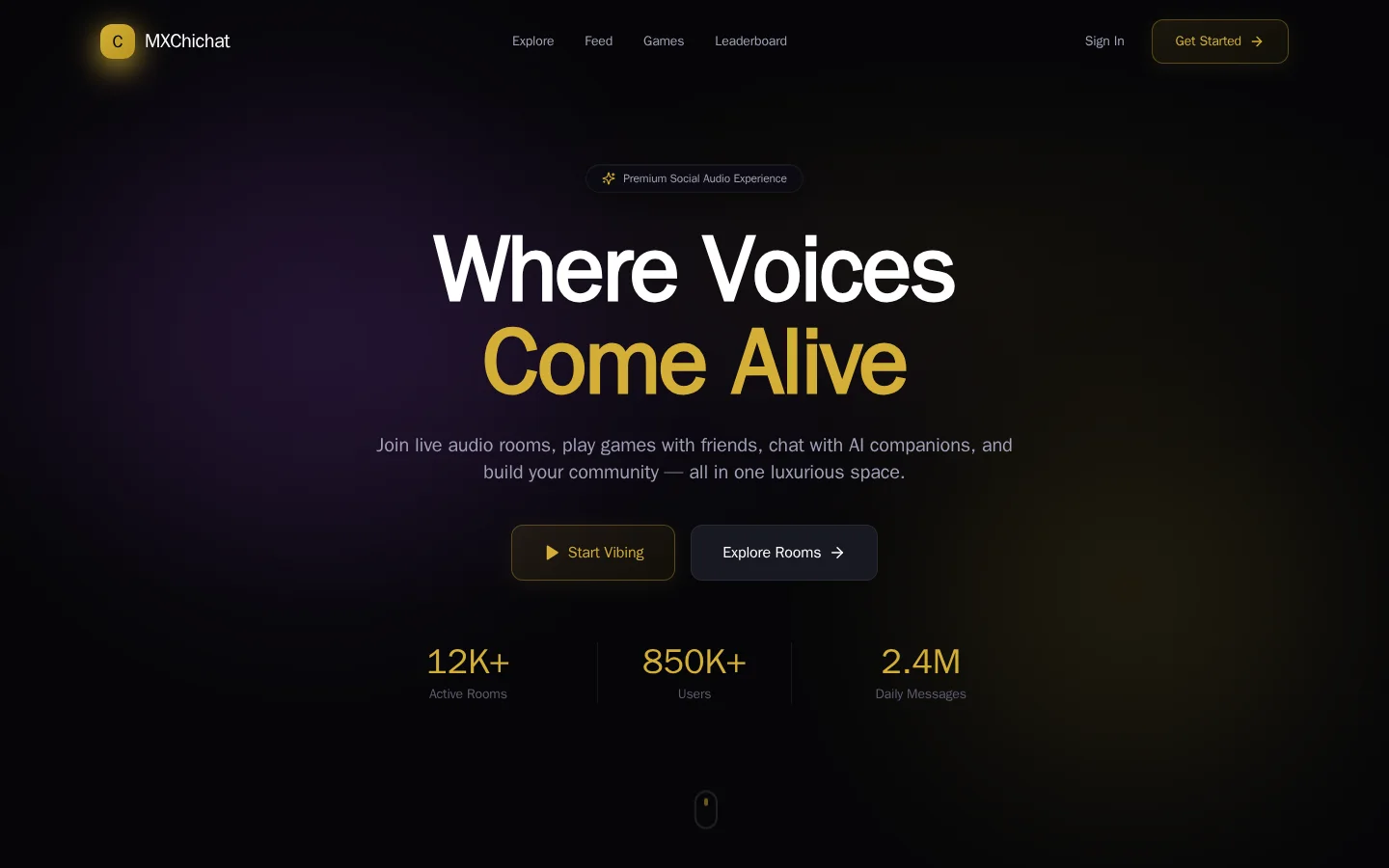
  • Dark web feed with a left menu, trending tags, story row and an audio post
    Web app
  • Phone voice room with speakers, listeners and about tabs and mute, raise, chat, gift, games controls
    User app
  • Phone feed with trending tags, story circles and a post from a member
    User app
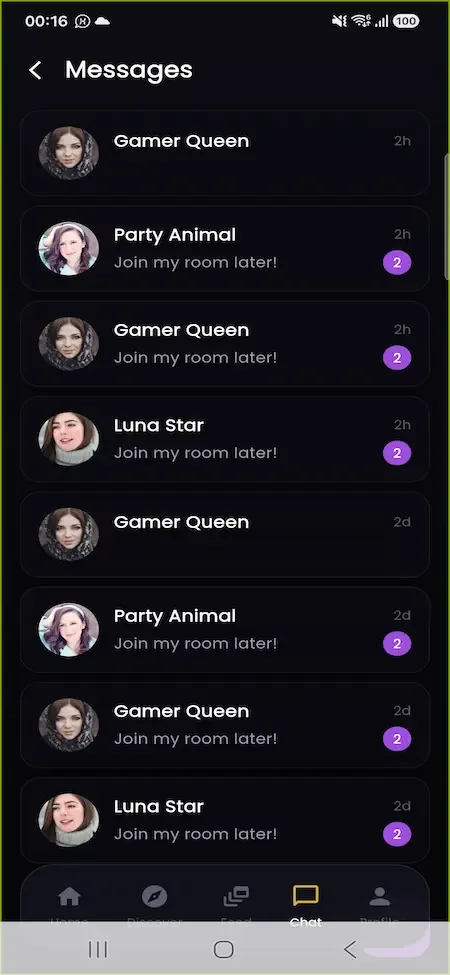
  • Phone messages list with member avatars, short previews and unread badges
    User app
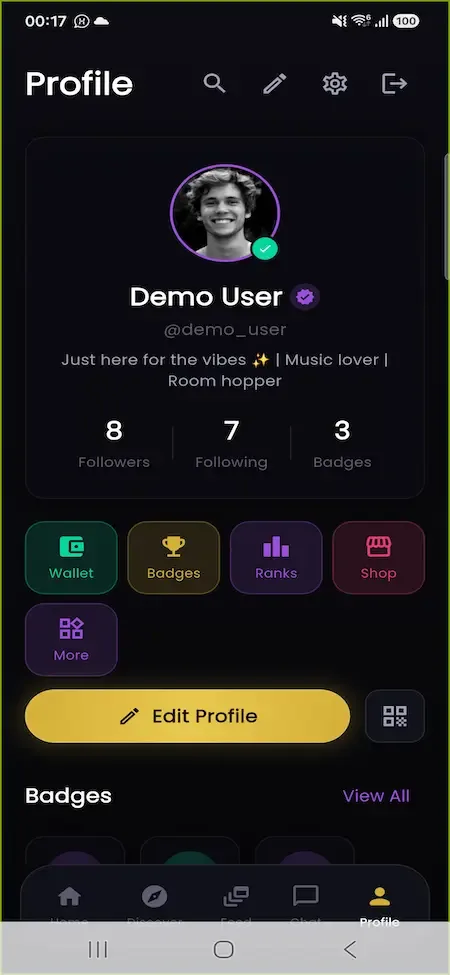
  • Phone profile with avatar, bio, follower counts, shortcut tiles and a gold edit profile button
    User app

The parts that carry commercial weight

Any team can stand up a room list and a chat box. These are the components that take months to get right, and the ones that decide whether members stay past the first fortnight and whether creators believe the platform will pay them.

  • Three-tier room roles

    An audio room where everybody can talk becomes unusable once a dozen people join. Splitting host, speaker and listener, with a hand-raise queue and per-person mute, lets a room grow without turning into noise, and that directly protects how long members choose to stay in each session. For a host running a book club or a late-night talk, the hand-raise queue is also a way to keep order without muting everyone, and you can see which rooms grow past the point where a single host can cope.

  • Live presence

    Who is in the room and who is speaking has to be right at every moment, because a stale participant list breaks the social contract of audio. Presence is pushed over sockets as people join, leave, mute and speak, and late arrivals receive the full room state on entry.

  • Server-checked private rooms

    Private communities are a major use case for voice apps, and a password that is only hidden in the interface is not a password. Entry to protected rooms is verified on the server, and capacity can be set per room, so invitation-only circles are genuinely closed. A club that charges for membership, or a friend group that wants privacy, can only trust a platform whose door is really locked, and a leaked link should not be enough to get in.

  • Ten gift tiers

    A single tip amount cannot express the difference between a nod and a celebration. Ten tiers, from a tiny heart to a castle animated to the whole room, give members a visible way to spend at every budget, and that spread is where most gifting revenue sits. The tiers also give you pricing room: low tiers keep casual members gifting often, while the top animation gives big spenders a moment worth paying for, and you can watch which tier earns most.

  • Experience and missions

    A long ladder of levels, daily and weekly missions, streaks and rarity-tiered badges give members reasons to return that have nothing to do with a particular host. Engagement in this category tends to fade quickly without them, so they are included from day one. Missions are also an inexpensive retention tool you control, because you decide what members are asked to do, such as joining a room, sending a gift or finishing a streak, and what they receive for it.

  • AI companion and moderation

    An optional companion offers several personas and saved conversations, and text moderation can run against more than one AI provider in real time. Moderation matters most in live audio and chat, where the harm is done in front of the room before a human could step in. Running more than one moderation provider also means a single outage or false-positive pattern does not leave the community unprotected, and you can tune your response to what your members actually write.

  • Runtime operator settings

    Platform fee, banned words and auto-ban thresholds are edited from the console and take effect without a deployment. Creator economics need adjusting as a community grows, and a setting that needs a release to change will stay wrong for months. For example, if creators complain that the fee is too steep during a growth push, you can lower it for a week and see the effect on gifting, then restore it, all without asking an engineer to ship anything.

ChillChat, ChillChat Clone and a ground-up build compared

The original app is not something you can buy or self-host, so the useful comparison for a buyer is between the second and third columns. The first column is included only to describe the shape of the category, using what is generally understood about social audio apps.

ChillChat, ChillChat Clone and a ground-up build compared
AspectChillChatChillChat CloneBuilding from scratch
Who controls it The company that operates it, with no access for outsidersYou, with full source code on your own serversYou, once every piece has been designed and built
Time to launch Not for sale, so not applicable to a buyerSix working days for the ready-made platformA long program for a capable team, measured in quarters
Room model Drop-in voice rooms with speaking roles, but only on the owner's own termsHost, speaker and listener tiers with hand-raise promotionOften everyone can talk, which breaks past a small group
Gift economy Virtual gifts that creators can turn into earningsTen tiers with coins, diamonds and a withdrawal pathA tip button with no earnings path behind it
Retention tools Community, social and live features that members already knowLevels, missions, streaks, badges and leaderboards built inA loyalty tool added late that cannot see your events
Mobile apps Native apps built, published and run by the owner itselfA Flutter app for iOS and Android on the same APIWhatever the budget allows, built separately for each platform
Operator tools Internal tools you never see and cannot configure yourselfAn eighteen-section console with settings you can change at runtimeA basic back office that grows after the first incident
Brand identity Fixed to the owner's identity, name and visual styleComplete white-labeling under your own name, logo and colorsWhatever you choose, applied by hand across each surface

The technology under the rooms

The stack is deliberately mainstream, which helps in two ways. Engineers you hire will already know it, and a technical reviewer can read the same documents we do. Below is each layer, named only as far as the package documentation names it.

The technology under the rooms
Web appNext.js 14 with React and TypeScript, styled with Tailwind CSS, covering the member experience across its routes.
Backend APINestJS with TypeORM and TypeScript, split into self-contained modules, with Swagger and OpenAPI documentation for every endpoint.
Data layerPostgreSQL 16 with Redis 7, holding the entities for rooms, wallets, missions and moderation, with indexes on the hot paths.
Real-time and audioSocket.IO for presence, mute state and live events, and Agora RTC for the audio and video that rooms and broadcasts carry.
Mobile appsFlutter for iOS and Android, with Firebase Cloud Messaging for push and RevenueCat to verify in-app purchases.
DeploymentDocker images, Kubernetes manifests with autoscaling, GitHub Actions pipelines and Sentry for error tracking.

What we set up around the platform

Most of the platform ships ready. These are the items that sit around it and need your decision, your accounts or extra setup from us before you take real traffic.

  • Pre-launch hardening

    Immutable audit logging, rate limiting that works across several servers, proper database migrations and single sign-on are available as work we finish before a public launch, with scope confirmed with us. The documentation marks each security control as done, partial or open so you know the list.

  • Media moderation at scale

    Text moderation runs in real time, but screening uploaded images and recorded audio at high volume is a step we set up for you. Scope is confirmed with us once the amount of user-generated media justifies reviewing it automatically.

  • Audio and video minutes

    The code to join rooms and stream is built, yet the minutes themselves are bought from Agora on your account. Capacity planning for concurrent rooms is a decision we help size, but the bill is yours and grows with use.

  • People to run the community

    Tools for reports, bans and banned words are included, but reviewing reports, welcoming hosts and setting house rules need people. Plan for moderators and community managers before launch, since software cannot replace them.

  • Store acceptance and compliance

    We assist with app publishing, but Apple and Google decide whether an app is accepted. Rules on minors, data protection and payouts depend on your market, and we do not provide legal advice on them.

  • Extra regional payments

    Stripe and RevenueCat are connected. A local payment rail for a particular country plugs into the same payment layer, but each carries its own onboarding and testing, and we confirm scope with you.

Try the live ChillChat Clone demo

The demo is a running copy of the platform with demo branding and public sample accounts. Sign in as a member to join a voice room, send a gift and watch coins move, then open the operator console in a second tab to see the same activity appear in reports, analytics and revenue. An Android build runs against the same API.

  • Member app

    Open the Member app demo
    Login
    demo@mxchichat.com
    Password
    Password123!

    Worth trying

    • Join a live room and raise your hand to speak
    • Open the feed and look at the stories row
    • Send a gift and check the wallet balance
    • Open missions and see which ones are in progress
  • Operator console

    Open the Operator console demo
    Login
    admin@mxchichat.com
    Password
    Password123!

    Worth trying

    • Search the user list and open a profile
    • Work through the report queue
    • Read the analytics and retention cohorts
    • Change the platform fee under revenue
  • Android build

    Open the Android build demo
    Login
    admin@mxchichat.com
    Password
    Password123!

    Worth trying

    • Install the app and sign in
    • Open a room from the phone
    • Check that your wallet matches the web app

ChillChat Clone feature FAQs

Can a room hold a large audience?

Room capacity is set per room, from a small private circle up to a large public gathering. Listeners see presence in real time, and speaking is limited to promoted members, which is what keeps larger rooms listenable. Very large concurrent audiences need capacity planning for both servers and media minutes.

Do members need to be on camera?

No. Voice rooms are audio only, and video appears only when a member chooses to broadcast or join a call. This suits communities where people prefer anonymity, and it keeps bandwidth demands low for members on weaker connections.

What can the AI companion do?

It offers several personas, keeps saved conversation history and can suggest matches between members. It is optional and needs a key from a supported AI provider, so you can leave it off at launch and enable it when you are ready to pay for the usage.

How are stories different from feed posts?

Stories are short-lived items that expire after a day, shown in their own row above the feed. Posts stay on the For You and Following tabs with likes, comments, saves and shares, so the two serve different moods and keep the feed from feeling stale.

Can members play games together?

Trivia and charades run inside a room as server-held sessions, with readiness and scoring tracked centrally. Games give a room something to do between conversations, and the games catalog can be edited by operators from the console.

How does the avatar shop work?

Members spend coins on cosmetic items such as hats, frames, backgrounds and animations, grouped by rarity, and equip them on their profile. Because other members see the items in rooms, they act as visible status, which is what makes them sell.

Is chat saved after a room ends?

Room chat is persisted and rate limited, so members who arrive late can read recent messages. Direct and group conversations keep read receipts and unread counts, and operators can act on reports that point to specific messages.

→Start here

Tell us what you want to launch.

Share the platform and your market. You get a walkthrough of the live demo, the exact scope of what ships, and a fixed price in writing. First response in under 2 hours, Monday to Saturday, 10:00 to 19:00 IST.

We reply to every inquiry. No newsletters, no shared data. See our privacy policy.

Trademark and independence notice

This page uses the name ChillChat to describe a type of platform. The product sold here is separate software, built independently, and ChillChat has no part in it.

Why this name

"ChillChat clone" is industry shorthand that founders use when searching for software with a comparable business model. It names a category of product, not a copy of ChillChat.

Who built this

The platform is an original product designed and written by Miracuves. It contains no code, design, graphics or content originating from the ChillChat website or applications, and it ships under your own brand.

Trademarks

ChillChat and its logos are trademarks of their respective owner and are named here for reference only. GetFame is not affiliated with, sponsored by or endorsed by ChillChat. Rights holders can write to legal@miracuves.com.

Operator responsibility. The operator of a launched platform is responsible for legal compliance in the markets it serves. Nothing on this page is legal advice.Read the full disclaimer