RedNote Clone Features for a Notes, Search and Shopping Community

A lifestyle community is built on recommendations that people can find again and act on. This page follows one recommendation from the moment it is written to the moment it becomes an order, shows which modules make that journey work, compares the product with the original app and a ground-up build, and says plainly what we set up around the platform, such as reviews and long-form notes.

3
surfaces from one codebase
5
revenue lines
6 days
to a live launch
On this page10 sections
  1. All 47 RedNote Clone features, by role
  2. From a written recommendation to a delivered order
  3. The RedNote Clone, on screen
  4. The modules that make a notes community commercial
  5. RedNote versus this platform versus a ground-up build
  6. Technology underneath the notes and the shop
  7. What we set up around the platform
  8. Try the live RedNote Clone demo
  9. RedNote Clone feature FAQs
  10. Explore the RedNote Clone

All 47 RedNote Clone features, by role

The complete list, grouped by the person who uses each feature. Nothing is hidden behind a plan tier: this is what ships in the platform.

Notes and discovery

13 features
Image carousels
A note can hold several images in a swipeable set, with cropping done before upload so each frame looks intended.
Captions and hashtags
Text and tags travel with each note, giving the community a way to describe and group what is shared.
Hashtag following
Readers follow a tag the way they follow a person, so the feed pulls in notes from topics they care about.
User and hashtag search
Search finds people and tags directly, which suits readers who arrive with a specific interest.
Private saves
Saved notes stay visible only to the member who saved them, which lets readers build personal guides.
Threaded comments
Replies sit under the comment they answer, so recommendations and follow-up questions stay readable.
Likes across formats
Likes and saves work the same way on notes and reels, with a shared record of each reaction.
Reposts with a comment
Readers pass a note to their followers and add context, a common way for recommendations to travel.
People tags and mentions
Tags positioned on an image and inline mentions credit people, subject to their privacy settings.
Reels and stories
Short vertical video and 24-hour stories sit beside notes, and highlights keep selected stories on the profile.
Future-dated posts
A publishing queue holds notes until the chosen time, which suits creators who plan content in batches.
Audio for reels
A browsable audio library offers tracks for reels, and a remix links back to its source.
Per-object reporting
Notes, comments and messages can each be reported, so moderators see exactly what was flagged.
Shopping

11 features
Shoppable tags
Product tags placed at chosen points on posts and reels open the listing for the item shown.
Seller listings
Sellers publish products with galleries of several images, so buyers see items from every angle.
Cart grouped by seller
Items from different sellers share one cart but are split by seller for checkout.
Order lifecycle
Each order moves through defined states that buyers, sellers and operators can all read.
Live drops
Sellers feature products during a broadcast, and viewers buy from the same catalogue used in the shop.
Wallet checkout
Buyers pay from wallet balance, which keeps shop sales on the same ledger as other transactions.
Price integrity
The server looks up unit prices, rejects forged ones and recalculates totals from the order items.
Locked order records
The order shell is column-locked on insert and update, so later edits cannot alter what was agreed.
Refunds to wallet
Operators issue refunds from the commerce panel, and the amount returns to the buyer wallet.
Order fee tracking
The platform fee on a delivered order is stored as its own ledger row, which makes revenue traceable by order.
Commerce oversight
Operators see orders and products together, so problems with a seller or listing are easy to find.

Creators and community

12 features
Creator tiers
Creators define tiers with named perks and prices, and subscribers receive what each level promises.
Subscriber-only notes
Selected notes can be restricted to subscribers or to a minimum tier.
Verified badge plans
Members buy a badge on plans you define, or apply for free review with documents.
Gifts from readers
A catalogue of gifts lets readers reward a note or a live session from their wallet.
Fundraiser notes
A note can carry a goal, a deadline and a running total, which suits community causes.
Close friends circle
Stories can be shared with a smaller list, giving creators a place for more personal updates.
Direct messaging
One-to-one and small-group chats show presence, and messages from non-followers wait in a requests inbox.
Vanish mode
A chat can be set to clear itself once the conversation closes.
Live broadcasts
Creators stream with real-time chat and can host drops, with replays stored for later.
Boost a note
Self-serve promotion runs on CPC or CPM with daily caps and automatic pause when the budget is spent.
Reach and engagement charts
A thirty-day view shows impressions, engagement rate, reach and top content.
Earnings breakdown
Charts show income across tiers, gifts, ads and sales from the live data.

Operators

11 features
Overview dashboard
Platform indicators with a thirty-day trend give a quick read on growth and activity.
Account controls
Search users, suspend or restore them and soft-delete within a recovery window.
Moderator and admin roles
Two role levels keep review work apart from the panels that move money.
Moderation states
Reports flow through pending, in review, escalated, resolved and dismissed, with four priorities and assignees.
Internal notes and bulk actions
Moderators leave notes for colleagues and act on groups of reports together.
Verification review
Applications with legal name, category, country and documents wait in a dedicated queue.
Plan editor
Verification plans can be added, renamed, repriced, reordered or switched off.
Promotion enforcement
Operators can force-pause any live campaign and compare spend to the event ledger.
Revenue reporting
Subscriptions, gifts, ads and order fees are totaled from the ledger with a thirty-day trend.
Publishing queue tools
Inspect the queue and force-publish stalled scheduled posts without touching the database.
Audit trail
Each privileged action records actor, target and time in a log that cannot be edited from the interface.

From a written recommendation to a delivered order

In a notes community the content is a guide, and the guide is only useful if people can find it, keep it and trust it. Here is the path one recommendation takes, and which part of the platform handles each hand-off between writer, reader, seller and operator.

  1. A writer builds a note

    The creator assembles a swipeable set of images, with each frame cropped before upload so it looks intended, then adds a caption and hashtags that describe the topic. The note can be saved for later, dated for a future hour, or published straight away, so a writer can prepare a week of guides in one sitting.

  2. Products are tagged where they appear

    Before publishing, the writer can place product tags at the exact points on an image where an item is visible, drawing from the shop catalogue. The recommendation and the thing it recommends are linked from the start, which is the difference between a guide that inspires and one that sells.

  3. Readers find it by topic

    Members follow hashtags the way they follow people, so the feed pulls in notes about topics they care about. Search finds people and tags directly for readers who arrive with a question. Discovery here is driven by interest rather than by who knows whom, which lets a new writer be found.

  4. The reader keeps what is useful

    Saves are private to the member who made them, so they build a personal collection of guides without it becoming a public signal. Likes, threaded comments and reposts with a comment let people ask follow-up questions and pass a note to their own followers, with added context.

  5. A tap opens the product

    When a reader taps a tag, the product listing opens with its gallery and price. Items from different sellers can share one cart, which is split by seller at checkout. The reader never leaves the note to start a purchase, so interest turns into action while it is still fresh.

  6. The order passes through checked steps

    Prices are looked up on the server, so a forged price is rejected, and totals are recalculated from the items. The order record is locked once created and moves through defined states that buyer, seller and operator can all read. Payment comes from wallet balance, keeping shop sales on the same ledger as everything else.

  7. Everyone gets paid and tracked

    The platform fee on a delivered order is stored as its own ledger row, so revenue can be traced order by order. Creators earn separately through tiers, gifts and boosts, and see income broken down across those sources. Refunds, when needed, are issued by operators and credited back to the buyer wallet.

  8. Operators keep the community honest

    Reports on notes, comments and messages reach a moderation workflow with states, priorities and assignment, and every privileged action is logged. In a recommendation community, undisclosed advertising and fake praise damage trust quickly, so the console is where the standards of the community are actually enforced.

The RedNote Clone, on screen

Real screens from the working product. Your platform ships rebranded with your name, logo and colors.

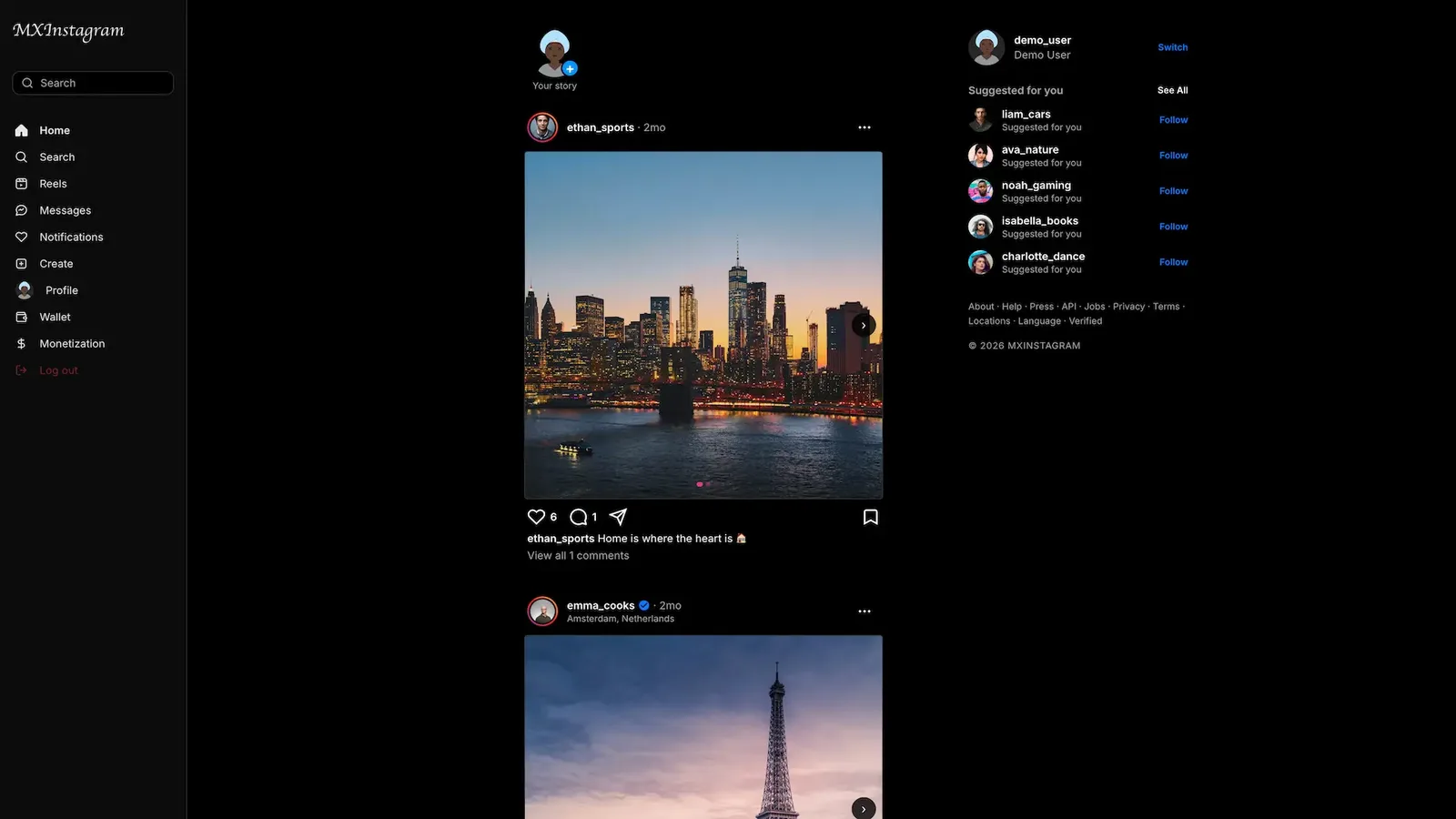
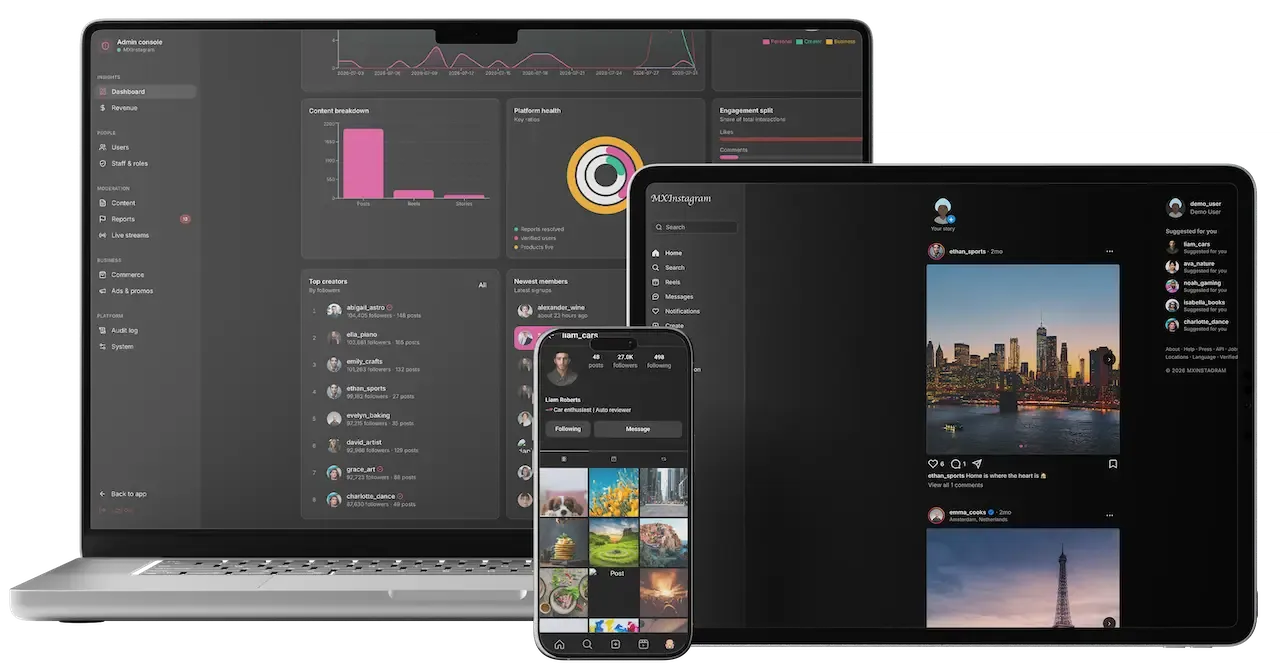
  • Dark web home with a left menu, a city photo post and a suggestions panel
    Web app
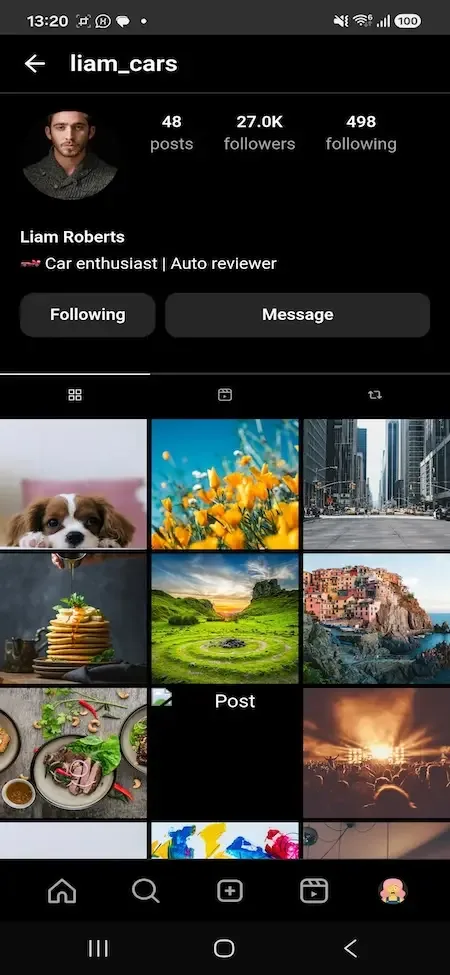
  • Phone profile with post and follower counts, follow and message buttons and a photo grid
    User app
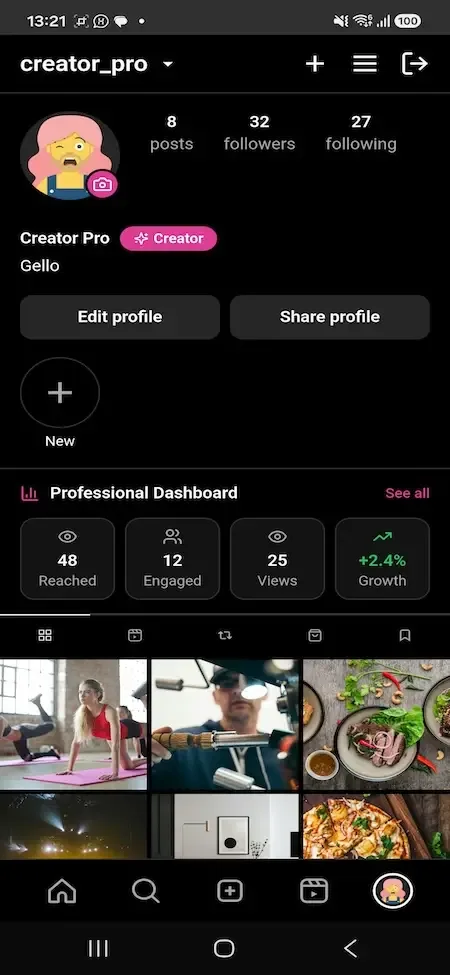
  • Phone creator profile with a professional dashboard of reach, engagement, views and growth tiles
    Creator studio
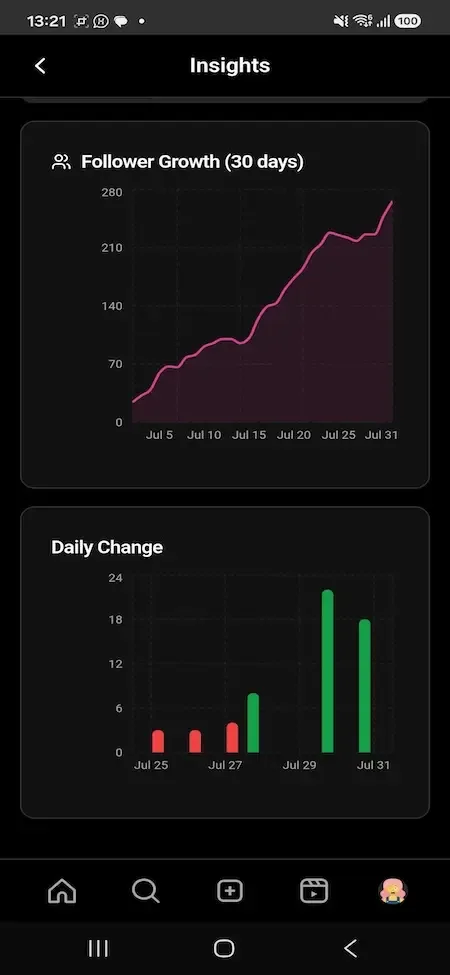
  • Phone insights screen with a pink follower growth line chart and a daily change bar chart
    Creator studio
  • Phone profile shop tab with product cards for a hoodie, tee and cap
    Creator studio

The modules that make a notes community commercial

Posting images and following people are common to every social app. These are the parts that turn a pile of guides into a place readers return to and sellers pay to reach, and they are the ones to examine first when you compare vendors.

  • Image carousels

    A note can hold a swipeable set of images with cropping done before upload, so each frame looks deliberate. For lifestyle content, where a guide is a sequence of steps or looks, the carousel is the native format, and it keeps a reader on one note for longer than a single picture would.

  • Hashtag following

    Readers follow a tag the way they follow a person, and the feed pulls in notes from topics they care about. It lets interest, not friendship, shape what appears, which is what makes a recommendation community feel useful to a stranger on their first visit. An operator can feature a few starter tags on the home screen, so a visitor who has no friends on the platform yet still finds a feed worth reading within the first minute.

  • User and hashtag search

    Search finds people and tags directly, which suits readers who arrive with a specific question. This is what ships ready: searching across every caption and comment is something we set up for you, so decide early whether your readers will depend on looking things up that way. Until then, strong tag hygiene does the work: merge near-duplicate tags, retire dead ones and promote the ones readers actually use.

  • Private saves

    Saved notes are visible only to the member who saved them, which turns the app into a personal library of guides. Because saving is private, readers do it freely, and a high number of saves is a quiet signal that a note was useful enough to return to.

  • Shoppable tags

    Tags placed at chosen points on posts and reels open the listing for the item shown. The recommendation and the purchase share one surface, and sellers pay through the shop fee only when an order is delivered, so the incentives line up with real sales. A writer reviewing a skincare routine, for example, can tag each product at the moment it appears, and the reader who taps lands on a listing instead of a search page.

  • Per-seller cart

    Items from several sellers can sit in one cart, split by seller for checkout and fulfillment. Shoppers get a single basket while each seller sees only their own orders, which is how a marketplace can grow without forcing buyers to check out repeatedly. Refunds and delivery problems are likewise tracked per seller, so one slow shop does not stall the rest of a shopper basket or confuse your support staff.

  • Server-checked prices

    Unit prices are looked up on the server, forged prices are rejected and order records are locked after creation. For a marketplace this protects both buyer and seller, and it removes a class of disputes that otherwise lands on your support team. Ask any provider whether they do the same, because a marketplace that trusts the price sent from a phone will eventually be abused by someone who edits it.

  • Creator tiers and boosts

    Recommenders can charge for premium notes and tier-gated content, and creators or brands can pay to boost a note beyond its natural reach. Together they let an expert earn from their knowledge directly, with the operator setting the share it keeps. Boosted notes should be labeled as paid so readers can tell them from organic ones, and that visible difference is what keeps the paid layer from eroding trust.

RedNote versus this platform versus a ground-up build

The original is a closed lifestyle community with its own audience and rules. This product reproduces the pattern of notes, saves and shopping, and gives you the controls, while a custom build gives you freedom at the cost of time. These are model differences, not company figures.

RedNote versus this platform versus a ground-up build
AspectRedNoteRedNote CloneBuilding from scratch
Core content Image-led guides about everyday lifestyle topics, shaped by its own editorial cultureCarousels, reels and stories on any topic you chooseWhatever you design after a long development period
Finding things Search and recommendation across a huge catalogHashtag follows and user and hashtag search, with content search set up for youSearch and ranking built and tuned from nothing
Shopping tools Commerce within the community under company rulesA native shop with your fee, your seller rules and wallet refundsA separate workstream that is usually postponed
Creator income Defined by programs the company runs and changes at its own discretionPaid tiers, gifts, promoted notes and shop sales, each with a split you setBilling and splits typically arrive after launch
Target market Built for its home audience and languageYours to aim at any market, niche or languageAnything, but only after the build is complete
Operator tooling None, because you are a user, not an ownerA twelve-panel console with moderation, commerce and logsOften raw database access until screens are built
Data and audience Kept inside the company, outside your reachStored in your own database and exportableStored in your own database once the system exists
Code and brand Closed software that runs under its own brandFull source under your name, live in 6 working daysYours eventually, after a very long build

Technology underneath the notes and the shop

The stack is mainstream and widely hired for, so a future team will not need a rare skill. The database enforces privacy, prices and money, which is why it is listed alongside the interface technology and the mobile packaging.

Technology underneath the notes and the shop
Front endReact 18, TypeScript 5 and Vite 5, with Radix primitives and Tailwind CSS 3.
Data and formsTanStack Query 5 for server data, with react-hook-form and zod for forms and validation.
DatabasePostgreSQL 14 with Row-Level Security on every table and ordered, forward-only migrations.
IdentitySupabase Auth handles sign-in, with optional TOTP two-factor sign-in for members who want a second step.
MobileCapacitor 8 wraps one shared bundle into the Android and iOS apps, adding native camera access and haptics.
Edge functionsDeno functions handle admin statistics, privileged actions, scheduled publishing and account bootstrap.
Real-timePostgres change data capture and presence channels support messaging and live updates.

What we set up around the platform

Honesty about limits matters most for a recommendation community, where some missing pieces change how readers behave. These are the items to plan for, have us set up or connect with your own accounts.

  • Product reviews

    The shop covers listings with galleries, tags, a per-seller cart, order states and refunds. A review system, with any rules about verified purchases, is something we set up for your build, with the scope confirmed with us.

  • Long-form notes

    Carousels, reels and stories carry captions and hashtags. We can set up an article-style note with richer layout and editing, with the scope confirmed once you describe what it should look like.

  • Search across all text

    User and hashtag search come standard. Finding words inside captions and comments needs indexing work that we set up for you, and it is worth deciding on early for a lookup-heavy community.

  • Seller payouts to banks

    Orders, fees and refunds are recorded in the wallet ledger. Moving funds out to a seller bank account depends on the payment provider you connect, and any payout flow beyond that is scoped with you.

  • Live payment capture

    The wallet is complete. Taking real money needs your own Stripe, Razorpay, PayPal, Apple Pay or Google Pay account, which the provider must approve for your business.

  • Importing existing content

    The product ships as a fresh platform. Moving notes, accounts or follower relationships from another site is integration work we handle, sized by the format and volume of your data.

Try the live RedNote Clone demo

A RedNote-style notes and shopping app runs on the same social commerce platform as our Instagram product, so the demo below is that shared build, shown with our demo branding and a public login for each role. Sign in as a member to read and save posts, as a creator to see tiers and tags, or as an operator to open the console.

  • Member web app

    Open the Member web app demo
    Login
    demo@mxinsta.com
    Password
    demo123

    Worth trying

    • Open a carousel post and swipe through its images
    • Save a post and look for it in your collection
    • Search for a person and a hashtag
    • Tap a product tag and add the item to the cart
  • Creator view

    Open the Creator view demo
    Login
    creator@mxinsta.com
    Password
    creator123

    Worth trying

    • Open the tiers screen and see named perks
    • Look at the insights and earnings charts
    • Place a product tag on a new post
    • Browse the gift catalogue and live tools
  • Operator admin console

    Open the Operator admin console demo
    Login
    admin@mxinsta.com
    Password
    admin123

    Worth trying

    • Open the commerce panel and an order record
    • Work a reported post through the moderation states
    • Find the verification queue and the plan editor
    • Check the audit log of privileged actions
  • Android app

    Open the Android app demo
    Login
    demo@mxinsta.com
    Password
    demo123

    Worth trying

    • Take a photo with the native camera
    • Move between the feed, explore and create tabs
    • Open the wallet and check the balance
    • Compare the app with the web version

RedNote Clone feature FAQs

How does a reader find notes on a topic they care about?

They can follow hashtags, so notes about a topic arrive in the feed, or search for people and tags directly. Searching inside every caption and comment is something we set up for you, so topic tags matter a great deal for discovery on day one.

Can a writer prepare notes ahead of time?

Yes. A note can be dated for a future time and held in a publishing queue, which suits writers who work in batches. Operators can inspect the queue and force-publish a stalled post from the console without touching the database.

What stops a fake price from being used on an order?

Unit prices are looked up on the server, so a forged price is rejected, and order totals are recalculated from the items. The order record is then locked on creation, which means later edits cannot change what the buyer and seller agreed.

Can sellers go live to present products?

Yes. A live broadcast can feature products from the shop catalogue, and viewers buy from the same listings the shop uses. A replay is stored for later, which gives the seller a recorded demonstration that continues to work after the show.

Are saved notes visible to other people?

No. Saves are private to the member, so they act as a personal collection. Likes, comments and reposts follow each account privacy setting, and private accounts and blocks are governed by the same database rule that controls all visibility in the product.

Can members message sellers or friends privately?

Yes. Direct messages run one to one or in small groups with presence signals, and messages from people a member does not follow wait in a requests inbox. A chat can also be set to clear itself when the conversation closes.

Can I launch the notes first and add the shop later?

Yes. Modules can be enabled, disabled or extended, so a content-only launch is possible and the shop can follow when you have sellers. You can also hold back revenue levers you do not need yet and add them when your audience is ready.

→Start here

Tell us what you want to launch.

Share the platform and your market. You get a walkthrough of the live demo, the exact scope of what ships, and a fixed price in writing. First response in under 2 hours, Monday to Saturday, 10:00 to 19:00 IST.

We reply to every inquiry. No newsletters, no shared data. See our privacy policy.

Trademark and independence notice

This page uses the name RedNote to describe a type of platform. The product sold here is separate software, built independently, and RedNote has no part in it.

Why this name

"RedNote clone" is industry shorthand that founders use when searching for software with a comparable business model. It names a category of product, not a copy of RedNote.

Who built this

The platform is an original product designed and written by Miracuves. It contains no code, design, graphics or content originating from the RedNote website or applications, and it ships under your own brand.

Trademarks

RedNote and its logos are trademarks of their respective owner and are named here for reference only. GetFame is not affiliated with, sponsored by or endorsed by RedNote. Rights holders can write to legal@miracuves.com.

Operator responsibility. The operator of a launched platform is responsible for legal compliance in the markets it serves. Nothing on this page is legal advice.Read the full disclaimer