DramaBox Clone Features Built for Many Language Markets

Most short drama software handles one language and treats every other as a translation job added later. This build starts from the opposite assumption: a catalog that is sold in several languages, to buyers using several currencies, under territory rules that differ by title. Here is how those capabilities work and what each role gets.

5
interface locales shipped
2
right-to-left languages
3
ways to open an episode
On this page10 sections
  1. All 46 DramaBox Clone features, by role
  2. Opening a new language market, step by step
  3. The DramaBox Clone, on screen
  4. What a multi-market operator gets that a single-market app lacks
  5. DramaBox, this platform and a from-scratch build across markets
  6. How the language and market features are built
  7. What we set up for global operators
  8. Try the live DramaBox Clone demo
  9. DramaBox Clone feature FAQs
  10. Explore the DramaBox Clone

All 46 DramaBox Clone features, by role

The complete list, grouped by the person who uses each feature. Nothing is hidden behind a plan tier: this is what ships in the platform.

Localization

12 features
Locale flags
Each of the five locales has a flag in the console, which switches it on for the web app, the store app and the console.
Mirrored layouts
Hebrew and Arabic reverse the full interface direction on all three surfaces, covering the player, the store and the console.
Language editor
The app language JSON is edited inside the console, so a changed button label or paywall sentence goes live without a release.
Separate series languages
A series language catalog is kept apart from interface copy, so a Spanish interface can show Hindi-language dramas.
Default locale
Settings choose the locale a first-time visitor lands in, ahead of any picker choice they make.
Language picker
Viewers change language from inside the app on the web and the store build, and the choice carries across sessions.
Per-deployment report reasons
Report reasons are written by the operator, so moderation vocabulary can match the audience that will read it.
One binary for all locales
The Flutter app ships all five locales in a single binary, which avoids maintaining a separate store build per language.
Subtitle track independence
Subtitle files are stored per episode and rendered as a track whose language is unrelated to the chosen interface.
Locale-aware errors
Error messages and empty states are part of the editable copy set, so even failure screens can read naturally in each language.
Legal pages per locale
Privacy and terms pages are content you manage, so each language audience can read policies in its own tongue.
Audio track choice
Selectable audio tracks sit beside subtitles, which supports dubbed versions of the same episode.
Markets and pricing

11 features
Currency catalog
A list of currencies with operator-set rates, instead of a live feed, so each price is a deliberate decision.
Default currency
The default currency decides what a buyer is quoted at checkout, which lets different markets see different money.
Delivery country codes
Country codes and zip allowlists can be defined as part of the market model for territory-specific rules.
Region chips
Territory chips on a title are matched in the same query that builds a shelf, so out-of-licence titles never appear.
Dated licence windows
A title can publish and retire on schedule inside a licence window, matching what a distribution contract allows.
Signed expiring links
Playback addresses are signed, expire and apply geo rules, which supports territory restrictions at the file level.
Gateway switches
PayPlus, Stripe, Razorpay, Flutterwave and Play switches are toggled in the console, so a market settles on a rail it trusts.
Store product keys
Coin packs carry a store product key so in-app purchases in each store map to the right console record.
Country filter
User search and analytics accept a country filter, which is how one territory is examined at a time.
Coin pack bonuses
Each pack carries bonus coins and an offer price, so a regional promotion is a pack edit and not a release.
VIP and Premium plans
Plans are defined by validity window and type, with order history, so each market can have lengths that suit it.

Viewers

11 features
Guest browsing
A visitor reaches rails and trailers without registering, which keeps first impressions free of sign-up friction.
Episode zero trailers
Trailers live inside the title as episode zero, and they are region targeted exactly like the episodes around them.
Free window and lock
The opening run plays freely, then a lock offers each route forward at the moment the story hooks.
Two coin balances
Earned and purchased coins are tracked apart with a single total on display, and promotional coins expire.
Daily check-in
A seven day ladder with a streak pays coins that a viewer can spend on any market catalog.
Referral loop
A referral credits the referrer when a friend signs up, which suits tight-knit language communities.
Search and genre filter
Search matches title and plot text, with an optional genre filter on both consumer surfaces.
My List and resume
Series are saved to a list, and the app remembers where each title stopped for resuming.
Coin and gem history
The wallet shows every earn and spend, which helps a viewer in any market trust a balance they cannot easily verify.
Capped comments
Comments and likes sit on every episode, with a length limit and a report button.
Coming soon reminders
Viewers can request a reminder on an unreleased title, which builds an audience before a new language launch.

Operators and staff

12 features
Role grants
Roles list modules and actions, and a staff account takes one role, so a translator sees only the screens meant for them.
Role-aware sidebar
Menu items the role cannot use are hidden, which keeps each team focused on its own market tasks.
Report queue
Viewer reports collect in one queue and close with a solved state that notifies whoever filed them.
Comment and user controls
A comment can be hidden and a user blocked from the console without touching the database.
Campaign templates
Message templates are written once per language and reused across campaigns and audiences.
Scheduling and stats
Campaigns can be scheduled or cancelled and show delivery statistics after sending.
In-app inbox
Every targeted viewer gets an inbox row, and device push is added by connecting your Firebase project.
Revenue by series
Series revenue and top-earning episodes read from live data, which shows which titles work in which language.
Wallet inspection
Staff can open a viewer wallet and history and adjust a balance when a support case requires it.
View-only demo role
A demo operator can browse the entire console while the server refuses every write, safe for partner demos.
Currency and order history
Orders for coin packs and plans are listed with their plan details, so each market revenue can be reconciled.
Account data tools
Accounts can be exported, anonymized or deleted from the console, which helps answer regional data requests.

Opening a new language market, step by step

The clearest way to see the product is to follow an operator adding a country. The same catalog serves every step, and none of them needs an engineer or a store release when the wording and rules live in the console.

  1. Pick the default locale

    The default interface language is a setting, not a build flag. A viewer arriving from a new market sees that language first, and can change it from a picker on the web app. The choice follows the account, so a person who switches once does not have to repeat it on every visit or on a second device.

  2. Mirror the layout where it reads right to left

    Choosing Hebrew or Arabic flips the layout, not just the words. Navigation, rails, the wallet and the lock screen mirror in the web app, the store app and the console. A viewer in those markets meets a product that looks native, while your editors see the same mirrored console when they work in those locales.

  3. Edit the wording in the console

    Client copy is stored as language data that an editor changes from the console. A paywall that reads awkwardly in one market is fixed with a text edit and is live without a rebuild. Strings that are not yet translated in a locale fall back to English, which makes a gap visible rather than leaving a blank button.

  4. Attach subtitles and audio per language

    Episode subtitle files and audio tracks are held apart from the interface language. A viewer can read the app in one language and watch with another language track, and a series dubbed for several audiences keeps its tracks attached to each episode. The language catalog for series is its own list in the console.

  5. Set the territories a title may appear in

    Region chips and dated license windows on a title decide where it shows. When your rights in a country end, the title stops appearing there without being removed everywhere. The setting is data, so a licensing change that arrives on Friday afternoon is a console edit and not a code change.

  6. Quote prices in a currency the buyer knows

    A currency catalog lists the currencies you sell in, with one marked as the checkout default. Coin packs and VIP plans are displayed against it, and gateway switches let each market settle on the payment rail it trusts. Merchant accounts for each rail are yours and are connected at delivery.

  7. Compare markets in the reports

    User analytics include a country filter, and revenue reports run by series and by episode. An operator can see which title earns in which market and decide whether a dub, a price change or a different free window is worth trying next. Each experiment is a settings change you can reverse.

The DramaBox Clone, on screen

Real screens from the working product. Your platform ships rebranded with your name, logo and colors.

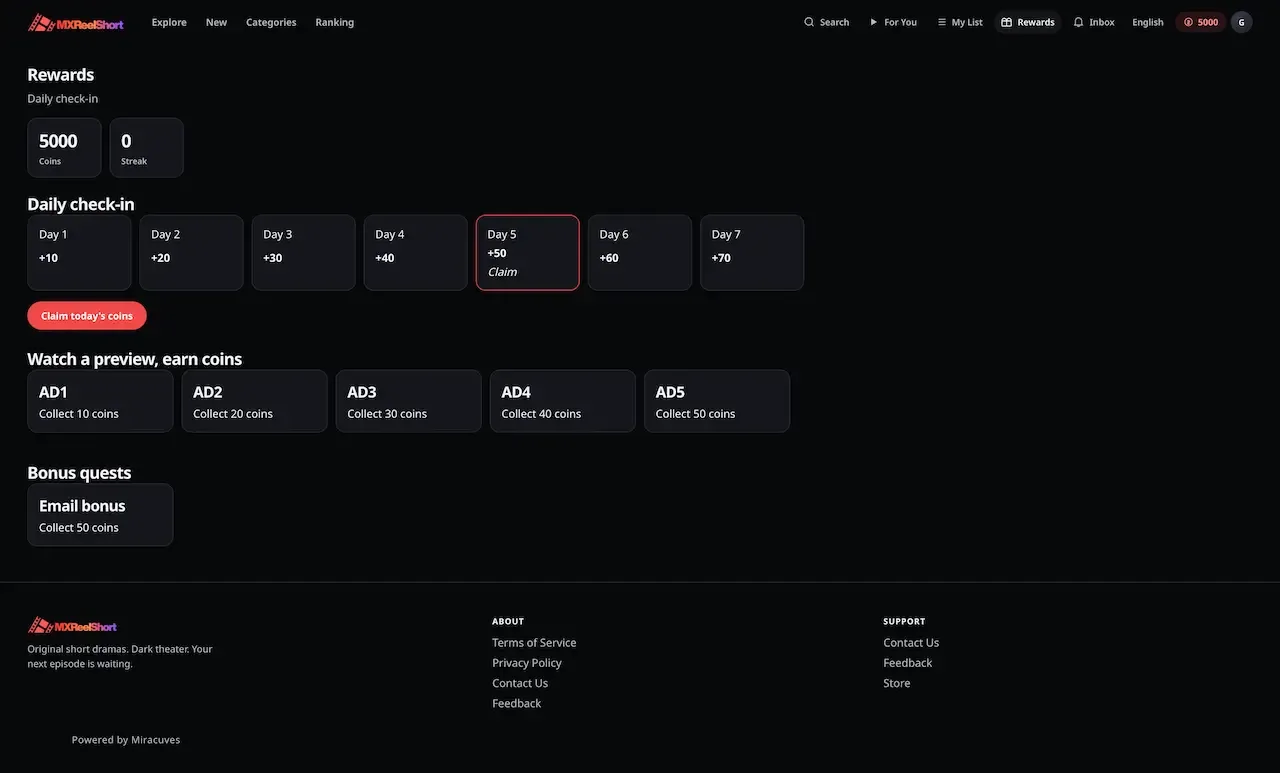
  • Dark web rewards page with a seven day check-in strip, watch ad tiles and bonus quests
    Web app
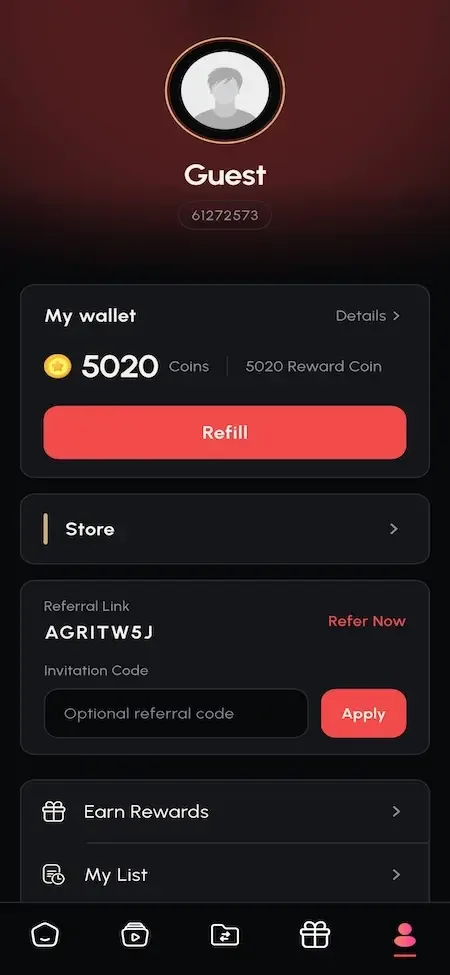
  • Phone profile page with guest avatar, coin wallet, refill button and referral code field
    User app
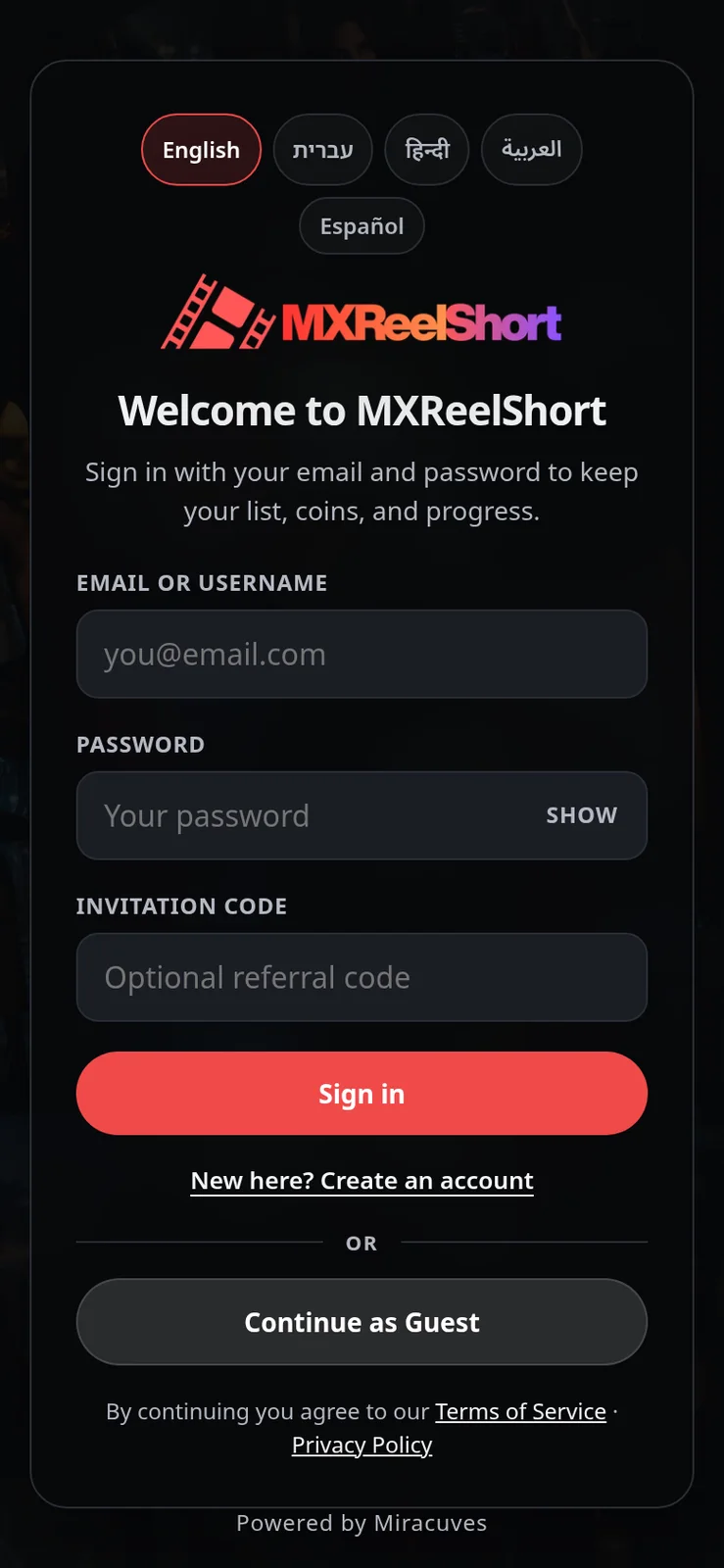
  • Sign in screen with language chips, email, password and invitation code fields
    Web app
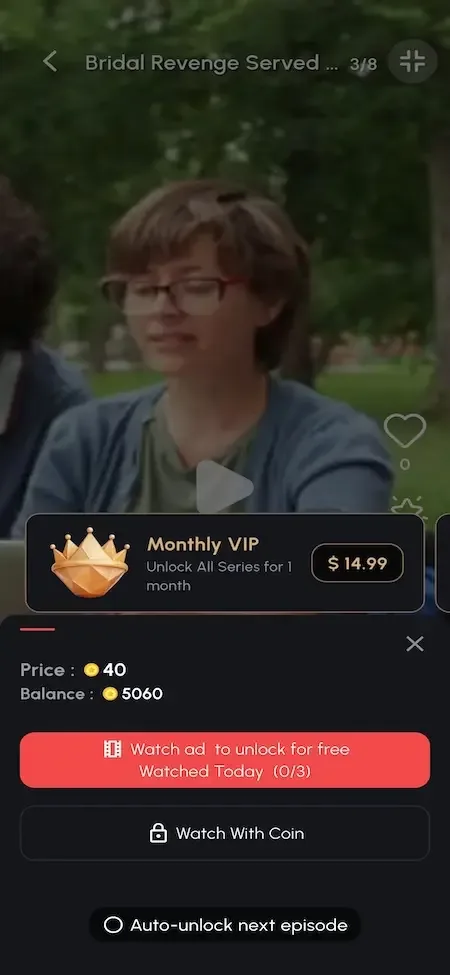
  • Phone episode paywall offering a monthly VIP plan, a coin unlock and a watch ad option
    User app
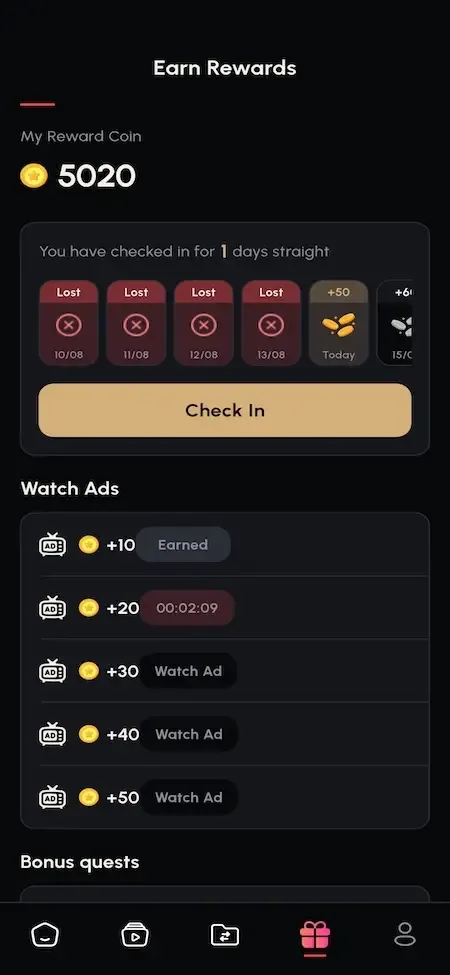
  • Phone rewards screen with a coin balance, a daily check-in streak and watch ad earnings
    User app

What a multi-market operator gets that a single-market app lacks

These capabilities are what separate a platform you can open in a second country from one that can only be translated once. Each has a commercial reason, covered briefly beside it.

  • Interface copy owned by you

    The wording of the apps lives in editable language data, so your team, a contractor or a regional partner can correct phrasing without touching code. Commercially, the paywall and the lock screen are where copy converts, and they differ by culture. Being able to adjust them in an afternoon is worth more than a perfect first translation.

  • Mirrored layouts on every surface

    Right-to-left support covers the viewer web app, the Flutter app and the console, which matters because retrofitting it after launch touches every screen. Markets that read right to left are often underserved by software that skipped the work, so a correct layout can be a real reason for viewers to stay.

  • Series language kept apart from UI language

    The language a series is spoken in is a catalog attribute, separate from the language of the menus. That lets a viewer browse in Arabic and filter for a drama dubbed in Spanish. For operators with a library in several tongues, this is the difference between a browsable shelf and an overwhelming list.

  • Territory chips and license windows

    Each title carries the regions where it may appear and dates that open and close its availability. This is rights administration in miniature, and licensors expect it. It lets you accept a territory-limited deal confidently instead of turning it down because the software cannot enforce it. A licensor who grants one country from a given date expects the title to vanish elsewhere and when the window closes, and setting that once on the title is easier to defend than a manual takedown.

  • Currency catalog with a checkout default

    The platform keeps a list of currencies and a default for checkout, which keeps displayed prices recognizable to buyers. It supports pricing that follows the market. Full regional pricing, with different amounts per country, is available as a module we set up, so decide whether you need it at launch or later.

  • Three tenders on one episode

    Coins, a rewarded ad or a VIP window open the same locked episode and write the same unlock record. In markets where card use is low, the ad route monetizes viewers who will rarely pay, while coins and passes suit buyers with cards. You are not forced to pick a single model for every country.

  • Staff roles across countries

    Staff accounts each have one role built from modules and actions, so a regional editor can manage titles and wording while someone else handles the economy screens. The sidebar hides what a role cannot use. Teams in different time zones can work in the same console without sharing a single powerful login.

  • Campaigns with an inbox

    Message templates are reused and the audience is chosen at send time, with an inbox entry for every targeted viewer. You can write one campaign in each language and send it to the right group. Device push is added only if you connect Firebase, so the inbox works from day one.

DramaBox, this platform and a from-scratch build across markets

The first column describes the widely known pattern of a drama app that serves viewers in many countries, not the private systems of any company. The others show what you receive here and what a team building alone would face.

DramaBox, this platform and a from-scratch build across markets
AspectDramaBoxDramaBox CloneBuilding from scratch
Interface languages Broad coverage decided by the owner and its roadmapFive locales shipped, with wording you edit yourselfOne language first, then a retrofit for each market
Right-to-left layout Supported where the company serves those marketsHebrew and Arabic mirrored on web, app and consoleA change that touches every screen already built
Territory control Set by the company that holds the rightsRegion chips and dated license windows on each titleAn access rule you design and test yourself
Currencies at checkout Chosen by the owner for its own appA currency list with a default and gateway switchesMulti-currency billing is a separate workstream, planned after the first market works
Wording changes Edited by the owner team before a releaseEdited by you in the console without a rebuildHard-coded strings that need a new build
Unlock options Coins, passes and ad rewards are commonCoins, rewarded ad or VIP window, plus auto-unlockEach route built and tested one by one
Audience ownership Viewers register with the brand, not a licenseeViewers register under your own name, domain and store listingYours once the product exists, but only after months of building it
Source code Not offered as a product to outside operators and used only internallyFull source for web, console, API and appYours, after the whole product is written

How the language and market features are built

The multi-market features sit on the same stack as the rest of the platform. Text, layout direction and currency are data and settings read by all three clients, which is why a change in the console reaches the web app and the store app together.

How the language and market features are built
Consumer web appA Vite and React single page app delivered as a static build, with a language picker and mirrored layouts.
Mobile appsA Flutter app on GetX for iOS and Android, shipping the same five locales and the same wallet as the web.
Operator consoleA Next.js 14 application on its own subdomain, including the app language editor and the settings tabs.
APINode.js with Express behind nginx and PM2, serving client and admin routers from a single service.
DatabaseMongoDB through Mongoose, holding titles, episodes, language data, currencies and the typed ledger.
Media storageA storage switch across local disk, AWS S3 and DigitalOcean Spaces, with uploads inspected by content signature.

What we set up for global operators

Operating in several countries raises expectations that we set up with you rather than assume. These are the points to settle before you promise anything to viewers or licensors in a new market.

  • Some strings still in English

    Five locales ship, but certain later strings in the web app fall back to English in Hindi, Arabic and Spanish. Finishing that wording is a configuration task, and you should review each language with a native reader before launch.

  • Regional pricing

    A currency catalog ships, and different price amounts per country come from the regional pricing module, which we set up with scope confirmed with us. It also requires a gateway that can charge each currency you enable.

  • No machine translation

    Wording is yours to supply. The platform stores and serves it but does not translate it, and it does not dub or subtitle video for you. Plan the translation work and its budget as part of your content pipeline.

  • Legal rules are yours

    Territory chips help enforce what a license allows, but consumer, tax and content rules differ by country. We provide tooling, not legal advice, so have an adviser review each market you enter.

  • Simulated web ads and no cash-out

    The web ad unlock is a timed preview, and live ad income runs through the store app. Coin cash-out is wallet architecture only. Both matter when you model income in markets that rely on them.

  • Hardening backlog

    The security reference lists open items such as password hashing and rate limiting. You decide with us which to close before opening in a new country.

Try the live DramaBox Clone demo

The demo shows the language side of the product best: a viewer app on the web and on Android, and a view-only operator console. It carries our demo branding and a seed catalog of royalty-free stills, so judge the layouts, wallet and settings screens rather than the titles.

  • Viewer web app

    Open the Viewer web app demo
    Login
    webuser@demo.com
    Password
    User_$321

    Worth trying

    • Switch the interface to Arabic and watch the layout mirror
    • Compare the same catalog under another interface language
    • Open the wallet and the coin packs screen
    • Hit a locked episode and read the three choices
  • Operator console

    Open the Operator console demo
    Login
    admin@demo.com
    Password
    Admin_$321

    Worth trying

    • Find the app language editor and read the wording keys
    • Look at the currency list and the default for checkout
    • Open a title and read its region and language fields
    • Try an edit and see the view-only role refuse it
  • Android viewer app

    Open the Android viewer app demo
    Login
    webuser@demo.com
    Password
    User_$321

    Worth trying

    • Change the app language and note which screens mirror
    • Watch an episode with its subtitle track on
    • Open the quests tab and the referral screen
    • Check the wallet history in the other language

DramaBox Clone feature FAQs

Can a viewer read the app in one language and watch in another?

Yes. The interface language belongs to the account settings, while subtitle and audio tracks are attached to each episode and chosen in the player. A viewer in a Spanish-language app can follow a drama with an Arabic subtitle file or an alternate audio track. How many tracks a title has depends on what you upload.

What happens when a string has no translation yet?

It falls back to English, so the screen still shows something readable instead of an empty label. That is useful during a rollout, but it is not a finished state. Review each locale on a real device with a native speaker, and use the console editor to complete the missing wording before you promote the market.

Is the layout really mirrored, or only the text direction?

The layout is mirrored for Hebrew and Arabic in the web app, the Flutter app and the console, which means navigation, lists and the wallet follow the reading direction. Individual images and video content are not changed, so artwork that contains text remains as supplied. Test your own title images in those locales.

Can I hide one title in one country?

Yes. A title carries region chips and dated license windows, so it can appear in the countries you hold rights for and stay out of others. When a window closes, the title stops showing there without affecting other markets. You enter the rules, because the platform cannot know your contracts.

Can one store listing serve several countries?

Yes. One build carries all five locales and the viewer chooses, or the default applies. This keeps releases manageable. You can still create per-market store listings with local descriptions and screenshots, which is a publishing task and not a separate codebase.

Can staff in different countries share the console?

Yes, with accounts that each belong to one named role. A regional editor can handle titles and wording while others manage the economy or moderation. The console signs staff out after a short idle period, and a view-only role exists for people who should look but never change anything.

Does the platform translate my wording automatically?

No. It stores and serves the language data you provide and shows where strings are missing. Translation, dubbing and subtitling are content tasks you manage with your own people or vendors. The console editor keeps the result easy to maintain once you have it.

→Start here

Tell us what you want to launch.

Share the platform and your market. You get a walkthrough of the live demo, the exact scope of what ships, and a fixed price in writing. First response in under 2 hours, Monday to Saturday, 10:00 to 19:00 IST.

We reply to every inquiry. No newsletters, no shared data. See our privacy policy.

Trademark and independence notice

This page uses the name DramaBox to describe a type of platform. The product sold here is separate software, built independently, and DramaBox has no part in it.

Why this name

"DramaBox clone" is industry shorthand that founders use when searching for software with a comparable business model. It names a category of product, not a copy of DramaBox.

Who built this

The platform is an original product designed and written by Miracuves. It contains no code, design, graphics or content originating from the DramaBox website or applications, and it ships under your own brand.

Trademarks

DramaBox and its logos are trademarks of their respective owner and are named here for reference only. GetFame is not affiliated with, sponsored by or endorsed by DramaBox. Rights holders can write to legal@miracuves.com.

Operator responsibility. The operator of a launched platform is responsible for legal compliance in the markets it serves. Nothing on this page is legal advice.Read the full disclaimer